

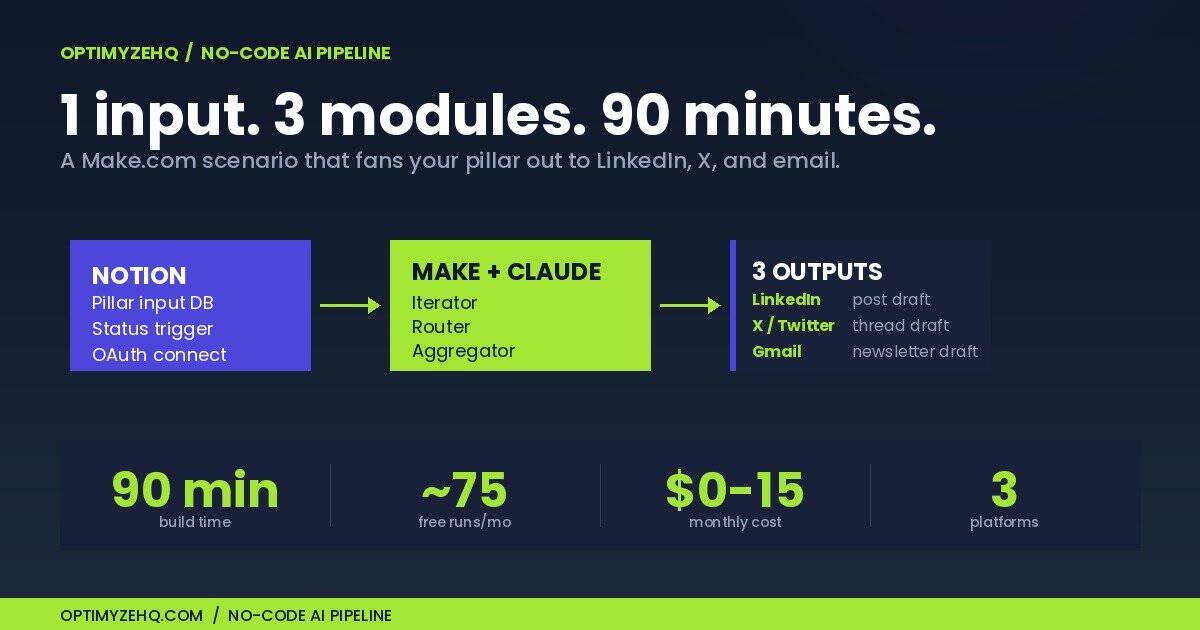
How to Build a No-Code AI Content Pipeline with Make.com and Claude (2026 Tutorial)
You wrote a blog post on Tuesday. By Thursday, you’ve manually shaped it into a LinkedIn post, an X thread, a newsletter draft, and a YouTube description. That’s four hours you’ll never get back. Every week.
This is the manual copy-paste tax that quietly eats solo creators alive.
There’s a better way that doesn’t require writing a single line of code. One Make.com scenario, the native Claude module, and a few output handlers can take a piece of pillar content and fan it out to multiple platforms in under a minute. Free Make tier handles around 75 runs per month. Total build time is about 90 minutes. Ongoing cost lands somewhere between $0 and $15 per month for most solo creators.
If you can drag boxes on a canvas, you can build this.
If you haven’t yet mapped the system on paper, read How to Repurpose Content with AI first. That post covers the strategy. This one covers the build.
Who this is for, and what you need before you start
This tutorial is for solo creators and freelancers who already publish a few times per week and want the manual repurposing work to disappear. You should be comfortable copy-pasting between apps, willing to learn how a JSON-shaped payload works (we’ll show the snippets), and have an existing pillar workflow producing content. If you publish less than weekly, you don’t need automation yet. Build the habit first.
This tutorial is not for people still deciding which three platforms they post to. That’s strategy work and Post #1 covers it.
Here’s what to have ready before opening Make:
| Tool | Plan needed | Why |
|---|---|---|
| Notion | Free | Pillar input database and drafts hub |
| Make.com | Free to start | Scenario builder. Core ($10.59/mo annual) when you outgrow free |
| Anthropic API | Pay-as-you-go | Claude API key with $5 minimum credit |
| Buffer | Free or Essentials ($5/ch annual) | Social publishing bridge |
| Gmail | Free | Email newsletter draft handler |
Make’s pricing changed last August: what used to be called “operations” are now called “credits.” Same thing, new label. The free tier still gives you 1,000 credits per month and two active scenarios. Core unlocks unlimited scenarios and one-minute polling intervals. If you’re only running this pipeline a few times per week, free is genuinely fine.
The blueprint at a glance
Here’s the shape of what you’re building:
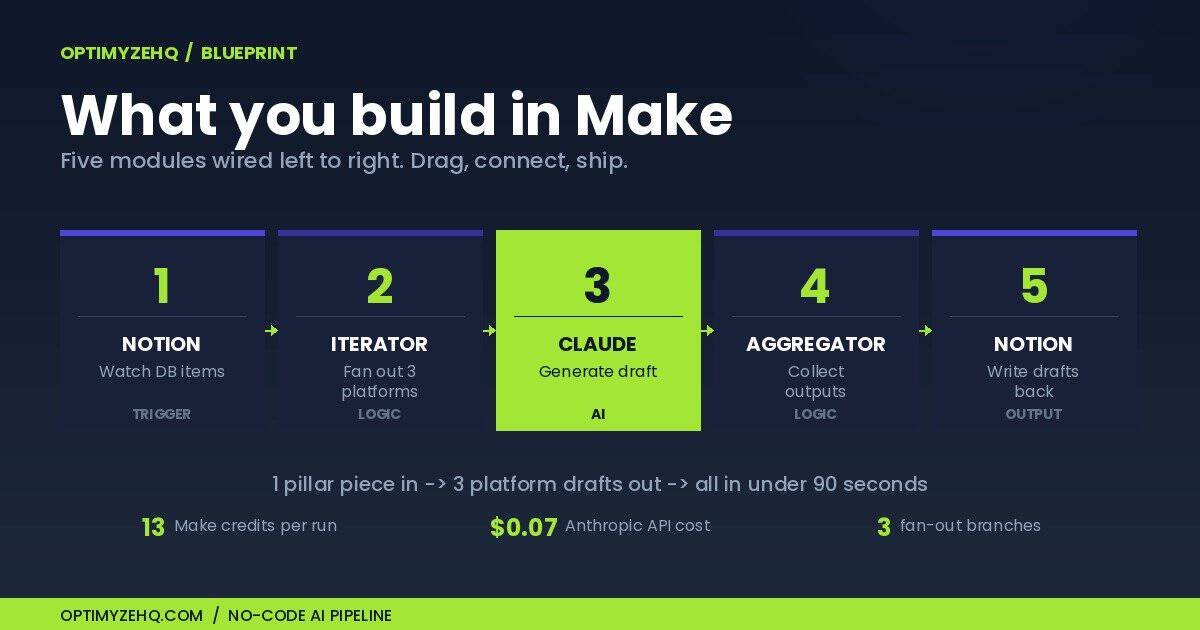
Read it left to right. A new pillar piece (blog post, transcript, podcast script) lands in a Notion database with status “Ready to repurpose.” Make detects the status change, hands the content to Claude three times (once each for LinkedIn, X, and email), collects the outputs, and writes them back to Notion plus your publishing tools.
Why this shape? One input, fan-out to many outputs, single review checkpoint in Notion before anything goes live. You stay in the loop. Nothing auto-publishes on day one. You earn auto-publishing privileges after 30 days of consistently good output.
A note on direction. As of March 2026, Make also runs as a built-in MCP connector inside Claude Desktop. That means you can flip the relationship: instead of Make calling Claude, Claude can call your Make scenarios as tools when you’re chatting with it. We’re not using that direction in this tutorial because it requires Claude Desktop and a different mental model. But it’s worth knowing the bidirectional capability exists if you later want Claude to trigger your repurposing workflow on demand from a chat.
Step 1. Set up your Notion trigger
Notion is the right starting point for three reasons. You probably already use it. The Creator Content Engine product is built on it. And “ready to repurpose” maps cleanly to a status field, which is exactly the trigger Make needs.
Build a database called Pillar Inputs with four properties:
| Property | Type | Purpose |
|---|---|---|
| Title | Title | Name of the pillar piece |
| Source URL | URL | Link to the published version |
| Full Content | Text | The actual content to repurpose |
| Status | Status | Draft / Ready to Repurpose / Drafted / Published |
In Make, create a new scenario and add the Notion module Watch Database Items. Connect your Notion account through OAuth. No manual integration token needed. After connecting in Make, go back to your Notion database, click the three-dot menu in the top right, choose Add connections, and approve your Make connection. Without that approval, your database won’t show up in Make’s picker.
Configure the trigger:
- Database: Pillar Inputs
- Watch: By updated time
- Filter: Status = “Ready to Repurpose”
- Limit: 1 (process one record per run while testing)
Run the trigger once with a test record to confirm Make pulls back the right payload. Look at the output bundle: the Status property should be a clean object, but the Full Content text comes back as an array of rich_text objects, not a clean string. This is a known Notion quirk. We’ll handle it in Step 2.
Two operational notes that catch beginners:
Polling costs credits even when nothing changes. Every check counts as 1 credit, whether or not new data is found. Free tier polls every 15 minutes minimum, which means roughly 2,880 credits per month in polling alone. That’s three times your monthly free allowance. The fix: set the trigger to run on a schedule (say, twice daily at fixed times) rather than continuously. You’re a solo creator, not a real-time alerting system.
Same-minute updates can be missed. If you flip Status to “Ready to Repurpose” and immediately edit the content, the trigger may only fire once. Make a habit of writing the content, then changing status as the final action.
Step 2. Configure the Claude module
Make has a native Anthropic Claude module. You don’t need the HTTP module for this. The HTTP module is a fine escape hatch for advanced cases, but the native module handles authentication, headers, and error parsing automatically.
Get your API key first. Sign up at console.anthropic.com, deposit at least $5, then go to API Keys and generate one. Copy it now. Anthropic only shows it once.
In your Make scenario, add the Anthropic Claude → Create a Prompt module after the Notion trigger. When prompted for a connection, paste your API key. Make encrypts it. Don’t paste API keys into Variables, scenario notes, or HTTP headers as plain text. Those leak into shared blueprints, exports, and execution logs.
Configure the module:
- Model:
claude-sonnet-4-6. This is the production-recommended Sonnet as of May 2026, at $3 per million input tokens and $15 per million output tokens, with a 1M context window at standard pricing - Max Tokens: 1024 (enough for one platform output)
- Temperature: 0.6 (we’ll explain why below)
- System Prompt: your style guide and brand voice rules (more on this in Step 3)
- Messages: one user message containing the platform-specific instruction plus the pillar content
About model choice. Sonnet 4.6 is the right default. Haiku 4.5 ($1/$5) is cheaper and fine for short reformat-only tasks where voice doesn’t matter much. Opus 4.7 ($5/$25) is overkill for repurposing. Its strengths are coding and long agent loops, not turning a blog post into a tweet. Save the money.
About temperature. Claude’s temperature range is 0 to 1. The default is 1.0, which is too creative for repurposing. You’ll get drift and occasional hallucination. Setting 0 gives you near-deterministic output that often becomes extractive (Claude pastes sentences verbatim from your blog). Sweet spot for repurposing is 0.5 to 0.7. Use 0.5 when you want tight fidelity to the source. Use 0.7 when you want Claude to find an angle. I default to 0.6.
To handle the Notion rich_text array, map your Full Content variable using this Make formula:
{{join(map(1.properties.Full_Content.rich_text; "plain_text"); "")}}That joins the array’s plain_text values into a single clean string. Drop it into the user message wherever you want the source content to appear.
Step 3. The three modules beginners get wrong
This is where most Make tutorials lose people. Iterator, Router, and Aggregator look similar in the canvas. They do completely different things. Get this section right and you’ll never get stuck again.
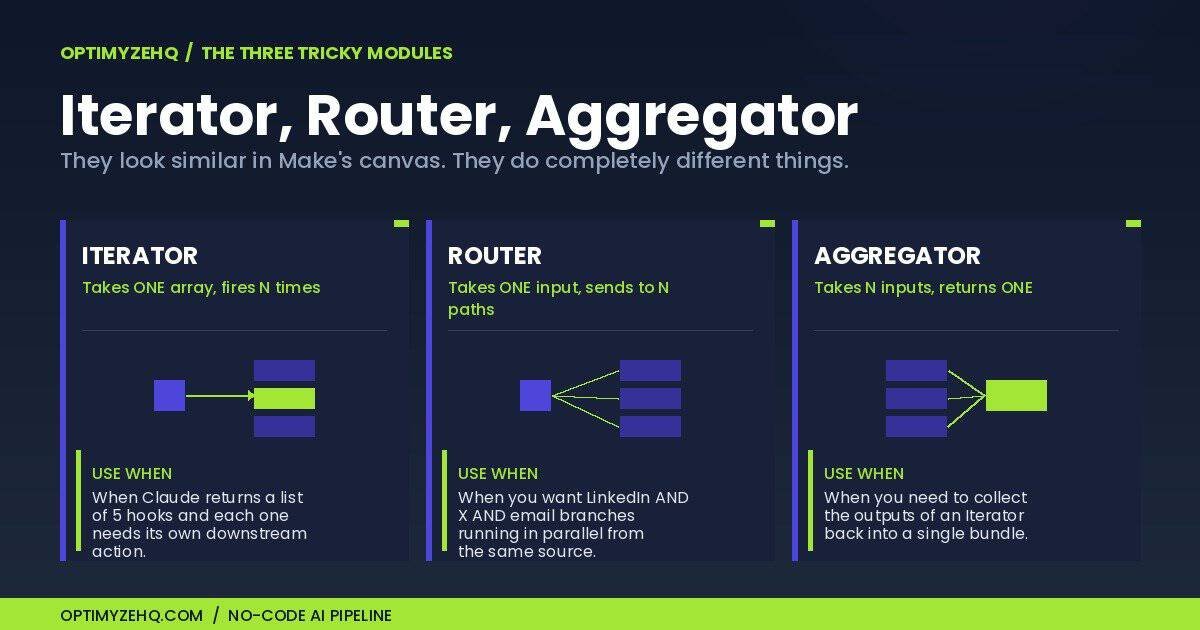
Iterator
Iterator takes one bundle containing an array, and emits one bundle per array element. You use it when you want to run downstream modules once per item.
For our pipeline, the Iterator splits a single trigger event into three platform-specific Claude calls. Right after your Notion trigger, add an Iterator module and feed it a static array:
[
  {"platform": "LinkedIn", "max_chars": 3000, "tone": "professional, story-driven"},
  {"platform": "X", "max_chars": 280, "tone": "punchy, no jargon"},
  {"platform": "Email", "max_chars": 2000, "tone": "personal, one-on-one"}
]
Now your Claude module runs three times (once per platform), with the platform name and constraints available as variables in your prompt.
A common pitfall: if the upstream module has no defined data structure (a Webhook or Parse JSON output), the Iterator’s mapping panel only shows “Total bundles” and “Bundle order.” Run the upstream module once first to define the structure.
Router
Router branches your scenario into multiple paths based on filter conditions. Each path can run different modules. Routes evaluate sequentially, so order matters.
Use the Router after Claude when you want each platform’s output to flow to its own destination. LinkedIn output goes to one Buffer module. X output goes to a different Buffer module configured for the X channel. Email output goes to Gmail.
Set up filter conditions on each route. Route 1: platform equals LinkedIn. Route 2: platform equals X. Route 3: platform equals Email.
A pitfall worth knowing: Router’s fallback route (the wrench icon route) evaluates per-bundle. If you have multiple bundles flowing through, the fallback can fire alongside successful routes, which surprises beginners. For our use case it’s fine. Three explicit routes cover all three platforms.
Aggregator
Aggregator does the opposite of Iterator. It takes multiple bundles and combines them into one. Use it when you need a consolidated record at the end of the run.
After all three Claude calls complete, add an Array Aggregator. Set the source module to your Claude module, and configure the target structure to capture the three outputs. Now you have one bundle containing all three drafts, which you can write back to Notion as a single Update Database Item call.
This is the part most beginners skip. They leave three separate Claude outputs floating in the scenario and end up with three Notion update calls, which wastes credits and makes the data harder to review.
The credit counting beginners miss
Here’s how Make charges credits for this fan-out pattern. Each emitted bundle from the Iterator is processed by every downstream module, and each processing event costs 1 credit:
| Module | Credits |
|---|---|
| Notion Watch Database Items | 1 |
| Notion Get Item | 1 |
| Iterator (split into 3) | 1 |
| 3× Claude API calls | 3 |
| Array Aggregator (3 bundles → 1) | 3 |
| Notion Update | 1 |
| 2× Buffer + 1× Gmail | 3 |
| Total per run | 13 |
Plus polling overhead. Plan accordingly.
Step 4. Wire up your output handlers
Three destinations cover most of what solo creators need: Notion as the central drafts hub, Buffer for social publishing, Gmail for email newsletters.
Notion update
After the Aggregator, add a Notion → Update a Database Item module. Update the original record with the three generated drafts and flip the Status from “Ready to Repurpose” to “Drafted.” Now you have a single review surface, with one row containing all three drafts, ready for you to skim, edit, and approve.
Watch for a documented Make bug: rich_text fields in Notion accept a maximum of 2,000 characters per element. If your generated LinkedIn post runs longer (it shouldn’t, but Claude occasionally over-runs the max_tokens cap), the update silently fails. The fix is to split long content into multiple rich_text array elements, which the Notion API joins on render. The Make community has a pre-built workaround blueprint for this. Search “Notion update database item 2000 character limit” in Make Community if you hit it.
Buffer
The Buffer module’s main action is named Create a Status Update, not “Create a Post” and not “Add to Queue.” This trips people up because the action name doesn’t match what most other tools call publishing.
The Publication selector inside has three modes: post immediately, top of queue, or scheduled date+time. For a review-first workflow, use “scheduled” with a placeholder time 24 hours out. You’ll edit the time when you approve the draft.
Buffer’s free plan gives you three connected channels and 10 scheduled posts per channel (with a lifetime cap of 8 unique channels ever connected). That ceiling fills up fast if you publish daily. Essentials at $5 per channel per month (annual) removes both limits.
Buffer doesn’t have a native “draft” action via the Make module. If you want true drafts that don’t auto-publish, leave the post scheduled for some date far in the future and treat the Buffer queue as your review surface. Or use Buffer’s web interface to manage the post once Make has created it.
One more thing about Buffer and LinkedIn: LinkedIn’s official API doesn’t let solo creators create drafts on their personal profile, only published posts. Buffer’s “scheduled” mode is the de facto draft surface for LinkedIn, since you can edit or cancel anything in the queue before it publishes. This is a meaningful workaround. Without Buffer, your only LinkedIn options are publish-immediately-via-API or copy-paste-manually.
Gmail
Add the Gmail → Create a Draft action. Map your email-platform Claude output into the body field. Set Subject to a placeholder like [DRAFT] {{1.title}} so you can spot it in your drafts folder.
Important: this creates a standalone draft, not a draft reply attached to an existing thread. If your newsletter goes out as a reply to a thread (some creators run their list this way), the Gmail module can’t help. You’ll need the API call escape hatch.
The principle running through all three handlers: nothing auto-publishes. Everything lands in a review surface where you can read, edit, and approve before it goes live.
A real worked example
Let me show what this looks like with actual content. Take the first OptimyzeHQ blog post, How to Repurpose Content with AI, and run it through the pipeline. Drop the full text into the Notion record’s Full Content property, set Status to “Ready to Repurpose,” and wait for the next polling cycle.
Forty-seven seconds later, the Notion record updates. Status is now “Drafted.” Three new fields are populated.
LinkedIn draft (preview):
Most creators repurpose backwards.
They write a blog post, then ask “how do I cut this into tweets?”
Wrong question.
The right question: what’s the single idea, and which 5 platforms is it shaped for?
Here’s the system I run on 4 hours a week:
1. One pillar piece per week (blog, podcast, video)
2. AI extracts 5–7 angles
3. Each angle gets shaped to platform format
4. I review, approve, schedule
The 4-hour cap is the real discipline. If it takes longer, the system isn’t working. The prompts need tuning.
X thread draft (4 tweets, character counts shown):
1/ Most creators repurpose backwards. They write the post, then carve it up. Wrong order. (134)
2/ The right order: one idea, shaped for 5 platforms in parallel. AI handles the shaping. You handle the idea. (160)
3/ My weekly cap: 4 hours total for one pillar piece + 5–7 derivatives across LinkedIn, X, email, YouTube, Instagram. (172)
4/ If it takes longer than 4 hours, the prompts need work. Not the system. (98)
Email draft:
Subject: the 4-hour repurposing rule
Hey,
Quick one this week. I’ve been refining the repurposing system and I think I finally found the right constraint: a 4-hour weekly cap.
Not “as fast as possible.” That’s how you get sloppy. Not “until it’s perfect.” That’s how you burn out.
Four hours per week, total, for one pillar piece and 5–7 derivatives. If you’re going over, your prompts need tuning. If you’re under, you’re cutting too much.
Try it this week. Reply and tell me where you landed.
Gilles
Total cost for this run: about $0.07 in Anthropic API spend, plus 13 Make credits. Total elapsed time: 47 seconds.
Cost and operations math
Let’s get specific about what running this actually costs.
Per-run cost
| Line item | Detail | Cost |
|---|---|---|
| Make credits | 13 credits at Core ($10.59/10K credits) | $0.0138 |
| Anthropic API (uncached) | 15K input + 1.5K output tokens | $0.0675 |
| Anthropic API (cached) | After first run, system prompt cached | $0.0466 |
| Buffer post slot | Counts toward channel limit | $0 marginal |
| Gmail draft | Counts toward Gmail storage | $0 marginal |
| Notion update | Free tier covers it | $0 |
Monthly cost at three publishing rates
8 runs per month (1–2 pillars per week):
- Make Free + Anthropic ~$0.50 + Buffer Free = under $1/month
20 runs per month (5 per week):
- Make Free + Anthropic ~$0.95 + Buffer Free = under $1/month
60 runs per month (15 per week, multi-niche creator):
- Make Core $10.59 + Anthropic ~$2.80 + Buffer Essentials $15 (3 channels) = about $28/month
The middle tier is where most solo creators land. Free Make plus a few dollars in Anthropic spend covers it. The numbers stay tiny until you cross 50+ runs per month, which most creators never do.
Prompt caching: the cost-saver most tutorials skip
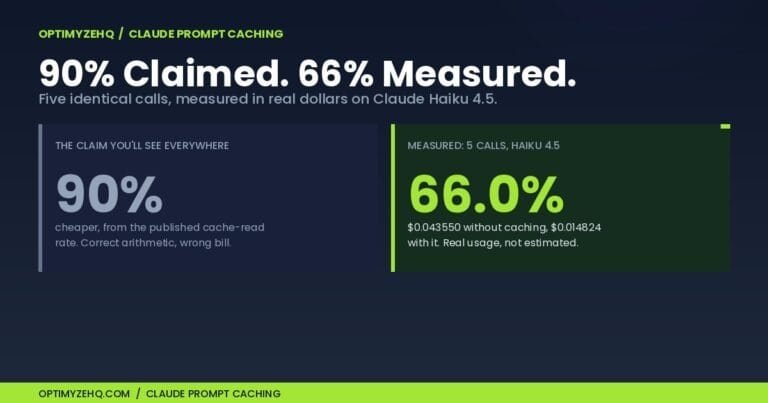
Anthropic’s prompt caching feature lets you mark large stable prefixes (your system prompt and brand voice rules) as cached. Cache reads cost 10% of base input pricing. The first call writes the cache at a 25% premium; every subsequent call within the 5-minute TTL reads it at 90% off.
For our 3-platform fan-out, all three Claude calls run within seconds of each other. The cache is always warm by call two. Adding cache_control: {"type": "ephemeral"} to the system prompt block in your Claude module’s body cuts API cost from $0.0675 per run to $0.0466 per run, roughly 31% savings. The cache write premium is recouped on the very first cache read.
A practical caveat: the cacheable content needs to be at least 1,024 tokens for Sonnet 4.6 (4,096 for Haiku). If your system prompt is short, caching won’t trigger. Most brand voice rules + style guide content comfortably clears 1,024 tokens, so this is rarely a problem.
The 25% extra-credit premium
If you blow past your Make credit allowance, additional credits cost a 25% premium over base plan rate. This applies whether you buy them manually or auto-purchase. Make changed this in November 2025. Previously manual purchases were no-premium. Build with the free or Core allowance, monitor usage, and upgrade tier rather than buying overage credits.
The time math
The pipeline takes ~47 seconds of compute per run. At 30 runs per month that’s about 24 minutes of total compute time. Compare to manual: 4 hours per week × 4 weeks = 16 hours per month doing the copy-paste tax by hand. Net: 15.5 hours per month reclaimed.
That’s the real ROI. Not the dollars. The hours.
The 5 things that will break
This list is the difference between a tutorial that gets you to “it works” and a tutorial that gets you to “it works in production.” Save it.
1. Anthropic 429 rate limits. On the Start tier, Sonnet 4.x allows 1,000 requests per minute and 2,000,000 input tokens per minute, so a single ebook run sits well inside the per-minute ceiling. Two other things trigger this error more often. New organizations can begin on the Evaluation tier, which Anthropic sets below the published limits while your account builds usage history, and it does not publish those starting numbers. Limits are also enforced over windows shorter than a minute, so an Iterator firing three platforms at once can burst past the limit even when your per-minute average looks comfortable. A sharp jump in overall usage can trigger 429s through acceleration limits as well. The fix is to smooth the burst rather than shrink the job: add a 2-second Sleep module between Iterator passes so calls don’t fire simultaneously, and ramp a new workload up over several runs instead of launching it at full volume. Usage tiers rise automatically as your account builds history; there is no deposit or purchase that moves you up. Bonus: tokens read from the cache don’t count toward ITPM on most models, which is another reason to use prompt caching. Tokens written to the cache do count.
2. Anthropic 529 overloaded errors. This is platform-side capacity, not your quota. Anthropic returns 529 when their fleet is saturated, which has been more common throughout 2025–2026 as demand spiked. Important: 529 needs a different retry strategy than 429. Don’t retry immediately. That hurts success rate. Use longer initial delays (start at 5 seconds), exponential backoff up to 60 seconds max, and a circuit breaker that stops retrying after 5 attempts. In Make, wrap your Claude module with a Break error handler set to 5 retries with 5-second base delay.
3. Formatting drift. Claude returns markdown by default (bold and italics), which Buffer renders as literal asterisks and underscores. Your X thread looks unhinged. Fix in two layers: tell Claude in the system prompt “Output plain text only. No markdown formatting. No asterisks for emphasis. No em dashes.” Then add a regex find-and-replace module after the Claude module that strips any remaining markdown characters as belt and suspenders.
4. Notion-specific gotchas. Two to watch. First, the rich_text 2,000-character per-element limit on Update Database Item. Long generated content fails silently. Second, Notion’s API throttles at 3 requests per second sustained per integration. If you have multiple Make scenarios touching Notion, you’ll hit it. Wire a Sleep module of 350ms between consecutive Notion calls in any scenario, and use a Break error handler on Notion modules to retry on 429.
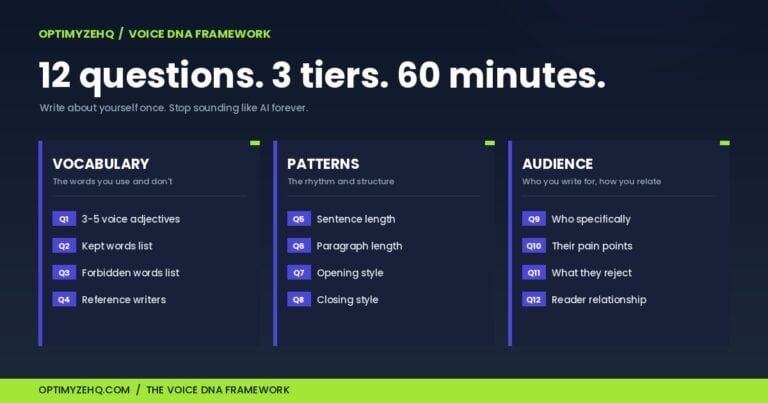
5. AI brand drift. Six weeks in, your LinkedIn drafts start sounding like a motivational poster. “In today’s fast-paced world…” “Let’s dive into…” “It’s not just X, it’s Y.” Claude defaults toward generic LinkedIn-bro voice unless you actively prevent it. The fix is the Voice DNA pattern from Post #1. Feed Claude 5–10 of your existing best-performing posts as
When to graduate to a paid template
Here’s the honest pitch.
Build this yourself if you enjoy automation work and have a Saturday afternoon free. The technical content above is enough to get you to a working pipeline in 90 minutes. Add your own prompts and you’re done. Total cost: $0 to $15 per month ongoing.
Don’t build it yourself if you’re solving for time-to-revenue rather than time-saving-as-a-hobby. The DIY version takes 90 minutes upfront, plus 2–3 hours per month maintaining prompts as Claude’s behavior shifts, plus the inevitable debugging when an API change breaks something at 6am.
The Creator Content Engine is the done-for-you version. $97 once. You get the pre-built Make blueprint, 15 tuned prompts across the major platforms, a brand voice template, the Notion dashboard already wired up, and a video walkthrough. It exists because I wanted the version of me who didn’t want to spend a Saturday learning Make’s quirks to have a shortcut.
No urgency. No countdown. Build it yourself if that’s what you want. The post above is a complete blueprint. Buy the system if you’d rather skip ahead.
FAQ
What’s the cheapest version of this I can run? Make Free, Anthropic with $5 deposit, Buffer Free, Notion Free. Total fixed cost: under $1 per month for typical usage (8–10 runs). The only ongoing cost is API tokens, which run about $0.05 per run with caching enabled. You’ll outgrow the free Make tier when you cross 50+ runs per month or want polling more frequent than every 15 minutes.
Should I use Sonnet 4.6, Haiku 4.5, or Opus 4.7? Sonnet 4.6 is the right default. Use Haiku 4.5 for short reformat-only tasks where voice doesn’t matter much (e.g., generating 30 hashtag variants). Skip Opus 4.7 unless you need the kind of voice precision that Sonnet’s drafts consistently fail to deliver. Opus is 1.67× the cost and overkill for most repurposing. Note that Opus 4.7 uses a new tokenizer that produces up to 35% more tokens for the same input text, so effective cost can be higher than the headline rate suggests.
Should I use n8n, Zapier, or Pipedream instead? Make is the right balance for non-technical solo creators. n8n closed a $180M Series C at a $2.5B valuation in October 2025 and is excellent if you’re technical and want self-hosting on a $5/month VPS. Long-term cheaper, steeper learning curve. Zapier has 8,000+ integrations vs Make’s 3,000+, but Zapier charges per task in a way that punishes fan-out workflows like this one (each iterator branch counts as a separate task). Pipedream got acquired by Workday in November 2025 and the standalone product’s future is uncertain. I’d avoid new investment in it for now. For a deeper side-by-side, see Make.com vs n8n vs Zapier for solo creators.
What happens when something breaks while I’m asleep? Configure Make’s email error notifications: Account → Settings → Notifications → enable email on scenario failure. Set “Allow storing of incomplete executions” to Yes so failed runs queue for retry rather than disappearing. Add Break error handlers on the Anthropic modules and Ignore handlers on Buffer (one platform failing shouldn’t kill the whole run). The result: most transient errors auto-recover, and the ones that don’t show up in your inbox at 6:01am with full context.
How do I scale to 10 platforms without losing my mind? Don’t. Cap at 5 platforms you actually engage on. The repurposing system speeds up shipping; it doesn’t compensate for being absent on a platform. Adding TikTok, Threads, Mastodon, and Bluesky in parallel doesn’t help if you’re not also showing up to comment, reply, and engage. Pick the 3–5 platforms where you actually have a presence and ignore the rest.
Sources and further reading
- Make.com pricing: official, updated frequently
- Make’s credits documentation: what counts as a credit and what doesn’t
- Anthropic API pricing: per-model rates and caching multipliers
- Anthropic prompt caching: full cache_control syntax reference
- Make’s Iterator documentation: the most-misunderstood module in Make
- Make’s Aggregator documentation: array vs text variants
- Notion API rate limits: the 3-req-per-second cap
- Buffer API documentation: for the advanced “draft” workaround
Three steps. Trigger. API call. Output handler. That’s the entire architecture. Everything else is the prompts.
The prompts do the actual work. They’re what turns a working pipeline into a system that actually sounds like you. Spend 80% of your prompt-tuning time on the system prompt and brand voice examples, and 20% on the platform-specific instructions.
The compounding starts when you stop manually copy-pasting. Ship something this week.
→ Get the Free AI Starter Kit. The pillar prompts, the brand voice template, and the Notion dashboard, delivered to your inbox in 90 seconds.
Go deeper: the complete Make plus Claude workflow guide, and the prompting system these pipelines run on.
This is one of the few Make tutorials that actually gets to production, the 429 vs 529 distinction alone is worth the read. One thing I’d add for anyone who ends up running this for clients instead of just themselves, because that’s usually the next step. Once you’re operating five or ten of these in parallel, the failure mode stops being rate limits and becomes config drift. Each duplicated scenario carries its own hardcoded system prompt, so a brand voice tweak means editing it in ten places and forgetting two. The fix that saved us: keep the brand voice and the do-not-use list in a Notion table the scenario reads at run time, so the prompt is data, not hardcode. Second, add an idempotency key. Store a hash of the pillar content on the row and skip the run if it matches, otherwise an accidental re-edit reprocesses and re-bills the whole fan-out. We wrote up how we wire that kind of ops-grade monitoring and idempotency across client workflows here: https://hackceleration.com/automation-agency . Really solid post.