

Stop chasing invoices and re-typing the same follow-ups. Your client admin runs itself.
One Airtable base plus three Make automations that handle the unglamorous half of client work: acknowledging new inquiries, chasing overdue invoices until they are paid, and sending project updates and testimonial requests in your voice. Setup is about 30 minutes, once. After that it runs on a daily schedule in the background.
What you’ll get
One Airtable base. Clients, Invoices, and Settings, already structured, with the views and formulas built in. You copy it into your own workspace with one click. It is the single place your client work lives, and the source of truth for everything the automations do.
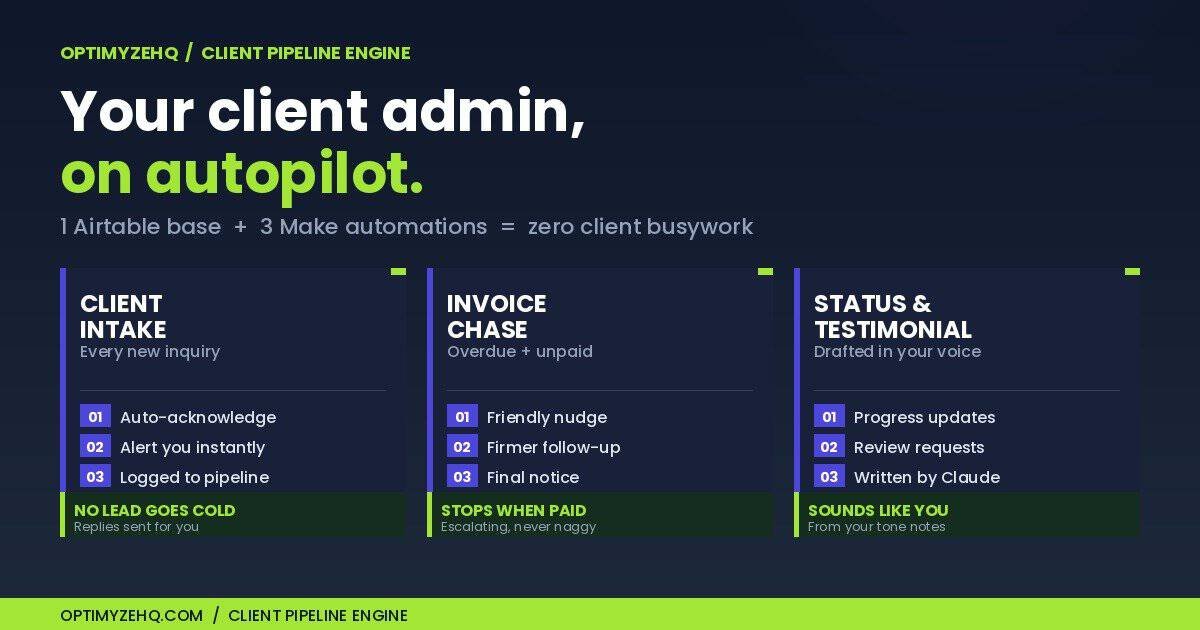
Three Make automations. Client Intake acknowledges every new inquiry and alerts you, so a lead never sits unanswered. Invoice Chase sends escalating reminders on overdue invoices and stops the moment one is marked paid. Status and Testimonial drafts a project update from your notes, and asks for a testimonial once a project is complete. The status and testimonial drafts are written in your voice by Claude.
The whole package. You get the Airtable base template, three Make blueprints that import in minutes each, an Airtable intake form to drop on your site, a written setup guide that takes about 30 minutes with no code, lifetime updates, and email support. Reply to your welcome email and I will see it.
How the Client Pipeline Engine works
1 base → 3 automations → zero client busywork
Your Airtable base is the single source of truth. The three Make scenarios read it and write back on a daily schedule, so the system keeps itself current without you opening it.
A new inquiry arrives through your Airtable intake form. The client gets an acknowledgement, you get an alert, and the lead lands in your pipeline at the Inquiry stage.
An invoice goes overdue. The chase fires a reminder whose tone matches how many times that client has been chased: friendly first, firmer next, final after that. The instant you mark the invoice paid, the reminders stop. A cap and a spacing interval mean no client is ever over-contacted.
A project moves. Mark a client In Progress and add a note, and Claude drafts an update for you to review, written from a Voice and Tone field you fill in once. Mark a project Complete, and after a delay you set, Claude drafts a testimonial request. The drafts read like you wrote them, not like generic AI.
What’s inside
- Airtable base template: Clients, Invoices, Settings, with views and formulas built in. One-click copy
- 3 Make blueprints: Client Intake, Invoice Chase, Status and Testimonial. One .json each, ready to import
- Three-tier escalating chase: friendly, then firmer, then final, keyed to the reminder count
- Paid-stop logic: reminders end the instant an invoice is marked paid or cancelled
- AI drafts in your voice: status updates and testimonial requests written by Claude from your tone notes
- New-inquiry handling: an automatic acknowledgement to the client and an alert to you
- Airtable intake form: a shareable form that feeds straight into your pipeline
- Written setup guide: about 30 minutes, no code, every step covered
- Lifetime updates as the engine evolves
- Email support: reply to your welcome email
What it costs to run (after you buy)
Being honest about running costs upfront, because this is what surprises people about AI tools:
- Airtable Free plan works.
- Make.com Free plan works when you run the three scenarios once a day, which is the recommended setup. Near-instant intake is an optional upgrade on Make’s Core plan (about $9/month annual).
- Gmail Your existing account sends the client emails. No extra cost.
- Anthropic API Pay-as-you-go, used only by the status and testimonial drafts. A handful of drafts a month costs a few cents. Typical use stays under $1/month.
You are not subscribing to OptimyzeHQ. The Client Pipeline Engine is a one-time purchase. Any cost above goes to Make and Anthropic for the infrastructure that runs your pipeline, not to me.
Why $147 for the first 50
First buyers help shape v1.1. You will get a feedback email 14 days in asking what worked, what broke, and what surprised you. That is the whole ask. No hidden obligation.
For the founding price, you get:
- The same product as $197 buyers, with zero feature difference
- $50 off
- Direct input on the next iteration, since I read every reply
After the first 50 sell, the founding link closes and the price moves to $197.
Who this is for (and not)
This IS for you if:
- You invoice clients, and at least one has drifted past its due date while you were heads-down on the work
- You want every new inquiry answered fast, even when you are busy
- You want project updates and testimonial requests to go out without you remembering to send them
- You are comfortable with a one-time setup of about 30 minutes: copy a base, import three blueprints, paste an API key
This is NOT for you if:
- You don’t have clients or invoices yet. This runs your client admin, it does not find you clients
- You want a full CRM with deal stages, proposals, and contracts. This is a lightweight pipeline, not a heavyweight sales platform
- You need to-the-second intake on a free plan. The daily schedule acknowledges new inquiries on the next run. Near-instant intake is a paid-plan upgrade
- You want zero setup. Copying a base and importing three blueprints is real work, and the guide walks you through every step