Train AI in Your Brand Voice: One Prompt, One Reusable Profile
Ask a fresh AI to write a post for you and you get the same thing everyone else gets: competent, fluent, and faceless. It reads like a brand that has no opinions. The fix is not a better model or a longer prompt. The fix is sitting in your published work right now, unused. You have already written in your voice, dozens of times. You have not handed that evidence to the tool in a form it can reuse.
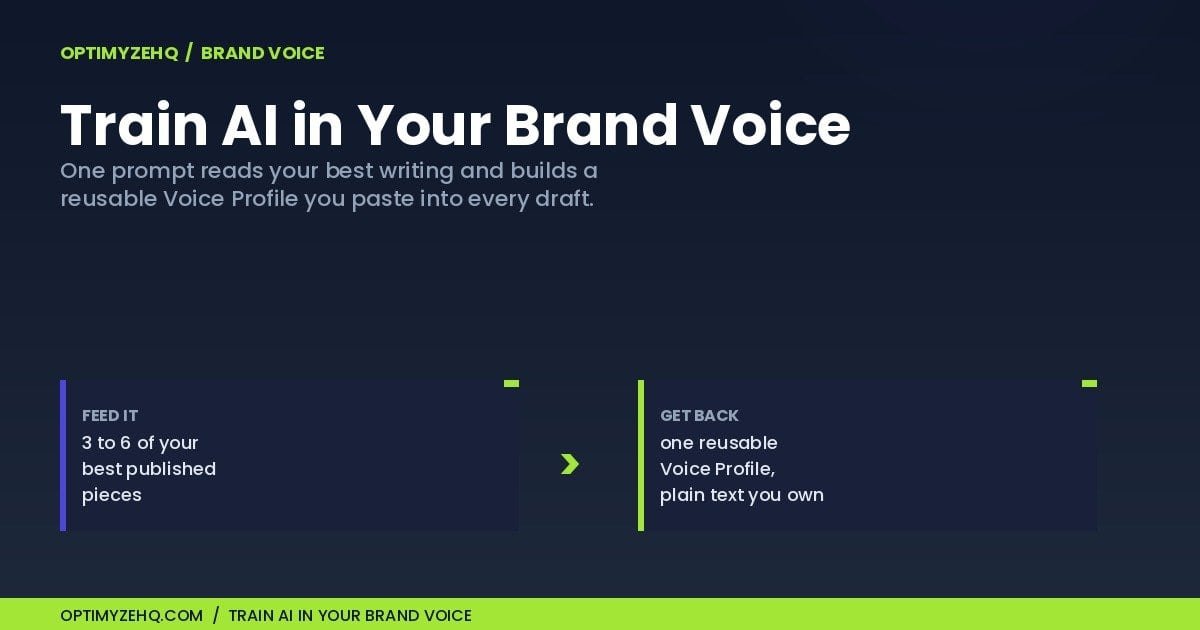
This is the second of two ways to train AI in your brand voice. The first, the one I wrote up in the Voice DNA framework, asks you to explain your voice from scratch by answering twelve questions about yourself. This one does the opposite. You feed the model three to six of your best existing pieces and let it infer the patterns, then it hands back a reusable Voice Profile you paste into every draft after that. One prompt, one profile, and you stop re-explaining yourself in every chat.
Who this is for: a solo creator or freelancer who already has a body of published writing, a blog archive, a newsletter back catalog, a stack of client work you are proud of, and wants AI drafts that need less editing. If you are brand new and have nothing written down yet, this is not your road. The other one is, and I will point you to it in a second.
Two quick definitions before we start. Training here does not mean fine-tuning a model or changing how it works under the hood. It means handing the model a reusable, plain-text Voice Profile: a one-page guide to how you write, covering your rhythm, diction, structure, audience, and the rules you follow, so every draft starts from your voice instead of a blank one.
Two ways to train AI in your brand voice
There are two honest ways to get an AI to sound like you, and they start from opposite ends.
The first is introspection. You sit down and describe your own voice: how you open, what you refuse to say, who you are writing for. That is the Voice DNA framework, and it makes the case that introspection beats extraction. It is right about the kind of extraction it has in mind, the naive kind. Dumping your whole archive in can average you into your median past self, raw samples on their own do not tell the model who you write for, and most sample-based tools trap the result inside their own platform. Those are real traps.
The second road is extraction, and this piece is about walking it without falling into those three traps. You hand the model a few finished pieces and ask it to reverse-engineer the patterns. The reason to take this road is simple: if you already have writing you are proud of, the evidence of your voice is already on the page. Reconstructing it from memory in a twelve-question interview is slower and, frankly, less accurate than letting the model read what you actually did.
So the real question is not which method is better in the abstract. It is which one fits your situation. Both roads end at the same destination: a single plain-text Voice Profile you own and reuse.
New to this, with nothing written down yet? Take the introspection road instead. The Voice DNA framework builds the same reusable Voice Profile by asking you twelve questions about how you write, no samples required.
Why extraction wins when you have a back catalog
The catch with extraction is real, so here is how each part gets handled rather than waved away.
The averaging problem is solved by curation. You do not feed the model everything you have ever published. You feed it three to six pieces that sound the most like you on a good day. Garbage in, median out. Best work in, sharp profile out. The selection is the work, and it is worth ten minutes.
The audience problem is solved by asking for it directly. A good extraction prompt does not only study sentence rhythm and word choice. It infers who you are writing for from the samples, and where the samples leave that unclear, it asks you one question to pin it down. Your finished posts carry more audience signal than people assume, in who you address, what you assume the reader already knows, and what you bother to explain.
The lock-in problem is much smaller here, because the output is portable plain text rather than something held inside a tool. The profile is a plain-text document. It lives in your notes, and it pastes into any model you want. The one way to recreate lock-in is to store it in a single platform and nowhere else, so keep your own copy. That is the same portability the Voice DNA framework prizes. The only difference between the two roads is what you put in, not what you get out.
Here is the quick way to pick your road.
| Introspection (Voice DNA) | Extraction (this method) | |
|---|---|---|
| What you give it | Answers to twelve questions about how you write | Three to six of your best published pieces |
| Best when | You are new, or you have little written down yet | You already have a back catalog you are proud of |
| Time to first profile | About sixty minutes of guided reflection | About two minutes to generate, after ten minutes choosing samples |
| What it captures | The voice you intend to have | The voice you have actually written |
| Main risk | Overthinking it, or describing a voice you wish you had | Averaging weak or too-similar samples into a flat profile |
| What you end up with | One plain-text Voice Profile you own | One plain-text Voice Profile you own |
How to build your Voice Profile in five steps
Here is the whole process at a glance before the detail:
- Choose three to six of your strongest writing samples (more on what makes a good one below).
- Paste their full text into a fresh AI chat.
- Run the extraction prompt below.
- Read the Voice Profile it returns and correct it: cut rules that feel wrong, sharpen anything vague, add what it missed.
- Save the finished profile where you draft: a Claude Project, a custom-instructions field, Notion, a Google Doc, or your workflow system.
The extraction prompt (yours to keep)
This is the engine for step three. Copy it, paste it into a fresh chat with your samples, and the model returns a Voice Profile in about two minutes. The two minutes is only the generating; the real time goes into choosing and checking your samples, which is the next thing to get right.
You are a voice analyst. I am going to give you several samples of my best writing. Your job is to study them and produce a reusable Voice Profile I can paste into any AI tool so its drafts sound like me, not like generic AI.

Read all the samples first. Look for what is consistent across them, not what is unique to one piece. Ignore the subject matter; I write about different topics. Focus on HOW I write.

Then write a Voice Profile with these sections, in plain text, no preamble:

1. Voice in one sentence. The single line that captures how I sound.
2. Sentence rhythm. Typical length and how I mix long and short. How I open and close pieces.
3. Diction and register. Formal or plain, concrete or abstract, the kinds of words I reach for and the kinds I avoid.
4. Recurring moves. The three to five things I do again and again (for example: lead with a specific moment, name a real number, admit a limit, end on a turn).
5. What I never do. The patterns absent from every sample, stated as rules (for example: never opens with a definition, never uses hype words).
6. Audience. Who I am clearly writing for, inferred from the samples. If the samples do not make the audience obvious, say so and ask me one question to pin it down.
7. Five-line style guide. Five imperative rules a model can follow on every draft to write as me.

Quote two or three short phrases from the samples as evidence for the patterns you name, so I can see you are reading the real writing and not guessing.
What counts as a good sample matters more than how many you use. Three strong pieces beat eight average ones, because the model averages whatever you give it. The selection is the real work, and it is worth ten minutes. Choose writing that is:
- Recent enough to still sound like you
- Fully yours, not rewritten by an editor or shaped to a client’s house style
- Varied in mood or format (a teaching piece, an opinion piece, a personal one)
- Work you are proud of, not something you published only because you had to
- Free of private client detail
If your best work lives on a few different platforms, paste the text in directly rather than linking it, so the model reads the words and not a page of navigation. These are pieces you have already published, so they are usually safe to paste, but scan them first and strip anything you would not want sitting in an AI chat: client names, private numbers, unpublished strategy, or anything under an NDA.
The Voice Profile it produces
I ran that exact prompt on four of my own posts. Here is the real output, trimmed for length.
Voice in one sentence
A working practitioner who earns trust by showing the math, naming the limits, and refusing to oversell anything.

Recurring moves
Open with a scene that has already happened. Every piece begins mid-action, in the past tense, with a specific day or moment: "This past Tuesday, a newsletter went out," "Last fall I spent a Thursday morning I will never get back." The reader lands inside a real situation before encountering any thesis.

Separate what the system handles from what requires human judgment. This recurs in explicit language: "you stay in the loop only for judgment and approval," "what I kept doing by hand on purpose." The boundary between automation and the human decision is the key distinction in every piece.

Audience
Solo operators (freelancers, consultants, one-person businesses) who are technically capable enough to use tools but are not developers, are already sold on automation, and are sensitive to being oversold. The relationship is peer-to-practitioner, not expert-to-beginner.

Five-line style guide
1. Open every piece inside a specific, already-completed scene (a named day, a real action, a concrete result) before stating any thesis.
2. State the central answer early and plainly in one or two sentences, then spend the rest of the piece on the reasoning behind it.
3. Attach every number, claim, or tool recommendation to its real-world limit or condition; never let a positive stand alone without its honest qualifier.
4. Keep sentences concrete and operational; if a sentence contains no noun a reader could point to or a number they could verify, cut or rewrite it.
5. Close on the next practical action or on what the system still cannot do; never on inspiration, encouragement, or a call to believe something.
That is not a summary I wrote. The model pulled it from the samples, down to the phrases it quoted back as evidence. A profile like this is roughly a page of plain text, and it does the job a twelve-question interview does, in a fraction of the time, because the answers were already on the page.
Treat that output as a strong first draft, not a verdict. Read it once, keep what rings true, change what does not, and add anything it missed. You decide what your voice is going forward, not the model.
What the profile does to a draft
The profile is the input. The payoff is the draft. To show the difference, I gave one model the same request twice: write a short post telling freelancers to stop chasing overdue invoices by hand. The first time cold, with no profile. The second time with the Voice Profile above pasted in first. Both outputs are real and shown trimmed for length.
Generic AI, no profile:
Stop Chasing Invoices. Start Getting Paid.

Here's the thing: payment reminder automation doesn't sleep, forget, or feel weird about asking twice. [...] Set it up once. Let it run. [...] Automate the awkward. Keep the money moving.
The same request, with the Voice Profile pasted in first:
Last Thursday a client paid an invoice 47 days late. The invoice was net-15. I had sent 4 manual follow-up emails across those 32 extra days, each one slightly more awkward than the last. [...] You stay in the loop only when a client actually responds. The one thing it cannot do: judge when a relationship is fragile enough to handle manually instead. That call stays yours.
Same model, same request, back to back. The cold draft reaches for a headline, a slogan, and an emoji. The tuned one opens on a dated scene, names real numbers, draws the line between what the system handles and what stays a human call, and closes on a limit instead of a cheer. That is the point of the profile: not a better idea, a voice a reader would recognize.
Where the Voice Profile goes to work
A profile that sits in a file does nothing. The point is to put it in front of the model every time it drafts. There are a few good homes for it.
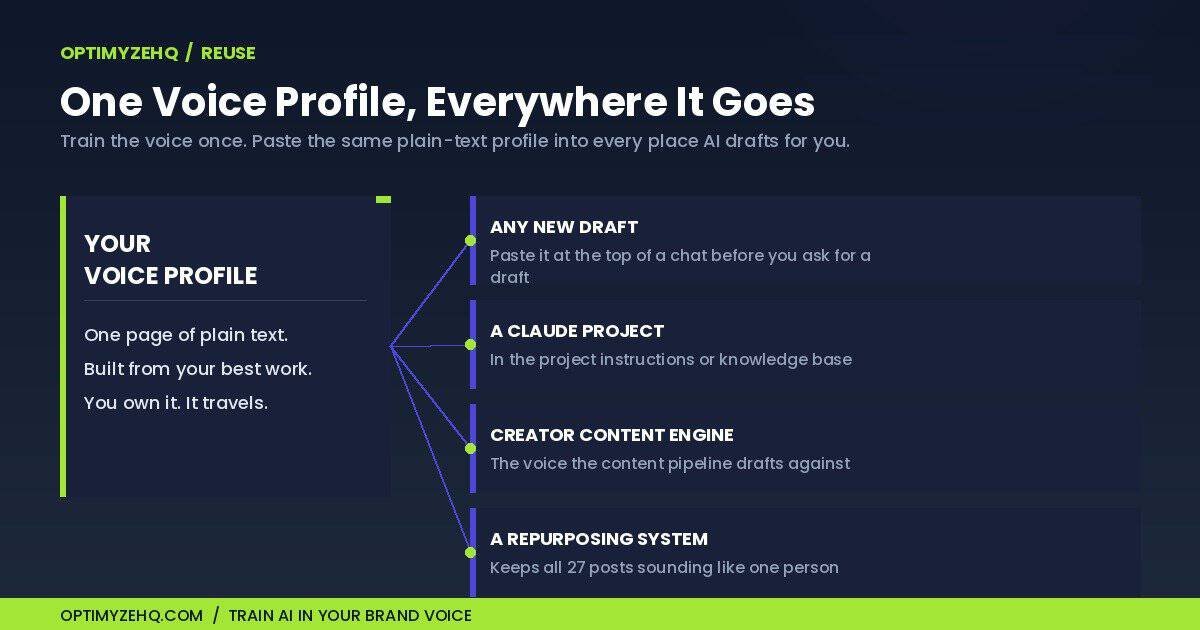
The simplest is to paste it at the top of any chat before you ask for a draft. One paste, and that whole conversation writes in your voice. If you want to be explicit about it, open with a framing line, then make your request: “Use the Voice Profile below when you draft. Match the rhythm and structure, do not reuse its phrases, and apply the style to the new topic.”
The more permanent option is to drop it where the model keeps standing instructions. In a Claude Project, the profile goes in the project instructions or the knowledge base, and every chat inside that project starts already knowing how you sound. The same idea works in a custom-instructions field or a saved system prompt in any tool you use. Because the profile is plain text, it travels.
And it slots straight into the systems you may already run. If you use the Creator Content Engine, the Voice Profile is the voice input that the pipeline drafts against. If you run a content repurposing system to turn one blog post into a month of social posts, the profile is what keeps all twenty-seven of those posts sounding like one person instead of twelve. Train the voice once, reuse it everywhere.
Keeping it honest
Your voice is not frozen, so your profile should not be either. The way you wrote a year ago is not exactly how you write now, and a profile built on last year’s samples will slowly pull your drafts toward a version of you that you have outgrown.
Two habits keep it current. Re-run the extraction every few months on your newest best work, and replace the old profile with the new one. And before you trust a draft, run a quick voice check: paste your profile and the draft back into the model and ask whether the draft actually follows the profile, where it drifts, and what to change. It is a thirty-second pass that catches the drafts that look like you but do not quite read like you.
A profile has limits worth naming too. It will not replace your editing, it will not make a thin idea worth reading, and it will not know your current positioning unless you put that in the draft. If your samples are too few or too alike, it can pick up surface habits and repeat them, which is one more reason to vary what you feed it. And if you genuinely write in different registers for different audiences, a sharp technical voice in one place and a looser personal one in another, build a separate profile for each rather than averaging them into one blurry middle.
Build it yourself, or skip the setup
Everything above is the complete method, and the prompt is the whole engine. You can run it today for nothing. The free version removes none of the thinking, which is the point: choosing your best samples and judging the result is the part that makes the voice yours.
What it does leave on you is the upkeep, the sample triage, and the voice-checking, every time. The Content Repurposing Skill Pack, a paid add-on for the Creator Content Engine, packages that work as four tested Claude prompts: a Voice Extractor that is the integrated version of the prompt above, a back-catalog triage that helps you pick which pieces to feed, a Voice Check that runs the drift pass for you, and a cross-platform adapter that keeps the voice steady when one piece becomes a thread, a carousel, and a caption. It runs $37 during launch, then $67. It is an OptimyzeHQ product, built for Claude, and Anthropic did not sponsor this.
If you only ever use the free prompt, that is a genuine win, and I would rather you train your voice with that than not at all.
FAQ
A few questions that come up once people start extracting their voice.
How do you train AI in your brand voice?
You give the model evidence of how you write instead of asking it to guess. Feed it three to six of your best published pieces with a prompt that asks it to study the patterns, and it returns a reusable Voice Profile: a plain-text description of your sentence rhythm, word choice, and recurring moves. You paste that profile into any draft so the output sounds like you rather than generic AI.
Is it better to train AI on writing samples or to describe your voice yourself?
Both work, and they suit different starting points. If you already have writing you are proud of, feeding those samples is faster and more accurate, because the model reads what you actually did. If you are new or have little published, describing your voice through a set of guided questions is the better road. The Voice DNA framework covers that introspection method, and both approaches end at the same plain-text Voice Profile.
How many writing samples does the AI need?
Three to six is the sweet spot. Fewer than three and the model has too little to find a consistent pattern; more than six and you start averaging in pieces that sound less like you. Pick your strongest work across a couple of moods, a teaching piece, an opinion piece, a personal one, rather than feeding everything you have ever written.
Will the AI copy my old writing word for word?
Not if the prompt is doing its job. It asks for the patterns behind your writing, your rhythm, structure, and diction, rather than the sentences themselves, so the Voice Profile describes how you write and the model applies that style to new topics. Even so, review your drafts for repeated phrasing, especially if you feed it only one or two samples or several pieces that all open the same way.
Where do I keep the Voice Profile so the AI uses it every time?
The quickest home is the top of a chat: paste the profile before you ask for a draft and that whole conversation writes in your voice. For something permanent, put it where the tool stores standing instructions, the project instructions or knowledge base in a Claude Project, or a custom-instructions field in other tools, so every new chat starts already knowing how you sound.
Does this work with ChatGPT and other AI tools, or only Claude?
Mostly, yes. The Voice Profile is plain text, so it pastes into any model or custom-instructions field. Results vary a little by model and by how well a tool follows standing instructions, so a draft may land closer in one tool than another, but the profile itself is portable. The prompt in this article was tested on Claude, and the integrated Voice Extractor in the Content Repurposing Skill Pack is built for Claude.
Where to start
Open a fresh chat, paste the prompt and three of your best pieces, and read the profile it builds. If it captures you, save it and start pasting it into every draft. If you would rather define your voice from the inside out, or you do not yet have samples worth mining, take the other road and start with the Voice DNA framework instead. Either way, you train AI in your brand voice once instead of re-explaining it in every chat, you keep the profile current as you grow, and every draft after that gets easier.