Content Repurposing System: 4 Posts, 30 Days
I have thirty published posts on this site. For months, almost none of them showed up on social media. The writing was done, sitting there, working for no one past the week it went live.
That gap is the most common one I see in solo creators. You publish, the post gets a small spike, and then it goes quiet while you stare at an empty social calendar and feel a low hum of guilt about content you already paid for in hours. The standard advice is to repurpose, and the advice is right. The trouble is that most people repurpose one post once, by hand, on a rare free afternoon, and then never again.
What actually fills the empty calendar is a content repurposing system: a repeatable chain you can run on any post that takes one finished piece and returns a stack of platform-native social posts in your voice, the same way every time. Not a burst of motivation. A pipeline. This post shows the exact one I run, built on Claude Skills, and the real month of content it produced from four old posts. Nothing here is mocked up.
This is for a solo creator or freelancer who already publishes long-form, has a back catalog gathering dust, and wants a system instead of another guilt trip. If you have never written a blog post or a newsletter, start there first. A repurposing system needs source material to run on.
What a content repurposing system actually is (and why one post at a time is not one)
A content repurposing system is the difference between an act and a habit you can hand off. The act is what most guides teach: take this blog post, pull a few quotes, write some captions. Useful once. A system is that same work turned into a fixed sequence you run without re-deciding each time. Read a finished piece and list every standalone angle inside it. Sequence the best angles into a dated calendar. Then write each one in the native format of its platform. Three moves, any post, every week.
One post at a time never compounds because the deciding is the slow part, not the typing. Every manual session, you re-ask which angles are worth pulling, which platform fits, and what order to post in. A system answers those questions once and then executes. The result is that the work stops depending on whether you feel like doing it.
Two narrower versions already live on this site. If you want the one-post method first, I walked the manual version end to end in how to repurpose a blog post into social media, and the weekly rhythm in the four-hour weekly system. This post is the wider view: the machine that runs across your whole catalog, not a single piece.
The four old posts I fed the system
To show the system honestly, I ran it on four posts I had already published, chosen for variety rather than for being my best work:
- n8n vs Make (3,066 words): a comparison.
- How I Build a 90-Day Content Plan in One Afternoon (2,498 words): a framework.
- Claude Skills for Solopreneurs (2,100 words): a concept piece.
- How to Build an AI Agent in Make.com (4,062 words): a step-by-step tutorial.
Four different shapes on purpose. A comparison atomizes very differently from a tutorial, and I wanted to watch the system handle all of them. Together they are an afternoon of reading and thinking I did not have to do, because I did it months ago. That is the quiet advantage of mining a back catalog instead of a single fresh post: the research is already paid for.
From four posts to thirty days: the calendar the system built
The pipeline runs two passes before a single post gets written. First, a Post Atomizer skill reads each piece and returns a ranked menu of standalone angles, each tagged with the format that suits it. Four posts produced more than thirty distinct angles. One focused post is worth about a week of social, not a month. Four evergreen posts adding up to a month is the math working, not hype. Then a Sprint Planner skill takes the strongest angles and sequences them into a dated, five-platform calendar with rest days built in and a cut list for the weeks you fall behind.
Here is the actual calendar it produced: twenty-seven posts across thirty days. Each platform-specific asset counts once, so that breaks down as ten LinkedIn posts, six X posts, four Instagram carousels, three Reel scripts, and four Pinterest pins.
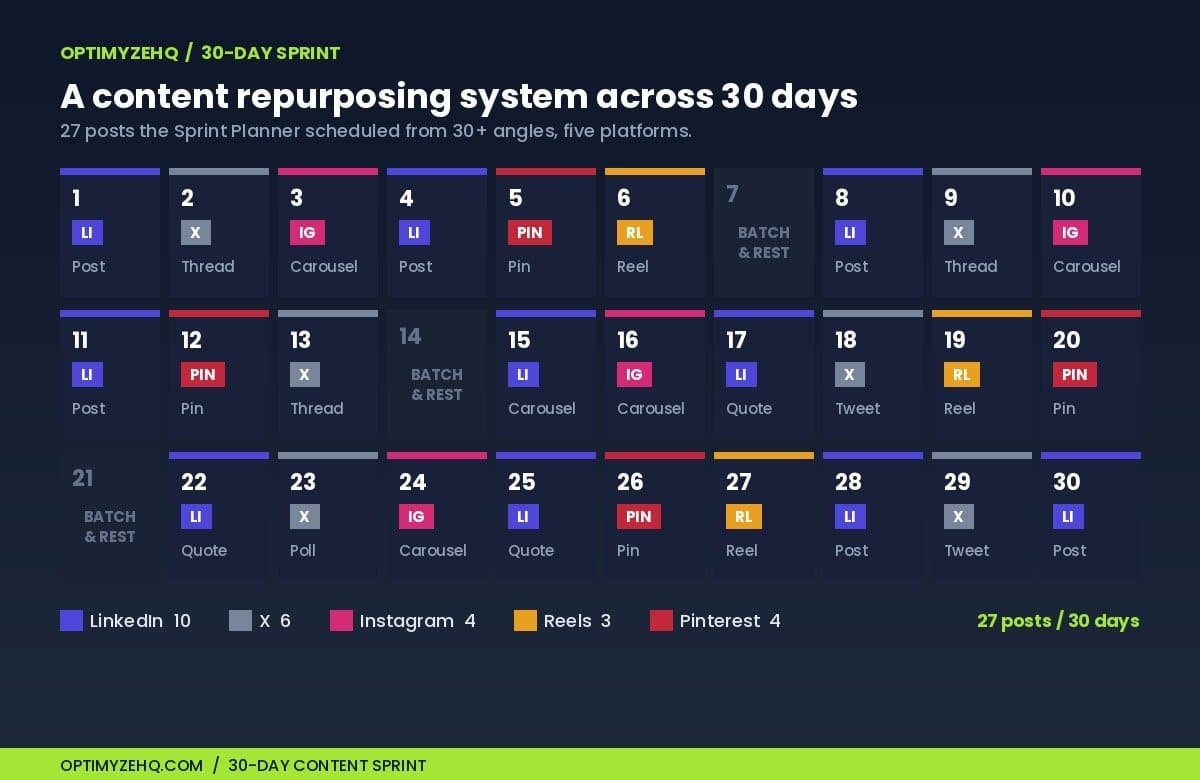
A few details matter, because they are what a thinking system does and a template does not. There are batch-and-rest days on 7, 14, and 21, not a relentless daily grind. Several entries are siblings, the same angle adapted for a second platform with a fresh framing, and they are marked so you never post the same thread twice. And the planner front-loads reach early, then pushes the email-signup posts later, once an audience is actually watching.
The cadence it settled on:
| Platform | Posts in 30 days | Roughly per week |
|---|---|---|
| 10 | 2 to 3 | |
| X | 6 | 1 to 2 |
| 4 | about 1 | |
| Reels | 3 | 1 every 10 days |
| 4 | about 1 | |
| Total | 27 | about 6 |
That cadence is a proposal, not a default. When the planner ran, it also produced a fifteen-post minimum cut list for weeks when you only have half an hour. Honest pacing is part of the output, not an afterthought you have to add back in.
Want to run this exact system? The seven skills and four prompts that produced this calendar are the Content Repurposing Skill Pack. How the pieces fit together is next.
The five moving parts
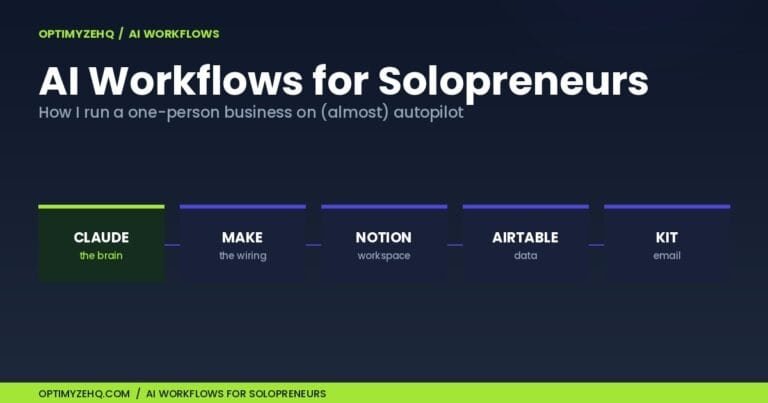
Underneath the two passes, the Content Repurposing Skill Pack is seven Claude Skills and four prompts. The running system has five moving parts, because the five platform writers act as one write step: three of the parts are skills Claude runs, and two are prompts you paste in for the finishing work.
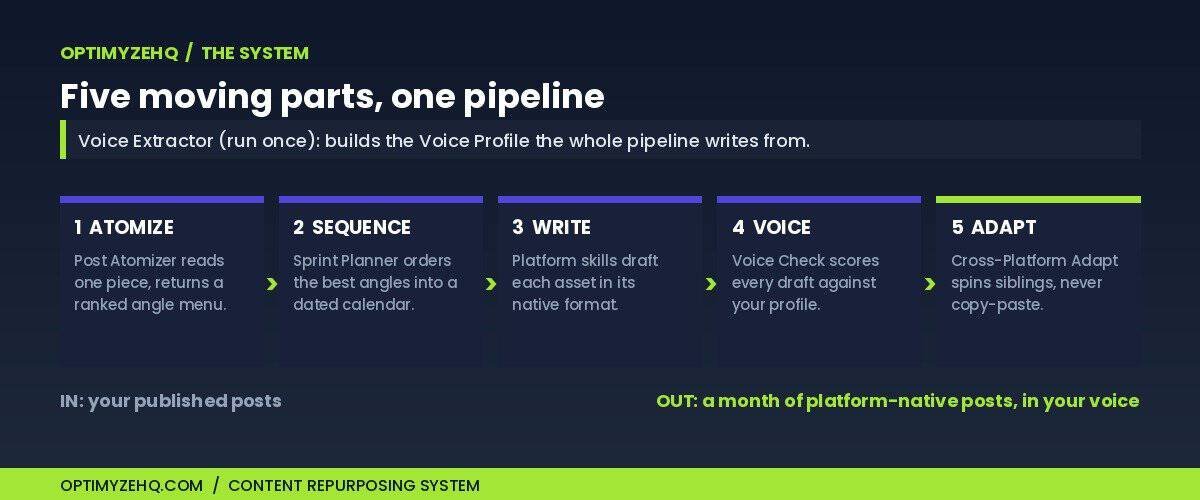
- Post Atomizer is the one-to-many engine. It reads a finished piece and hands back a ranked angle menu, each angle tagged with the format that suits it and whether it is a reach play or a saves play.
- Sprint Planner sequences those angles into the dated calendar above.
- The platform skills (a LinkedIn writer, an X-thread writer, an Instagram-carousel writer, a Reel-script writer, a Pinterest-pin writer) each draft one angle in that platform’s real house format: white space and a soft prompt on LinkedIn, a numbered hook-first thread on X, swipeable slides on a carousel.
- Voice Check, a paste-in prompt, scores any draft against your Voice Profile and flags the exact lines that drift off-voice, with fixes.
- Cross-Platform Adapt, the other paste-in prompt, takes a finished asset you like and spins a native sibling for another channel, changing the opening line so the two never read as copies.
A skill, mechanically, is a short instruction file Claude loads on its own when your request matches, the same idea I covered in Claude Skills for solopreneurs. You install one by uploading a ZIP and toggling it on, no terminal and no developer setup. The line the whole Pack runs on is the one I keep coming back to: prompts you paste, skills Claude runs.
Keeping it in your voice (the part most tools skip)
The reason most AI repurposing reads like AI is that the tool never learned how you sound. It defaults to the flat, agreeable register every model slides into, and your LinkedIn post ends up indistinguishable from everyone else’s.
The system handles this with two pieces. A Voice Extractor prompt reads a handful of your real writing, three to six pieces you are proud of, and produces a reusable Voice Profile: your rhythm, your vocabulary, your signature moves, and an inferred list of words you never use. You run it once and keep the output. Every platform skill then writes from that profile, and Voice Check audits each draft against it before anything goes out. It is a voice pass, not a quality edit. It only flags where the draft stopped sounding like you.
Going deeper on voice: building a reusable voice from samples of your own writing is a craft of its own. The full method is in the Voice DNA framework.
Two finished assets, exactly as the skills produced them
Angles and calendars are planning. The point of the system is finished, paste-ready posts. Here are two, reproduced exactly as the skills wrote them, then passed through Voice Check. The first is a LinkedIn post built from the Claude Skills piece. The second is an X thread built from the agent tutorial.
LinkedIn post · written by the LinkedIn skill · source: Claude Skills for Solopreneurs
Every Claude session used to cost me two minutes before I typed a single word.
Re-paste the audience description. Re-explain the tone rules. Copy the context block from Notion. Skip one piece and the output drifts.
That’s not a workflow problem. That’s a tax you pay on every session, compounding.
Claude Skills exist to kill that tax. You write the instructions once, install them once (no terminal, no developer setup, upload a ZIP and toggle on), and Claude loads them on its own when the job matches.
The five jobs worth building first for solopreneurs: client email replies, meeting notes to action items, cold outreach, SOP writing, and weekly review. All repeatable. All rule-bound. All places where consistency matters more than novelty.
The distinction that actually helps: prompts you paste, skills Claude runs.
One thing worth knowing: skills don’t auto-update when a new model ships. Worth retesting your key ones whenever that happens.
The re-briefing tax is optional. Most people haven’t stopped paying it yet.
Which session setup are you rebuilding from scratch most often?
178 words, written to earn comments.
X thread · written by the X-thread skill · source: How to Build an AI Agent in Make.com
1/ Your Make.com AI agent will cost more than you planned. Not because of the plan fee. Because of memory.
2/ Every time your agent runs with memory enabled, it carries earlier messages into the new run. More history = more tokens = a bigger bill. The agent does not forget for free.
3/ The credit math compounds fast. Make bills roughly one credit per operation. Each tool the agent calls is an operation. Add your own Claude key and you pay Make for operations and Anthropic for tokens on top. Two meters running at once.
4/ The fix is simple enough to miss: cap the retained history, or turn memory off when the task does not need it. Inbox triage rarely needs memory at all. Category, priority, draft. Done. No history required.
5/ One more thing to check before you scale: Make AI Agents is in open beta as of June 2026. Pricing can shift, and Make has not published a fixed per-run cost yet. Verify the current numbers on Make’s pricing page before you commit. Build the agent. Watch what it costs. Then decide how much memory it actually needs.
A 5-post thread, plus Threads and Bluesky adaptation notes the skill produced alongside it.
Read the last line of that thread again. The skill wrote a pricing claim, then flagged its own number for you to re-verify before posting, because third-party prices move and a repurposed post still goes out under your name. That guardrail is deliberate. For the record, as of June 2026 Make bills in usage-based credits, roughly one credit per operation for standard modules, while its AI features, including the AI Agents (in beta), use dynamic pricing tied to token usage, so an agent run costs noticeably more than a classic scenario. Always check Make’s live pricing. The skill will not invent a figure to sound confident. It tells you where to look.
What this system is not
It is not autopilot. The skills draft; you still read, approve, and sometimes cut. The thirty-to-forty-five-minutes-a-day budget on the calendar is editing and posting time, not zero.
It is not a scheduler. It writes the posts. It does not publish them. You still paste into LinkedIn or the scheduler of your choice.
It is not magic on a thin post. Run it on a 400-word listicle and you get a thin handful of angles, because the atomizer can only pull what the source contains. That is what the Back-Catalog Triage prompt is for: it ranks which posts are worth a sprint and which to skip or refresh first.
And it runs inside your own Claude account, on content you choose to give it. Keep anything you would not publish out of it, and treat it like the public-facing tool it is. Skills also do not auto-update when a new model ships, so retest your key ones when that happens.
Build it yourself, or skip the setup
You can build a version of this yourself. The moves are not a secret: write a strong atomizing prompt, a planning prompt, and one prompt per platform, save them, and run them in order. If you would rather start there, the one-post method walks the manual version end to end. The system above is the whole system. I am not holding the method back.
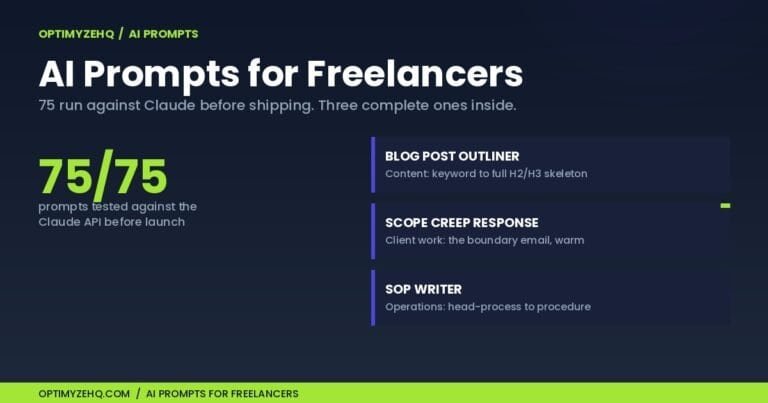
What you would be buying, if you skip the building, is the part that took me the longest to get right. That is the Content Repurposing Skill Pack, our paid product, $37 right now during launch and rising to $67 once the early reviews are in. Inside:
- 7 Claude Skills: the Post Atomizer, the Sprint Planner, and five platform writers for LinkedIn, X, Instagram, Reels, and Pinterest
- 4 prompts: Voice Extractor, Voice Check, Back-Catalog Triage, and Cross-Platform Adapt
- The worked thirty-day example you read above
- A no-code install guide, about five minutes
Full disclosure: it is ours, and these links are not sponsored by Anthropic.
If you also want the engine that writes the original long-form in the first place, the Creator Content Engine and the Pack come together as a bundle for $89. The Engine creates; the Pack repurposes. Your Voice Profile drops straight into both.
FAQ
What is a content repurposing system?
A content repurposing system is a repeatable chain you run on any finished piece of content. It reads the piece, lists every standalone angle inside it, sequences the best angles into a dated calendar, and writes each one in the native format of its platform. The point is that you decide how it works once, then run it the same way every week, instead of repurposing one post by hand whenever you find a spare afternoon.
Can I repurpose old blog posts, or only new ones?
Old posts are ideal. The system runs on anything you have published, and a back catalog is an advantage rather than a problem, because the research and thinking are already done. The Back-Catalog Triage prompt ranks which of your existing pieces are worth a sprint and which to skip or refresh first, so you do not waste a month on a thin post.
Will the posts sound like me or like AI?
That is what the voice pieces are for. The Voice Extractor prompt builds a reusable Voice Profile from samples of your real writing, and every platform skill writes from it. Voice Check then audits each draft against the profile and flags the lines that drift, so the output reads like you rather than like a generic model.
How long does a month of content take with this system?
The two planning passes take a few minutes. Drafting each asset is fast once the skills are installed. A realistic budget is an afternoon for the first full run, then thirty to forty-five minutes a day to edit and post. In the worked example, that produced twenty-seven posts across thirty days from four source pieces.
Do I need to know how to code?
No. You upload a ZIP file in Claude’s settings and toggle the skill on. There is no terminal, no developer setup, and no API wiring. The whole setup takes about five minutes. The skills work on Claude’s Free, Pro, Max, Team, and Enterprise plans, with code execution turned on in settings. On Team and Enterprise an admin may need to enable Skills first.
What does the Content Repurposing Skill Pack cost?
It is $37 during launch and rises to $67 once the early reviews are in. Every OptimyzeHQ product carries a 30-day refund, no questions asked.
Where to start
If you are starting from scratch, the one-post method is the smallest first step, and the AI content system pillar covers how the original pieces get made before there is anything to repurpose. The system here is what you graduate to once you have a back catalog worth mining, which, if you have been publishing for a while, you already do.