How to Repurpose a Blog Post Into Social Media (11 Posts From 1)
You spend a day on a blog post. It goes live, your newsletter sends it a quick wave of traffic, someone shares it on LinkedIn, and then it sits there. Quietly. That post held a week of social content, and you used it once.
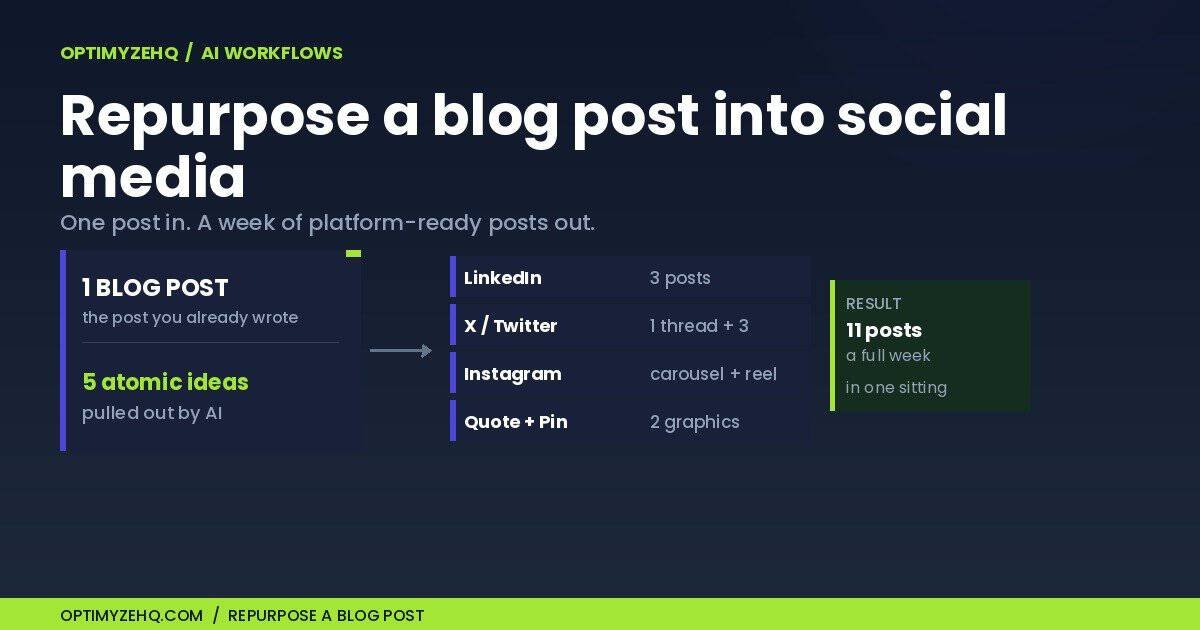
Here is the short version, then I will show my work on a real post. To repurpose a blog post into social media, you do five things in order: pick the right post, pull out its atomic ideas, map those ideas to a seven-day calendar, generate a draft for each platform with a format-specific prompt, then scrub the drafts so they sound like you. Done by hand with a capable AI assistant, one solid post turns into about a week of social in a single sitting.
One honest boundary before we start. Generating the first drafts is fast: with the prompts saved, the full set of eleven takes me under twenty minutes. The work that actually matters, the voice edit, is slower, and I will not pretend otherwise. Skipping it is the difference between content that sounds like you and content that sounds like everyone else’s AI.
Who this is for, and what this is not
This is for the solo creator or freelancer who already publishes, has Claude or a similar assistant on any plan, and has at least one post worth reusing. You need nothing else. No automation tool, no subscription, no new app.
It is also deliberately narrow. If you want the full weekly machine that pulls from podcasts, videos, and your newsletter as well as your blog, that is the 4-hour weekly system, and it is a bigger build. This piece zooms all the way in on the single most common job: one blog post, into a week of social, start to finish. One distinction worth setting first: cross-posting drops the same asset everywhere, while repurposing keeps the idea and rebuilds the asset for each platform. This is repurposing.
How to repurpose a blog post into social media, step by step
Here is the whole method on one real post, so you see the actual inputs and outputs rather than a sanitized demo. The source is a comparison I published, n8n vs Make: Which Should a Solopreneur Actually Learn in 2026? I picked it on purpose, which is the first step.
Step 1: Pick an idea-dense post
A good source post has a clear opinion or method, several standalone claims, and enough detail to keep the social posts accurate. Evergreen beats timely, and opinionated beats neutral, because every strong opinion is already a hook. The n8n vs Make piece fits: it takes a side and stands on a handful of strong claims.
Step 2: Extract the standalone ideas
An atomic idea is one claim that still makes sense pulled out of the article. Paste the post in and ask for them directly:
You are my repurposing assistant. Below is one of my blog posts. Pull out every
standalone idea a reader could agree or disagree with on its own, as a numbered
list. One sentence each, in plain language, no preamble. Rank them from most
contrarian to most obvious.

[paste full post]
On the n8n vs Make post, that returns the real spine of the piece:
- The one thing that decides n8n vs Make is how they charge, not what they can do.
- If you are a non-developer who wants a paid automation running this week, learn Make.
- If you care about owning your data and you are building toward AI agents, learn n8n.
- “It depends” is a cop-out. The right answer depends on who you are, and you can name that.
- The honest move is to tell people where the tool you sell on is the worse choice.
Five claims, pulled straight from the article instead of invented. Now they need somewhere to go.
Step 3: Map the ideas to a seven-day calendar
Decide where each idea lives before you write a word. A single idea can carry more than one format: idea 1 becomes a LinkedIn post and a quote graphic, and the verdict becomes both a thread and a carousel. That is how five ideas stretch to eleven assets across the week.
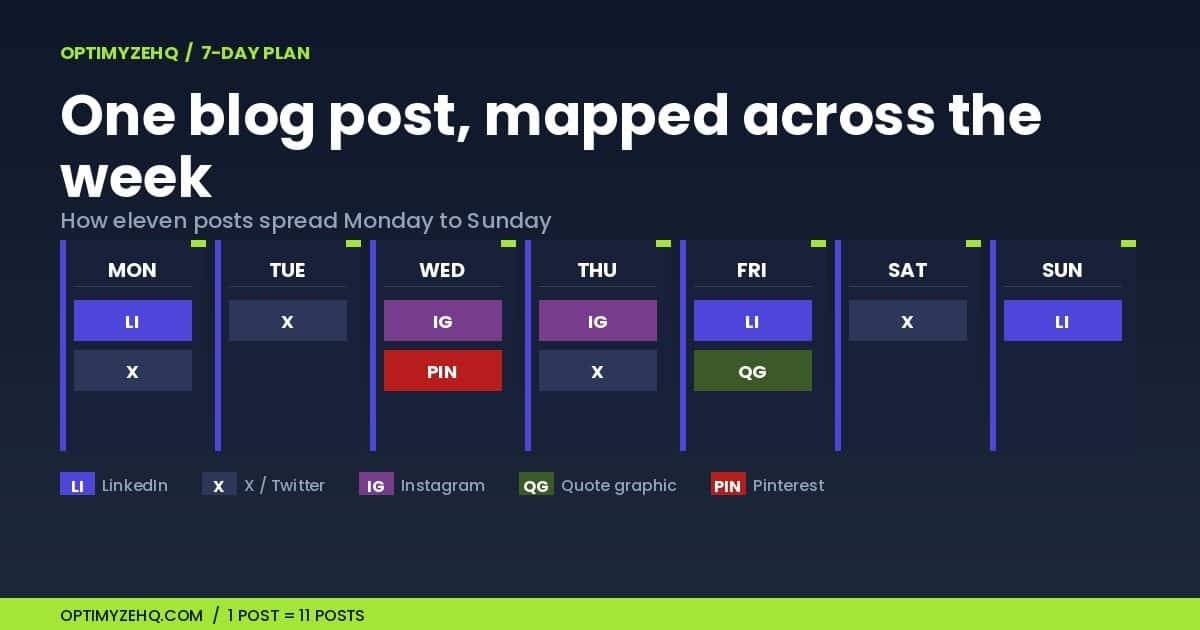
Here is the full week, mapped from source idea to asset:
| Day | Platform | Format | Source idea | Goal |
|---|---|---|---|---|
| Monday | Opinion post | Pricing model decides the choice (idea 1) | Discussion | |
| Monday | X | Standalone post | Feature comparisons miss the point (idea 1) | Reach |
| Tuesday | X | Five-post thread | Which tool, by who you are (verdict) | Engagement |
| Wednesday | Carousel | Learn Make if / learn n8n if (ideas 2 and 3) | Saves | |
| Wednesday | Pin | The n8n vs Make comparison | Blog traffic | |
| Thursday | Reel | The decision in three rules | Discovery | |
| Thursday | X | Standalone post | Make wins for a fast first build (idea 2) | Reach |
| Friday | Contrarian post | “It depends” is a weak answer (idea 4) | Discussion | |
| Friday | Quote graphic | “The invoice decides” | Recognition | |
| Saturday | X | Standalone post | n8n wins for control and data (idea 3) | Reach |
| Sunday | Educational post | Name where your own tool loses (idea 5) | Trust |
Step 4: Generate each platform draft
A generic “turn this into a LinkedIn post” gives you generic mush. Shape the prompt to the platform, and tell it to stay inside the source so it does not invent things. The drafts below are first passes after a quick voice-and-fact edit, not raw model output. LinkedIn, from idea 1:
Write a LinkedIn post from this idea: "The thing that actually decides n8n vs Make
is how they charge, not what they can do." Open with a one-line hook on its own line.
Short paragraphs, one idea per line, no hashtags, no emojis. End with a question that
invites a reply. Use only claims the source article supports; do not invent
statistics, features, or examples. Leave a blank line between each line for white space.
Here is what it returns, lightly tightened:
Everyone compares n8n and Make on features. That is the wrong fight.
The thing that actually decides it is how each one charges.
Make bills in credits as each module runs, so a workflow with many steps costs more per run than a short one.
n8n Cloud bills per workflow run instead. Ten steps or two, that is one execution against your plan.
So the real question is not which tool has more nodes. It is how your workflows are shaped.
Want something simple live this week? Make’s visual builder wins. Running long, multi-step workflows? n8n Cloud’s per-run pricing pulls ahead.
The feature lists barely matter. The pricing model decides.
Which way do your automations lean: lots of small steps, or a few big runs?
X thread, from the who-you-are verdict. The 280-character cap keeps each post compatible with standard accounts:
Turn this into a 5-tweet X thread on choosing n8n vs Make. Tweet 1 is a hook that
promises a clear answer. Tweets 2 to 4 each give one decision rule based on who the
reader is. Tweet 5 is the takeaway. Under 280 characters each, no hashtags. Use only
claims the source supports; invent nothing.
The five-tweet thread comes back like this:
1/ “n8n vs Make” is usually the wrong question. The better one: how do you actually build? Here is how to decide in about 30 seconds.
2/ A non-developer who wants a paid automation live this week? Learn Make. The visual builder gets you shipping today.
3/ Comfortable in a terminal, care about owning your data, building toward AI agents? Learn n8n. Higher ceiling, and self-hosting is on the table.
4/ Still torn? Default to Make. It is faster to learn, and you can move to n8n later if you outgrow it.
5/ The takeaway: do not choose on features. Choose on who you are and how you build, and the tool follows.
Instagram carousel, from ideas 2 and 3:
Write copy for a 5-slide Instagram carousel on choosing n8n vs Make. Slide 1 hook,
slide 2 "learn Make if...", slide 3 "learn n8n if...", slide 4 the one rule that
settles it, slide 5 a soft CTA to read the full breakdown. One short line per slide.
Use only claims the source supports.
And the slide copy it returns:
1. n8n vs Make? Stop comparing features. Compare invoices.
2. Learn Make if you are non-technical and want a paid automation live this week.
3. Learn n8n if you live in a terminal, want to own your data, and are building toward AI agents.
4. Rough rule: simple, quick builds favour Make; complex or data-sensitive ones favour n8n.
5. Want the full breakdown? The complete comparison is on the blog.
Three prompts, three finished assets, every one of them traceable to a post you already wrote. Repeat for the remaining eight in the table and the week is drafted.
Step 5: Edit, verify, and schedule
This is the half that matters. Generating the drafts is fast; the edit is the work. Run every draft through one pass that fixes the voice and checks the facts:
Rewrite this in my voice: plain, direct, first person, short sentences. Cut filler
and AI tells like "delve," "unlock," and "in today's world." Then check every claim
against the source text below and flag anything it does not support.

[paste the draft, then the source section]
For a real voice match, paste 200 to 300 words of your own past posts above the draft, so the model has a target to copy rather than a list of adjectives.
Before anything gets scheduled, run each post past a short checklist:
- Every claim is supported by the source article. Cut anything that is not.
- Generic hooks are replaced with language you would actually use.
- The post stands on its own, without reading the original.
- Openings vary across platforms, so cross-followers do not see the same line twice.
- Image posts have alt text and captions, and carousel text stays large and readable.
- You read it aloud once. If it sounds like a bot, it is not done.
Then space the eleven posts across the week rather than dumping them in a day. Judge each asset by the metric that fits its goal: comments for discussion posts, saves for the educational ones, watch time for the Reel, and clicks for the Pinterest pin. After seven days, keep the idea that performed best and feed it back in: it can become next month’s post, a newsletter section, or a short video.
Going deeper on voice: a one-line tone instruction gets you most of the way, but a reusable voice built from samples of your own writing is what makes a batch sound like one person. The full method is in the Voice DNA framework.
The reusable prompt pack
The blank versions of every prompt, in one place. Swap the quoted idea and they work on any post. Keep the source handy: run these in the same conversation where you pasted the article, or paste the relevant section beneath the prompt when you start a fresh chat.
Extract the ideas:
You are my repurposing assistant. Below is one of my blog posts. Pull out every
standalone idea a reader could agree or disagree with, numbered, one sentence each,
ranked most contrarian to most obvious. No preamble.
[paste full post]
LinkedIn post:
Write a LinkedIn post from this idea: "[idea]". One-line hook on its own line, short
paragraphs, no hashtags or emojis, end on a question. Use only claims the source
supports; invent nothing. Leave a blank line between lines for white space.
Standalone X post:
Write one standalone X post from this idea: "[idea]". Under 280 characters, a sharp
hook, no hashtags. Use only what the source supports.
X thread:
Turn this into a 5-tweet thread from "[idea]". Tweet 1 hooks, tweets 2 to 4 each make
one point, tweet 5 is the takeaway. Under 280 characters each, no hashtags. Invent
nothing beyond the source.
Carousel:
Write a 5-slide carousel from "[idea]". Slide 1 hook, slides 2 to 4 one point each,
slide 5 a soft CTA to the full post. One short line per slide. Source-only.
Short-form video script:
Write a 30-second talking-head script from "[idea]". Scroll-stopping first line,
three quick beats, a one-line CTA. Spoken, not written. No stage directions.
Source-only.
Quote graphic:
Give me three pull-quotes from "[idea]", each under 12 words. Keep the wording
faithful to the source; do not change the claim. Flag the punchiest for the graphic.
Pinterest pin:
Write one Pinterest pin title and description for the full article. Give a clear
title, not a vague hook; use the main topic phrase naturally; say what the reader
will learn; end with a reason to read the full comparison. No unsupported claims.
For the editing pass, reuse the voice-and-fact-check prompt from Step 5.
Five mistakes that waste the whole exercise
Copy-pasting chunks instead of re-forming. Lifting a paragraph and calling it a LinkedIn post is not repurposing, it is dumping. Each platform calls for a different shape, which is why the prompts above ask for the shape, not the text.
Skipping the voice scrub. This is the one that quietly costs you. Eleven on-brand posts build an audience. Eleven posts that sound like a chatbot teach people to scroll past your name.
Repurposing a thin post. Garbage in, garbage out. A post with one idea gives you one good asset and nine stretched ones. Start with something opinionated and idea-dense, the way I picked a strong-opinion comparison above.
Posting all eleven on the same day. The point of the calendar is spacing. A week of presence beats a one-day flood that your audience misses by lunch.
Automating before you have done it by hand. Tools tempt you to wire this up before you know what good output looks like. Run it manually two or three times first. You cannot automate a judgment you have not formed yet.
What this is, and where the paid shortcut fits
The prompts above are the entire method. Nothing is held back. You can repurpose a blog post into social media tonight with a free AI account and no other tools.
The paid option is for the upstream problem, not this one. The Creator Content Engine, my paid Notion-and-Claude template, runs the engine these posts are drawn from: it is where the blog post itself gets briefed, drafted, and stored, so there is always something worth repurposing. It removes the setup, not the thinking.
If you just want the starting prompts in one place, the free AI Starter Kit includes the extraction and platform prompts ready to paste.
And when you want this to run every week without the manual steps, the same method is packaged as installable Claude Skills: the Content Repurposing Skill Pack, our paid product, $37 during launch.
FAQ
How many social posts can one blog post become?
A focused post realistically yields eight to twelve assets, which is roughly a week of social. Stretch much past that and quality drops fast. The honest number is “about a week,” not “a month.”
How long does it take to repurpose a blog post into social media?
With the prompts saved, I can usually draft a full week in under twenty minutes. The voice edit takes longer and is the part that matters, so I budget about an hour end to end for a first run, less once the prompts become muscle memory. Your time will vary with the article’s length and how much voice work it needs.
Will reusing my blog post on social hurt my SEO or look repetitive?
Normally, no. Reusing an article’s ideas on social is not the same as having duplicate web pages. Google’s duplicate-content guidance is about substantially repeated pages and deceptive attempts to manipulate rankings, not promoting your own work on social. The only real repetition risk is human: someone who follows you on three platforms should not see the same words three times. Re-forming each idea for its platform solves that.
Which AI is best for repurposing a blog post into social media?
Any capable assistant handles the drafting. I use Claude because it holds a voice instruction well across a batch, which keeps eleven posts sounding like one person. The method matters more than the model.
Do I need an automation tool like Make to do this?
No. The method is fully manual, and that is the right way to start. Reach for automation only once you have proven the workflow by hand and want to schedule or batch it.
Where to go next
This is the single-post version on purpose. When you are ready for the whole machine, pulling from video, audio, and your newsletter on a weekly cadence, that is the 4-hour weekly system. To run the same one-post method as a repeatable system across your whole back catalog, see how a content repurposing system turns four old posts into thirty days. And if the upstream is the real gap, where the posts come from in the first place, start with how to build an AI content system that doesn’t sound like AI.
Pick one post you are proud of and already half-forgot. Run the five steps. You will have next week’s social drafted before lunch.