How to Build an AI Content System That Doesn’t Sound Like AI
You can spot it in three sentences. The draft is grammatical, organized, weirdly polite, and interchangeable with ten thousand other posts published the same week. If you’ve used Claude or ChatGPT for content, you probably have a folder of these: drafts that are technically fine and impossible to ship.
Here’s the part most advice gets wrong. That generic sound isn’t a model problem, and it isn’t a prompt problem you can fix with magic words. It’s an architecture problem. One prompt, one pass, straight to publish: that’s the default way people wire AI into their content, and it’s exactly the wiring that produces the sound.
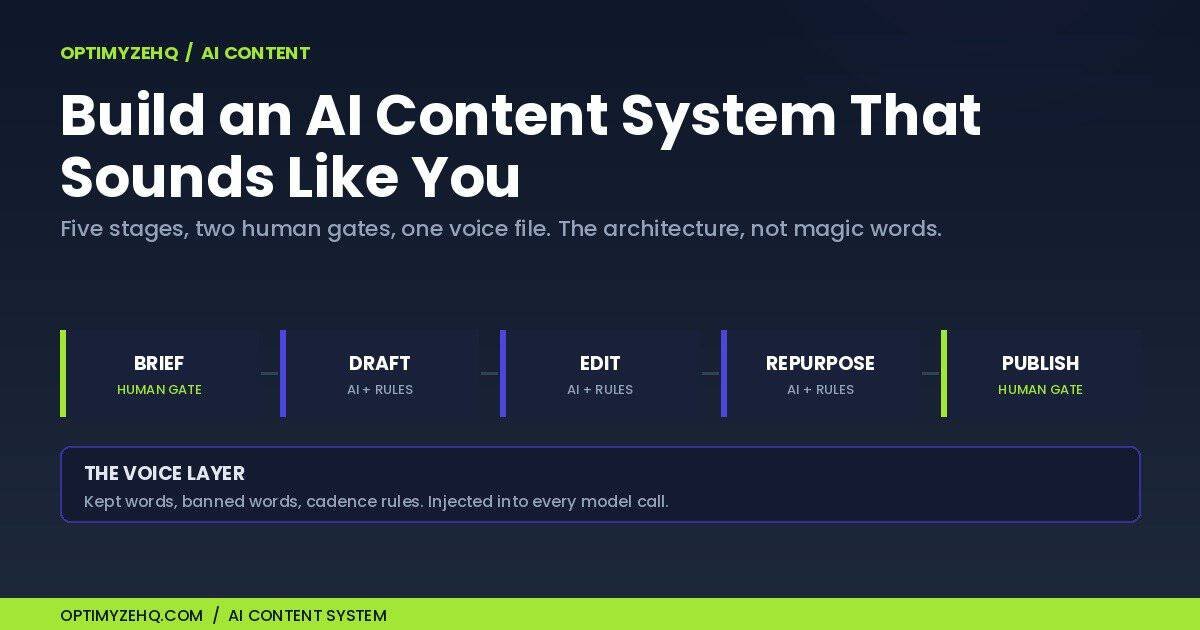
An AI content system fixes this structurally. It’s a repeatable pipeline (brief, draft, edit, repurpose, publish) where AI does the heavy lifting in the middle, your voice exists as a written artifact the system enforces, and a human controls what goes in and what ships. I run my one-person business on this architecture, and I sell a productized version of it. This guide is the architecture itself: the five stages, where your voice lives, which jobs a model should never get, what it costs to run, and what to build first.
Who this is for: solo creators and freelancers who publish weekly, or want to, and currently spend more time fixing AI drafts than the drafts saved them. It’s not for agencies chasing volume, and it won’t help you fool AI detectors. Different goals, and one of them is a dead end. More on that in a minute.
Why Does AI Content Sound Like AI?
Short answer: because most setups ask one model call to do four jobs at once, against a voice that exists nowhere in writing, with nothing enforcing the rules after the model finishes. Three causes, and each one has a structural fix.
Cause 1: single-pass generation. The typical workflow is one mega-prompt: “write a blog post about X in a friendly tone.” That single call is doing research, structuring, drafting, and editing simultaneously. Ask a model to do everything at once and you get the most typical version of everything: the average opening, the average transitions, the average wrap-up paragraph that summarizes what you read eight seconds ago. Typical is the opposite of voice.
Cause 2: no voice artifact. “Write it in my brand voice” fails for a reason that has nothing to do with AI: the brand voice isn’t written down anywhere. Your voice currently lives in your head as taste. A model can’t follow rules that don’t exist as text. Until your kept phrases, banned words, cadence preferences, and opinions live in a document the system feeds into every call, you don’t have a voice problem. You have a documentation problem.
Cause 3: nothing enforces the rules. Even a documented rule decays inside one long generation. Tell a model “no em-dashes” and a 1,200-word draft will still sprout a few near the end. Prompts are suggestions, and the further the model gets from your instruction, the weaker the suggestion. Systems handle this the way software does: with a deterministic cleanup step that runs after the model is done. The exact mechanism is in the edit stage below.
Drop the wrong goal first. A lot of “humanize your AI content” advice is detector evasion in a trench coat, and it’s aiming at the wrong target. OpenAI retired its own AI text classifier in July 2023 over a “low rate of accuracy.” Google, meanwhile, has been explicit since early 2023 that it rewards quality content “however content is produced,” and that what violates its spam policies is using automation primarily to manipulate rankings. What Google does police is publishing many pages that add no value for users, under its scaled content abuse policy. So the real risks were never detection. They’re publishing slop at volume, and boring the one detector that matters: your reader, who can smell generic from the first paragraph and can’t be fooled by synonym swaps. The goal isn’t beating detectors. It’s keeping the reader’s trust, at volume, and that’s a system property. So let’s define the system.
What Is an AI Content System?
An AI content system is a repeatable pipeline that turns an idea into published, on-voice content through five stages: brief, draft, edit, repurpose, and publish. AI carries the middle three stages. A human owns the brief and the final gate before anything ships. And a written voice layer wraps every model call, so output sounds like you on a foggy Tuesday the same as it did on Friday.
That definition separates a system from the two things it gets confused with. A tool is something you open: Claude is a tool. A prompt collection is something you paste: useful, but it depends on you showing up to run every step by hand, and results drift depending on which version of which prompt you grabbed. A system runs the same stages in the same order with the same rules every time, whether you’re sharp or fried. Voice isn’t a flourish you add at the end; it’s a constraint the pipeline enforces from the start.
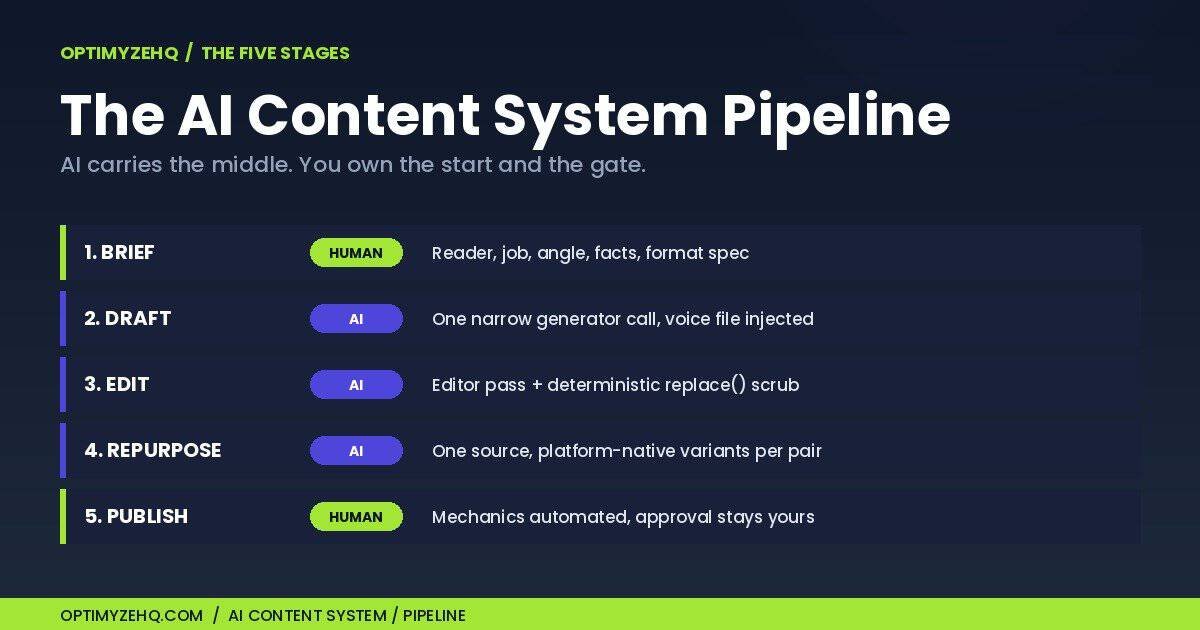
I’m not describing this from theory. The Creator Content Engine, a paid Make + Claude template I sell, runs this exact architecture, wired into Make, the no-code automation platform, with Claude doing the writing under the same voice rules every run. It’s the pipeline that turns each post on this blog into a week of platform-native social drafts. Everything below is the architecture itself, which you can build with a Make account, a Claude API key, and roughly an afternoon per stage. And if you’d rather import it than build it, that option exists too; I’ll point to it at the end.
Stage 1: The Brief (Where You Steer)
Every generic draft I’ve ever seen traces back to a thin brief. “Write a post about email marketing” gives the model nothing to work with except the average of everything ever written about email marketing, so that’s what you get back.
The brief is where your experience enters the system, and it’s the stage AI can’t do for you. A brief that produces a shippable draft answers five things in writing: who exactly this is for, the one job the piece does for them, your angle (the opinion or experience only you can supply), the facts that must appear (your numbers, your examples, your sources), and the format spec (length, structure, what the close should do). Ten minutes of brief saves an hour of rewriting, every single time.
Notice what this means: the system doesn’t remove your thinking. It concentrates it. You stop spending judgment on comma placement and spend it where it compounds, deciding what’s worth saying. If you have nothing to say about a topic, the system can’t fix that, and neither can a bigger model.
Stage 2: The Draft (One Narrow Job)
The draft stage is a single Claude call with a deliberately narrow mandate: one format, one audience, this brief, these voice rules. Narrow is what makes it good. You’re not asking the model to “write a great post.” You’re asking it to execute a spec.
Two inputs ride along with every draft call. The brief from stage 1, and your voice file, injected as the system prompt, which is the standing instruction a model reads before it sees your request. The voice file gets its own section below, but the wiring matters here: it’s attached to every call automatically, not pasted when you remember. That’s the difference between having voice guidelines and having a voice layer.
Expect the draft to come back 80% done. That’s not a failure state; it’s the design. The remaining 20% is what the next stages are for.
Stage 3: The Edit (Where the AI Sound Dies)
This is the stage almost everyone skips, and it’s the one that actually removes the AI sound. It has two layers that do different jobs.
Layer one: a second model call whose only job is to criticize the first. In the Creator Content Engine, the 10 Claude calls aren’t 10 drafts. They’re five generator-and-editor pairs. Every generator call is followed by an editor call that receives the draft, the brief, and the voice rules, with a mandate that’s the opposite of creative: enforce the banned-word list, cut hedging, kill the throat-clearing opener, check every claim against the brief, flag anything the source material doesn’t support.
Why does a second pass catch what the first one can’t? Because the jobs conflict. A model that’s mid-generation is committed to the sentences it’s producing; it can’t both write the paragraph and doubt the paragraph. A fresh call with a critic’s mandate has no such commitment. It reads the draft the way your most annoying editor friend would, and that’s a compliment. One mega-prompt asking the model to “write it well and check your work” gets you neither job done properly. Splitting them gets you both.
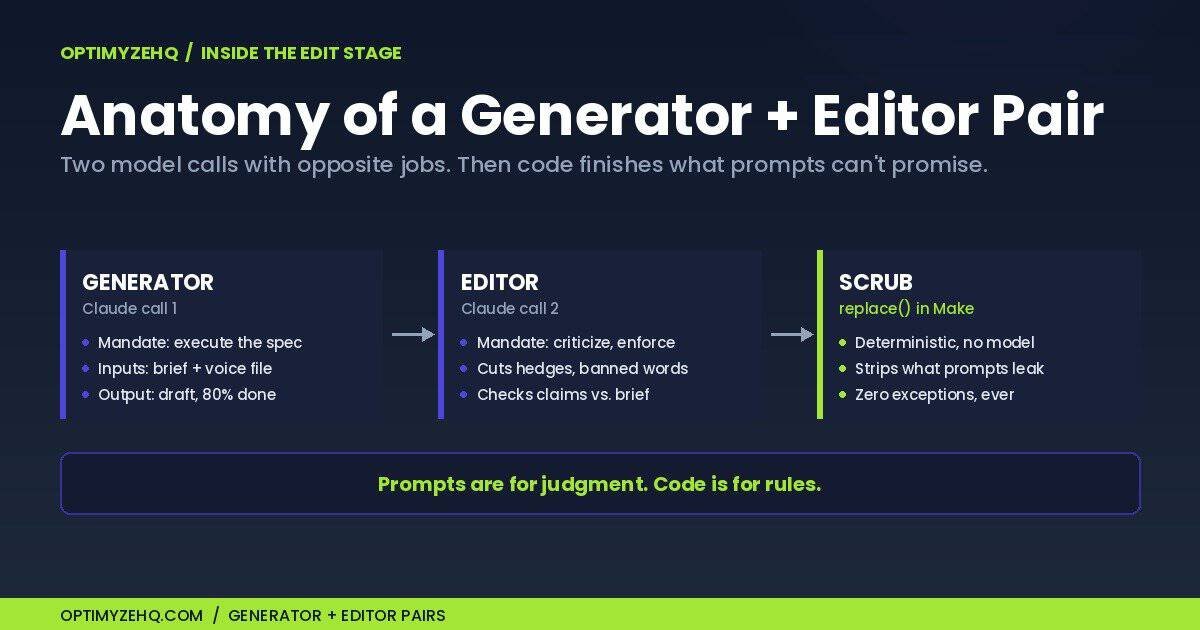
Layer two: deterministic cleanup, because prompts decay and string functions don’t. Remember cause 3: even a well-instructed model leaks an em-dash or a banned word into a long draft. So after the editor pass, my pipelines run a plain text-processing step in Make: nested replace() functions that strip em-dashes and swap them for periods or commas, no model involved. A string function doesn’t get tired at word 1,100. It applies the rule with zero exceptions, forever, for free. Anything in your voice file that can be expressed as a hard rule belongs in this layer, but only swaps that read correctly without context: characters, exact phrases, formatting. Judgment calls stay in the editor pass. Prompts are for judgment. Code is for rules.
Stage 4: Repurpose (One Idea, Five Formats)
Here’s where the economics of the system show up. The expensive part of content is the thinking: the brief, the angle, the facts. Once a pillar piece exists, the thinking is paid for, and turning it into a LinkedIn post, a thread, a newsletter section, and two short-form scripts is exactly the kind of constrained transformation models are reliable at.
Repurposing is not copy-paste cross-posting. Each output format gets its own generator-and-editor pair with platform-specific rules: hook conventions, length ceilings, link etiquette, what a close does on that platform. One source of truth, five native outputs. That’s why I built mine as five pairs rather than one big call: each platform’s pair carries its own spec, and the same voice file rides along with all of them.
I’ve broken the full method down separately in how to repurpose content with AI, and if newsletters are your main channel, the email version of this stage is covered in AI newsletter automation with Claude and Make. The Newsletter Engine, a paid Make + Claude template I sell, runs this same generator-editor pattern for email specifically.
Stage 5: Publish (Automate the Mechanics, Keep the Gate)
The last stage splits into two parts that should never be confused: the mechanics and the decision.
The mechanics deserve automation. Formatting for your CMS, setting the meta description, scheduling, image placement: these are checklists, and checklists are what automation is for. My posts go from approved draft to formatted WordPress draft without my hands touching the markup.
The decision is the part you keep. A human reads every word before anything ships under your name. Not skims. Reads. The gate exists for the 20% the pipeline can’t own: is the claim true, is the take actually yours, would you say this sentence out loud, does the piece earn its length? This is also where the policy risk lives. Google’s scaled content abuse rules target publishing volume without added value, and an unreviewed pipeline pointed at your own domain is precisely how you produce that. Auto-publish is for the mechanics, never for the approval. The day you stop reading what ships is the day the system starts writing for nobody.
One Idea Through the System
Here’s the whole pipeline on one idea, the shape of a typical run.
The idea: most creators automate the wrong half of their content.
The brief (ten minutes, human): reader is a freelancer already drafting with AI; the job is convincing them to automate editing and repurposing before generation; the angle is that generation was never the bottleneck; must include my own before-and-after hours; format is an 800-word post with a checklist close.
The draft (one generator call): a complete 800-word draft, on-structure, voice file applied. Two hedged claims, one generic opener, three em-dashes.
The edit (editor call, then the scrub): the editor rewrote the opener, cut both hedges, and flagged a stat the brief never supplied. The scrub caught the em-dashes the prompts missed.
The repurpose (five pairs): a LinkedIn post, an X thread, a newsletter section, two short scripts. Native formats, same voice file.
The gate (me, four minutes): verified the flagged stat, cut one joke that didn’t land, approved. Total hands-on time: under twenty minutes for six pieces of content that all sound like me.
The Voice Layer: Your Voice as a File, Not a Vibe
Everything above assumes a voice file exists. Here’s what’s actually in mine.
A voice file is a plain document that turns taste into rules a system can apply. Four sections do most of the work. Kept words: the vocabulary you actually use, the phrases readers associate with you. Banned words: the ones you never want shipped under your name (mine bans corporate filler and hype words; yours will differ, and that difference is the point). Cadence rules: sentence length variation, how you open, how you close, your punctuation habits. Sample passages: three to five excerpts of your best writing, because models match examples better than they follow descriptions.
The file lives in one canonical place (mine is a Notion doc) and gets injected into every generator and editor call. When your voice evolves, you edit one file and the entire pipeline shifts with it. Version it like the asset it is. Writing the prompts that put this file to work is its own craft, and I’ve collected the patterns that hold up in Claude prompts for automation. And if the blank page stalls you, the exact method for filling the file is published separately: the Voice DNA framework, 12 questions that turn how you talk into rules a model can follow.
What to Automate vs. What to Keep: The Decision Table
| Stage | What AI does | What stays human | What breaks if you flip it |
|---|---|---|---|
| Brief | Suggests angles, finds gaps | Picks the angle, supplies experience and facts | Generic drafts no edit can save |
| Draft | Writes 80% from brief + voice file | Nothing (this is the model’s stage) | You burn hours typing what a spec could produce |
| Edit | Editor pass + deterministic scrub | Spot-checks the editor’s judgment calls | AI sound survives; banned words leak through |
| Repurpose | Platform-native variants per format pair | Approves which platforms get what | Copy-paste cross-posting that flops natively |
| Publish | Formatting, meta, scheduling | Reads every word; final yes/no | Unreviewed volume: the slop scenario, with policy risk attached |
What to Build First
Don’t build five stages in a weekend. Build in this order, each step useful on its own. Items 1 and 2 are the complete minimum viable system; no automation required:
- The voice file. One afternoon for the first version, zero cost, no tools beyond a document; expect to tune it over your first few runs. This single artifact improves every AI interaction you already have, even with no automation behind it.
- A brief template in a Claude Project. Save the five brief questions plus your voice file as standing context. You now have stages 1 and 2 without touching an automation tool.
- One generator-and-editor pair, for one format. Your first Make scenario: two Claude calls and a
replace()scrub. Pick the platform you publish to most. - The repurposing chain. Add pairs per platform, feeding from one source document.
- The full pipeline. Wire publishing mechanics to your CMS, keep the approval gate manual. This complete build is what the Creator Content Engine is, if you’d rather import it than spend the build weekends.
What Does It Cost to Run?
Two separate bills, often confused. Your Claude subscription covers chat work (briefs, one-off drafts, the manual stages). Automated pipelines bill differently: per-token through the Claude API, which is its own line item. As of June 2026, the tiers most content pipelines run on are Haiku 4.5 ($1 input / $5 output per million tokens) and Sonnet 4.6 ($3 / $15); current pricing for the full lineup is at claude.com/pricing. In practice, a complete five-format repurposing run through ten model calls lands well under a dollar, and on Haiku, closer to a dime. Add your Make plan (pricing covered in the Make guide linked earlier) and the marginal cost of each finished content batch is pocket change. The constraint was never the bill. It’s the architecture.
Common Mistakes (I Made Most of These)
Automating before the voice file exists. You’ll scale the generic sound instead of removing it. The file comes first, always.
One mega-prompt doing four jobs. If your prompt says “write and make sure it sounds human and check the facts,” you’ve asked for three jobs and will receive zero done well. Split generator from editor.
Publishing unreviewed output. This is how you drift into the scaled, value-free publishing Google’s spam policies name. Reader trust goes first.
Writing for detectors. Synonym-swapping tools make text weirder, not more yours. The reader is the only detector that matters.
Building everything at once. A half-built five-stage pipeline produces nothing. A finished voice file plus one pair produces shippable content this week. Sequence beats ambition.
What an AI Content System Isn’t
It isn’t a volume machine; volume without a point of view is the problem, not the prize. It isn’t a substitute for having something to say; the brief stage runs on your experience or it runs on fumes. And it isn’t zero-touch; the two human gates are load-bearing. It’s also not the only system a solo business needs. Content is one workflow among several, and the full stack is mapped in AI workflows for solopreneurs: the complete guide.
If You’d Rather Import This Than Build It
Everything in this guide can be built from scratch with the build order above. If you’d rather start from the finished version, the Creator Content Engine is this exact pipeline as a ready-to-use Make template: all five generator-and-editor pairs, the scrub layer, and the voice file structure, at $67 founding pricing as of June 2026 ($97 after). Either path ends at the same architecture.
FAQ
What is an AI content system?
A repeatable pipeline that turns ideas into published content in five stages: brief, draft, edit, repurpose, publish. AI handles the middle stages under written voice rules; a human owns the brief and the final approval.
Does Google penalize AI-generated content?
No. Google’s published guidance evaluates content quality regardless of how it was produced. What its spam policies target is using automation primarily to manipulate rankings, including publishing many pages that add no value for users.
How do I make AI content sound like me?
Three mechanisms: a voice file (kept words, banned words, cadence rules, sample passages) injected into every call; a separate editor pass that enforces it; and deterministic text cleanup for hard rules. Prompt tweaks alone won’t hold.
What tools do I need to build an AI content system?
Claude for the writing, Make for the automation, and a home for your documents such as Notion. No coding; the scrub layer is built-in string functions.
How much does an AI content system cost to run?
After setup, marginal costs are per-run API tokens (well under a dollar for a full multi-format batch as of June 2026) plus an automation plan. The dated pricing block above has specifics.
Can AI write all my content?
It can draft most of it. It can’t supply your experience at the brief stage or your judgment at the approval gate, and a system that removes those two gates produces content with nobody home.
Start With the File, Not the Pipeline
One action this week, fifteen minutes to start: open a blank document and add four headings. Kept Words. Banned Words. Cadence Rules. Sample Passages. Put five to ten entries under each, paste in three passages of your best writing, and you have a working voice file. Every AI draft you generate afterward gets measurably closer to you.
If you want the head start, the free Creator’s AI Starter Kit includes my voice-file structure and the prompts that pair with it.
The other half of the business: clients. The Cluster D pillar, Client Management for Freelancers, maps the five-stage system that runs intake, invoicing, and testimonials.
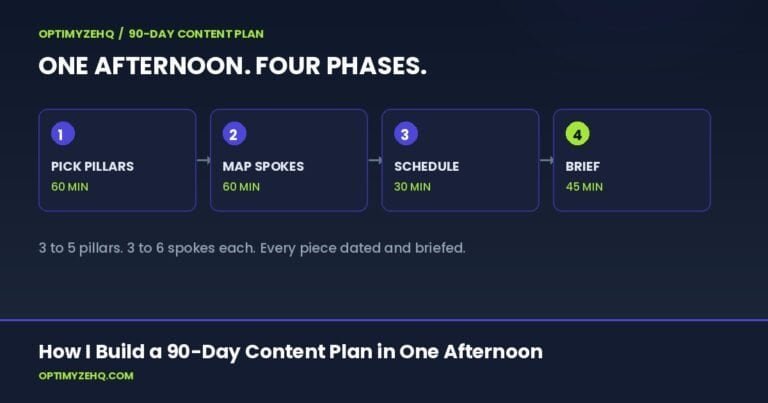
Plan the quarter first: How I build a 90-day content plan in one afternoon is the four-phase planning method that decides what enters this content system, before any drafting begins.
Repurposing is its own job. For the step-by-step on turning one post into a week of platform content, see how to repurpose a blog post into social media.