
Make.com + Claude: The Complete AI Workflow Guide for Solo Creators (2026)
On November 6, 2025, Make.com quietly opened its custom AI provider connections to every paid plan, including the Core tier at $10.59 a month. Before that date, bringing your own Anthropic API key required the Pro plan at $18.82 a month. The change reshaped the math for solo creators. You can now run scheduled AI pipelines on Make for the price of a streaming subscription.
Pair that with Anthropic Skills (launched October 16, 2025) and Claude Sonnet 4.6 (released February 17, 2026), and a complete Make.com Claude workflow costs under $25 a month all-in. That is the article you are reading: a complete Make.com Claude workflow guide covering everything Make and Claude can do together, the patterns that work in production, and the cost-control rules most guides skip.
A parallel piece of context matters here. On May 13, 2026, Anthropic launched Claude for Small Business with 15 ready-to-run workflows, 15 reusable skills, and eight connectors: QuickBooks, PayPal, HubSpot, Canva, Docusign, Google Workspace, Microsoft 365, and Slack. If your whole stack lives inside that list, Claude for Small Business is the easier path. You also get a Notion connector in the broader Claude Connectors Directory if you want Claude to read and write Notion pages interactively from the desktop app.
What Claude for Small Business does not do is run scheduled cross-platform pipelines for you. If you use Notion, Airtable, Webflow, ConvertKit, Beehiiv, or anything that is not on Anthropic’s connector list, and you want a scenario that fires every morning and produces five social posts from yesterday’s blog, you need Make. That is the lane this guide covers.
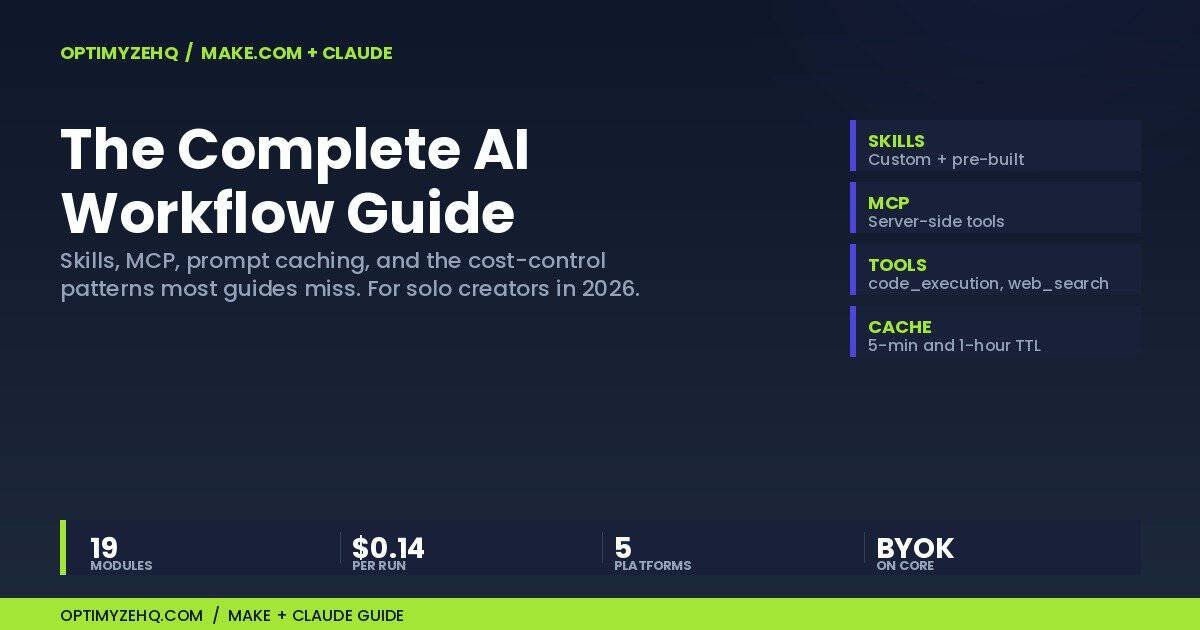
The 19-module Creator Content Engine that ships from OptimyzeHQ runs on the exact stack described below. Time from “I marked the post ready” to “five drafts in Notion”: 56 seconds, measured on a live 19-operation run rather than estimated. Cost per pillar run is roughly $0.14 in Sonnet 4.6 API spend, derived from the published rates and the workload rather than read off an invoice.
Why Make.com over Zapier or n8n for AI work
The short case, for readers who have already weighed alternatives: Make wins on credit math, on the visual canvas, and on AI module depth. The longer comparison lives in our Make.com vs n8n vs Zapier breakdown, which goes deep on the cost models. Here is the compressed version specific to AI work.
Zapier prices by “tasks,” and AI calls count as multi-task chains in many configurations. For a five-platform content-repurposing workflow that fires Claude once per platform, Zapier’s task math compounds. A workflow that costs you $10 a month on Make Core can land in the $30 to $50 range on a Zapier plan with the right tier.
n8n is the strongest competitor on raw flexibility. It is open-source, self-hostable, and the AI nodes are excellent. The trade-off is that you own the hosting, the upgrades, and the debugging. For a solo creator without ops capacity, Make’s hosted model removes a full category of work.
Where Make stands out for AI specifically:
- The native Anthropic Claude module exposes the Messages API directly. You set the system prompt, the user message, the model, temperature, max tokens, and tools. No HTTP module gymnastics required.
- Make’s Anthropic app added Skill CRUD modules after Anthropic’s October 2025 Skills launch. You can create, list, get, and version Skills from inside a scenario.
- Structured outputs went generally available January 29, 2026. Make’s module accepts the JSON schema directly, which kills the brittle “parse this LLM text response with regex” failure mode.
- The visual canvas matters more than it sounds. When a Claude module fails at 2 a.m., scrolling through a flowchart with a red dot is faster than reading n8n logs.
The combination of credit pricing, BYOK on Core, and a deep Anthropic module is what makes Make the right platform for a solo creator running scheduled AI pipelines in 2026.
Claude module fundamentals for your Make.com Claude workflow
The Make module you want is Create a new prompt under Anthropic Claude. It calls the Messages API. The fields you fill in:
Connection. Use a custom connection with your own Anthropic API key. This is the BYOK path. With BYOK on a paid plan, every Anthropic module call costs Make one credit and Anthropic bills you separately for tokens.
Model. Default to claude-sonnet-4-6 for production. $3 input and $15 output per million tokens (the Claude API pricing calculator will price these against your own volume), fast, and accurate enough for everything except deep reasoning tasks. Use claude-haiku-4-5 for classification, routing, and high-volume short tasks at $1 input and $5 output. Use claude-opus-4-7 only when reasoning depth is the bottleneck. Opus 4.7 ships a new tokenizer that produces approximately 30% more tokens than Opus 4.6 for the same text, which is Anthropic’s own figure. An OpenRouter analysis of over a million requests found the raw token inflation running 32 to 45%, but the real billed increase only 12 to 27%, because prompt caching absorbs part of the difference. Treat Opus 4.7 as the exception, not the default.
System prompt. Put voice rules, style rules, and persistent context here. If your scenario fires more than a handful of times within the same hour, this is the field you cache. We come back to caching in section six.
User message. The variable content for this run. In a content-repurposing scenario, this is the source blog post pulled from Notion. In a lead-enrichment scenario, this is the lead record.
Temperature. Default 1.0 is fine for most creative work. For deterministic outputs where you want the same input to produce the same output, drop to 0.2 or 0.3. We have a production note on temperature 1.0 in the anti-patterns section. One model-generation warning (June 2026): Opus 4.7 and later, including Opus 4.8 and Fable 5, reject a non-default temperature with a 400 error. On those models, leave the field empty. The tuning advice here applies to the Sonnet and Haiku tiers.
Max tokens. Cap based on your downstream storage destination, not based on the model’s maximum. If you write the output to a Notion rich-text block, the storage limit is 2,000 characters per block, which works out to roughly 500 to 700 tokens. Set max_tokens around 800 to leave headroom. Notion’s truncation cuts mid-word with no warning.
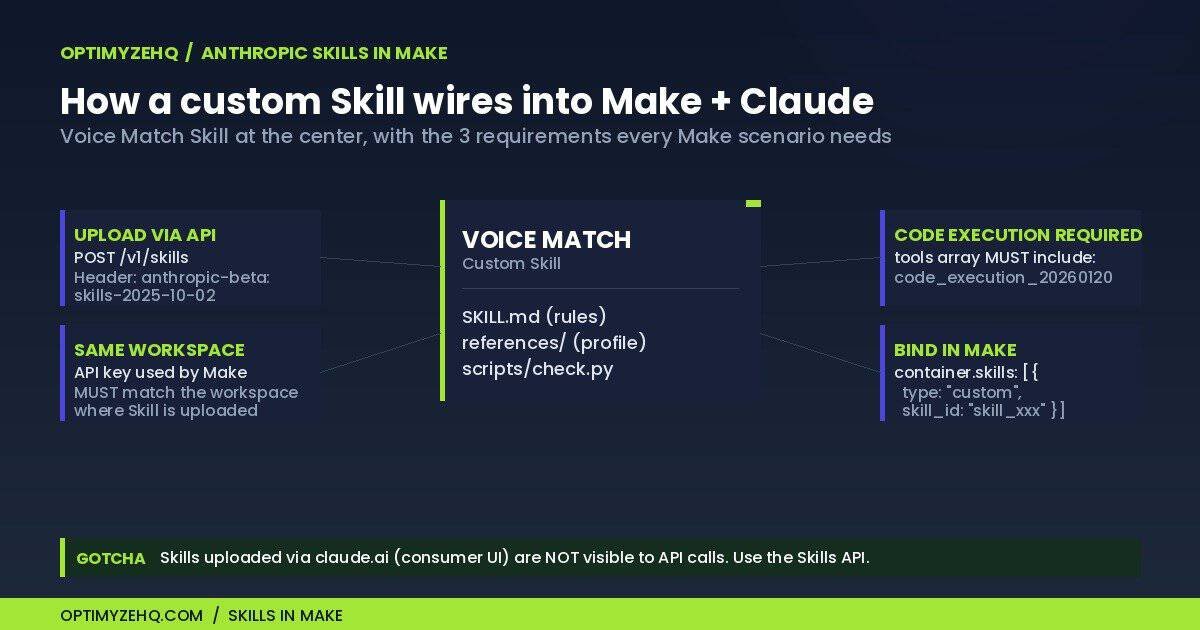
Tools. If you reference a custom Skill via container.skills, you must include code_execution_20260120 in the tools array. Skills require the Code Execution tool. Without it, you get a 400 error.
Two common failures worth flagging:
- 429 rate limit. Anthropic enforces limits over windows shorter than a minute, so bursty workflows can trip a 429 even when the per-minute average looks comfortable, and new organizations start with limits below the published figures while the account builds history. Solution: throttle with Make’s Sleep module between iterator items, and ramp new workloads up gradually rather than launching at full volume. Usage tiers rise automatically with usage history rather than by purchase.
- 401 unauthorized when using the HTTP module. Skip the HTTP module entirely. Use the native Anthropic Claude module. The Bearer-token formatting that HTTP modules default to does not match what Anthropic’s API expects.
On voice work specifically: a system prompt is where you encode the brand voice. If you are matching a specific human writing voice rather than a generic professional tone, you need more than rules in a system prompt. Voice DNA pulled from real samples, plus a Skill that enforces banned-word checks, is the pattern that produces drafts you would actually publish. Our Voice DNA guide covers that approach end-to-end.
The capability stack: Skills, MCP, tools, and structured outputs
This is where most Make + Claude guides stop short. The four capabilities below are what take a scenario from “AI writes a thing” to “AI writes the thing the way you would write it.”
4a. Skills inside Make scenarios
Anthropic Skills launched October 16, 2025. A Skill is a folder containing a SKILL.md file (required) plus optional scripts/, references/, and assets/ subfolders. The SKILL.md teaches Claude what the Skill does, when to use it, and the rules to follow. Skills are reusable across scenarios and across Claude surfaces.
Make’s Anthropic app added Skill CRUD modules sometime after the launch. You can createSkill, getSkill, listSkills, and createSkillVersion from inside a scenario.
The single most important practical detail in this whole article: custom Skills do not sync across surfaces. A Skill uploaded via the claude.ai consumer UI (Settings > Features) is not accessible from API calls. For Make scenarios using a BYOK API key, custom Skills must be uploaded via POST /v1/skills with the beta header anthropic-beta: skills-2025-10-02, against the same workspace whose key Make is using. Get this wrong and Make sees no Skills, with no clear error message.
Two more requirements:
- Skills require the Code Execution tool. Every
createAMessagecall that references a custom Skill must includecode_execution_20260120in the tools array. No exceptions. - Stacking. Up to 8 Skills per request via
container.skills. Anthropic ships pre-built Skills for docx, xlsx, pptx, and pdf, referenced by skill_id in the same array.
Here is a working voice-matching SKILL.md, embedded verbatim. Copy it, adjust the references to point at your own voice profile, and upload it via the Skills API. The bundled voice-match.zip (SKILL.md + reference templates + the banned-word scanner) ships free with the OptimyzeHQ Starter Kit so you can skip the file-building step.
---
name: voice-match
description: Match a specific human writing voice when drafting or editing
  prose. Use whenever a request asks Claude to write in someone's voice, sound
  like a brand, draft on-voice content (blog posts, emails, social posts,
  CTAs), or rewrite AI-flavored text into human-sounding copy. Reads the
  user's voice profile, banned words list, and examples from references/.
  Optionally runs scripts/check.py to scan output for banned terms before
  returning. Do not invoke for raw technical writing, code generation,
  translation, or summarization unless the user explicitly asks for on-voice
  output. Skill defers to the user's voice profile when it conflicts with
  general writing best practices.
---

# Voice Match Skill

A reusable skill for producing on-voice content. The user's voice profile
overrides general writing advice in any conflict.

## When to use this skill

Invoke when the request is to:

- Draft blog posts, emails, sales copy, social posts, or CTAs in voice
- Edit AI-flavored output into human-sounding copy
- Review copy and flag voice drift

## Workflow

1. Read references/voice-profile.md. Note brand name, audience, em-dash cap,
   tone, signature phrases, and what never to say.
2. Read references/banned-words.md. Hold this list throughout drafting.
3. Read references/examples.md. Anchor on the three worked examples.
4. Draft the requested content.
5. Self-check: pass the draft through scripts/check.py before returning.
6. If output contains banned words outside quoted meta-references, rewrite.
7. If em-dash count exceeds the profile cap, rewrite using period, colon,
   comma, or parentheses in that priority order.

## Voice rules (non-negotiable)

1. Respect the em-dash cap. Default: 5 per 4,000 words. Target: 0.
2. No banned words outside quoted meta-references.
3. No hype openers ("in today's fast-paced world", "imagine if").
4. No "we believe / we think / in our opinion" hedging.
5. Specific numbers over abstract claims.
6. Lead with the outcome. Context after.
7. Short paragraphs. 2 to 4 sentences for web.
8. Read it out loud. If it sounds stiff, rewrite.
9. Use contractions. Write like you talk.
10. One idea per sentence when possible.
11. CTA buttons: action verb plus specific outcome.
12. Numbers use "$" prefix.

## Notes for Claude

1. Always read all three reference files before drafting.
2. The voice profile overrides general writing advice in conflicts.
3. If asked for content outside scope, say so before producing.
4. If you cannot match the voice with the info given, ask one clarifying
   question rather than guess.
5. Treat banned words as a hard rule. Rewrite, do not justify.
The folder layout that goes inside the zip:
voice-match/
├── SKILL.md
├── references/
│   ├── voice-profile.md
│   ├── banned-words.md
│   └── examples.md
└── scripts/
    └── check.py
Wiring instructions: zip the folder with voice-match/ as the top-level directory (the Skills API rejects flat archives), upload via POST /v1/skills with the beta header, then reference the returned skill_id in Make’s Anthropic module via container.skills. Add code_execution_20260120 to the tools array. The scenario will load the Skill before each Claude call.
4b. MCP Toolset and server-side tools
Two directions matter here. The well-documented direction is Make as a connector inside Claude itself. Anthropic ships Make as a built-in connector, and Make’s MCP server lets Claude (running in Claude Desktop or Cowork) operate your Make scenarios directly. Useful for ad-hoc work, not for scheduled pipelines.
The less-documented direction is the reverse. Make’s Anthropic module input schema exposes an mcp_servers field, which lets Claude reach out to remote MCP servers during a scenario run. The pattern is present in the module schema but lightly documented in Make’s changelog. Test it on a non-production scenario before relying on it for billing-critical workflows.
Server-side tools available in the tools array, confirmed working in production for most accounts:
web_search: $10 per 1,000 searches on top of token costsweb_fetch: pulls content from a URL into the model’s contextcode_execution: required for Skills; also runs general Python sandboxed code
Computer use and some newer tools may be limited inside Make’s createAMessage call. Test before you build a workflow on top of them.
4c. Structured outputs
Structured outputs went generally available January 29, 2026. The output_format parameter moved to output_config.format at GA. Make’s module exposes this as outputFormat: json_schema and accepts the schema directly. This replaces the brittle pattern of asking Claude to “return JSON in this format” and then parsing the text response with regex downstream. Use it.
4d. Putting the stack together
A production scenario that ships drafts in your voice looks like this: Claude module configured for Sonnet 4.6, system prompt with your voice rules, container.skills referencing your voice-match Skill, tools array including code_execution_20260120, output_config.format enforcing JSON schema for the platform output. That is the pattern. The CCE production scenario described in section eight is one implementation of it.
Architecture patterns for AI workflows
Five patterns cover almost every scenario a solo creator builds:
Single-shot prompt. One Claude call, one output. Use for summarization, classification, or content generation where the input is bounded and the output is single-platform. The basic entry pattern.
Sequential chain. Two or more Claude calls running in series, with each call’s output feeding the next. Common pattern: first call generates a draft, second call edits it, third call enforces voice. Sequential chains share cache hits within the 5-minute TTL window, which makes them cheaper than parallel calls when the system prompt is large.
Fan-out via router. A Make Router splits the flow into N parallel branches, each calling Claude with platform-specific context. Use for content repurposing: one branch per platform (LinkedIn, X, Threads, Bluesky, email). Lower wall-clock latency than sequential, higher cost because each branch pays the cache-write multiplier separately on the first run.
Generator-editor-writer. A two-step pattern derived from agent-loop best practices. First call (generator) produces a rough draft. Second call (editor) reviews against voice rules and rewrites. We use a variant of this in CCE because temperature-1 outputs at the contaminated-input edge case sometimes leak AI-tells past prompt-only voice enforcement. The editor pass catches what the writer missed.
Agent loop with tool use. A single Claude call with tools enabled, where Claude decides which tools to use and when. Use for tasks where the path is not predictable in advance: research workflows, multi-step lookups, anything that needs Claude to plan. Anthropic’s Skill examples (Sentry, Atlassian, the official cookbook) are good references.
A practical default for solo-creator content workflows: fan-out via router for repurposing, sequential chain for editing passes, single-shot for everything else. Reach for the agent loop only when the simpler patterns visibly fail.
Cost math, honestly
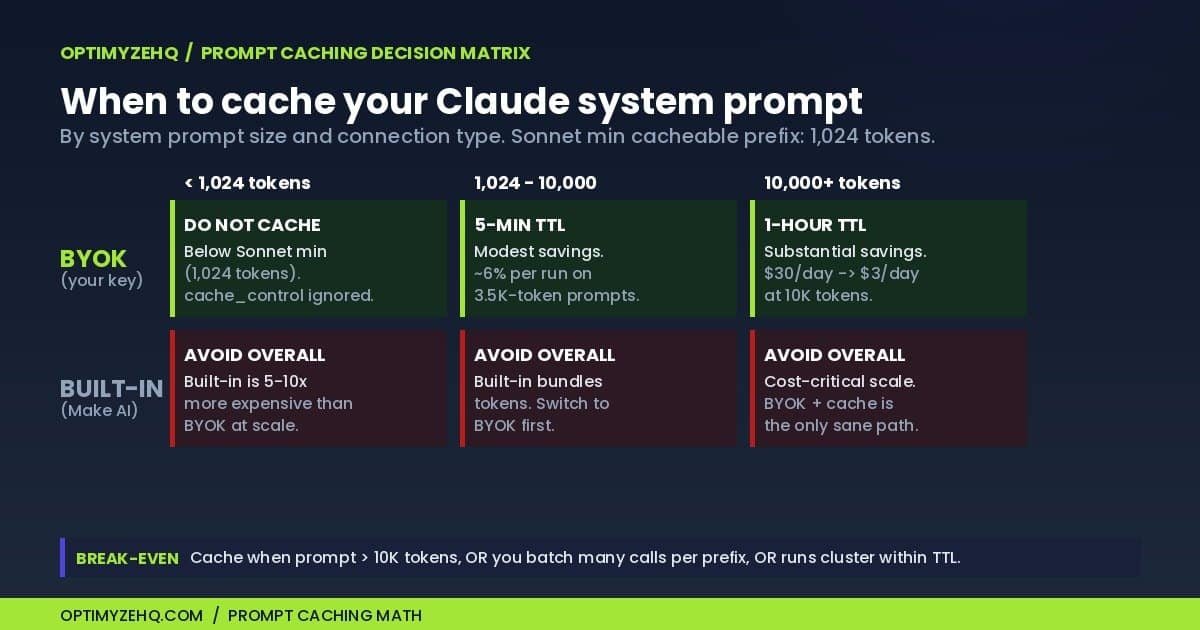
The pricing math everyone gets wrong runs in two directions. Most guides over-promise prompt caching savings. A few guides under-sell BYOK by quoting only token cost without the Make credit cost. Here is the honest version.
Base model pricing per million tokens, May 2026:
- Claude Haiku 4.5: $1 input, $5 output
- Claude Sonnet 4.6: $3 input, $15 output
- Claude Opus 4.7: $5 input, $25 output (plus 12 to 27% in real billed cost from the newer tokenizer, measured after caching)
Prompt caching pricing:
- 5-minute cache write: 1.25× base input
- 1-hour cache write: 2.0× base input
- Cache read: 0.1× base input (90% off)
Minimum cacheable prefix, re-checked 2026-08-08: 1,024 tokens for Sonnet 4.6, Sonnet 5, and Opus 4.8. 4,096 tokens for Haiku 4.5, alongside Opus 4.5 and 4.6. 512 tokens for Opus 5, Fable 5, and Mythos 5. The minimum is per model, and Haiku 4.5 carries the highest bar of any current model despite being the cheapest. Under the minimum, cache_control is ignored and no error is returned.
The break-even rule. Anthropic puts it at one cache read for the 5-minute duration, or two reads for the 1-hour duration. We measured it on real calls: five identical calls on Haiku 4.5 cost $0.043550 uncached and $0.014824 cached, a 66% saving, with the cold write running 24.7% more expensive than doing nothing at all. Caching rewards bursts rather than schedules, and an hourly scenario misses the 5-minute window on every run. One caution for Make specifically: the native Anthropic Claude module cannot set cache_control at all, because its System Prompt field is a single text box. The full measured breakdown, including that Make limitation and the silent failure below the token minimum, is in what Claude prompt caching actually saves.
Real per-run cost for a 5-platform content repurposing scenario (Sonnet 4.6, no caching):
- Input: 3,500-token system prompt + 5,000-token pillar = 8,500 tokens × $3/M = $0.0255
- Output: 5 × 1,500 tokens = 7,500 tokens × $15/M = $0.1125
- Per run: ~$0.138
Lead enrichment math (Sonnet 4.6, 50 leads/day):
- Daily: 50 × (700 tokens × $3/M + 300 tokens × $15/M) = $0.33
- Monthly: ~$10
- Same on Haiku 4.5: ~$3.30/month
The “60-min to 5-min default TTL” reduction that circulated in early 2026 is Claude Code session-default specific, not Messages API. The Messages API has defaulted to 5-min TTL since launch. Phrase this precisely when you read other guides.
The 8 anti-patterns to avoid
These are the eight mistakes that cost solo creators the most money or break the most scenarios. Listed in priority order.
1. Using Make’s built-in AI provider instead of BYOK. The built-in provider bundles credits and tokens. For high-token workflows, BYOK with your own Anthropic key is 5 to 10 times cheaper per run. With BYOK unlocked on Core since November 2025, there is no reason to default to the built-in provider for production.
2. Polling triggers instead of webhooks. A 1-minute polling trigger burns 43,200 credits per month while idle. The Core plan only includes 10,000 credits per month. Use webhooks wherever the source app supports them.
3. Iterator + Claude module without an upstream filter. A 1,000-row iterator feeding one Claude module = 1,000 Claude calls + 1,000 credits. Filter immediately after the iterator, or batch upstream of Make. Hookdeck reports 80% credit savings on this fix alone.
4. Calling createACompletion instead of createAMessage (the Messages API). Completions is the legacy endpoint. Messages is the documented current standard. New builds should never use Completions.
5. Parsing JSON from text responses instead of using structured outputs. Structured outputs went GA on January 29, 2026. The Make Anthropic module accepts JSON schemas directly. The pattern of asking Claude to “return JSON” in a prompt and then regex-extracting downstream is brittle and broken at scale.
6. Temperature 1.0 at the contaminated-input edge case. This is a practitioner observation from building the Creator Content Engine. When your input contains residual em-dashes, banned words, or AI-flavored phrasing, temperature 1.0 outputs sometimes leak those patterns through prompt-based voice rules. The fix is deterministic post-processing in a second Claude call configured as an editor. The lesson generalizes: hard output constraints belong in code, not in prompts. The Voice DNA guide covers the editor-layer pattern.
7. max_tokens set to the model maximum with a downstream storage cap. We hit this in CCE when Notion truncated AI-generated drafts at the 2,000-character text-block limit. Sonnet’s max output is 128,000 tokens, but Notion stores a fraction of that. Cap max_tokens upstream based on your storage destination. For Notion rich-text, around 700 tokens is safe.
8. Default 5-minute cache TTL for sporadic scenarios. If a scenario fires every few hours, every run is a cache miss. The 1-hour TTL only earns its 2.0× write multiplier when runs cluster within the hour. Honest assessment of your run pattern before adding cache headers.
A production example: the Creator Content Engine
The 19-module Make scenario at the heart of OptimyzeHQ’s Creator Content Engine implements every pattern in this guide. Quick anatomy:
- Trigger: Notion “Watch Database Items” on a Pillar Inputs database, fires when Status changes to “Ready to Repurpose”
- Model: Claude Sonnet 4.6 across all generation modules
- Capability stack: No external Skills in v1 (voice rules live in system prompts), structured outputs disabled in favor of separator-based parsing for downstream Notion rich-text writes, code_execution available but not invoked
- Architecture: Sequential chain of 5 generator-editor-writer pairs (one pair per platform: LinkedIn, X thread, Threads, Bluesky, email)
- Output: 5 platform drafts written to a Notion Drafts database, linked back to the source pillar, with status flipped to “Repurposed”
- Cost per run: ~$0.138 in Anthropic tokens + 19 Make credits (about $0.02 at Core pricing)
- Time: 56 seconds end-to-end, measured 11 August 2026
- Failure modes mitigated: All 8 anti-patterns from the previous section, including the temperature-1 leak and the Notion 2,000-character truncation
The single biggest production lesson from building CCE: prompt-only voice enforcement at temperature 1 is not enough against contaminated input. The editor layer (second Claude call with anti-AI rubric and Voice DNA reference) catches what the writer misses. That is the production-tested version of the generator-editor-writer pattern.
For readers building their own variant: the CCE v1 architecture is migratable to a Skills-based v2. Replace the per-platform editor prompts with a single voice-match Skill, reference it via container.skills on every generator call, and let the Skill enforce voice without the second editor pass. The trade-off: one more API call per platform vs. tighter voice enforcement and reusable assets across multiple scenarios. We are evaluating both paths internally, and the right answer depends on your input quality and your tolerance for cost-per-run.
Where to go next
Three reader paths from here.
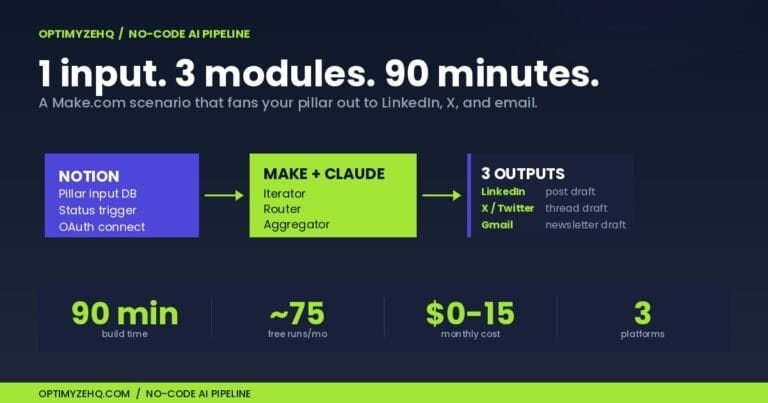
Build your own version. Our no-code AI content pipeline tutorial walks through a simpler 5-module Make scenario you can build in an afternoon. Good starting point if CCE feels like too big a leap.
Apply the patterns to a different domain. Our content repurposing with AI guide covers the use cases beyond cross-platform posting (newsletters, video scripts, course modules) where the same Make + Claude stack applies.
Skip the build entirely. The Creator Content Engine is the prebuilt 19-module production scenario described above, with Voice DNA, the Notion workspace, and the setup guide bundled. Founding pricing through the first 50 buyers, then it goes to regular price.
Or grab the Free Starter Kit. The voice-match Skill folder described in section four ships with it, ready to upload to your Anthropic workspace. The bundle also includes the Voice DNA reference prompts and a basic Make scenario template.
A closing positioning note that mirrors where this article opened. On May 13, 2026, Anthropic launched Claude for Small Business with workflows and connectors for QuickBooks, PayPal, HubSpot, Canva, Docusign, Google Workspace, Microsoft 365, and Slack. If your full stack lives inside that list, the bundled workflows are the easier path. If your stack uses Notion, Airtable, Webflow, ConvertKit, Beehiiv, or anything outside the list, and you want scheduled multi-platform automation rather than interactive AI work, Make plus BYOK Claude is the right answer. This guide covered the second path.
Questions on any of this: info@optimyzehq.com. Reach out and tell us what you are building.
Related on OptimyzeHQ: the prompting system behind every automation I sell, the Make vs Zapier vs Claude Cowork comparison, a hands-on look at what Claude Cowork actually does, and the Creator Content Engine built on these workflows.
The bigger picture: this Make and Claude build is the connective tissue of my whole operation. See the full system in AI workflows for solopreneurs.
New to Make? If you have not built a scenario before, start with my Make.com for beginners guide, then come back here to add Claude.
Choosing the right Claude surface: The API is one of five ways to put Claude to work. The Claude AI for solopreneurs pillar maps when automation beats chat, Projects, and Cowork.
Go further: When a workflow needs judgment instead of fixed steps, see how to set up an inbox-triage AI agent that reads each email and drafts a reply for you to approve.