

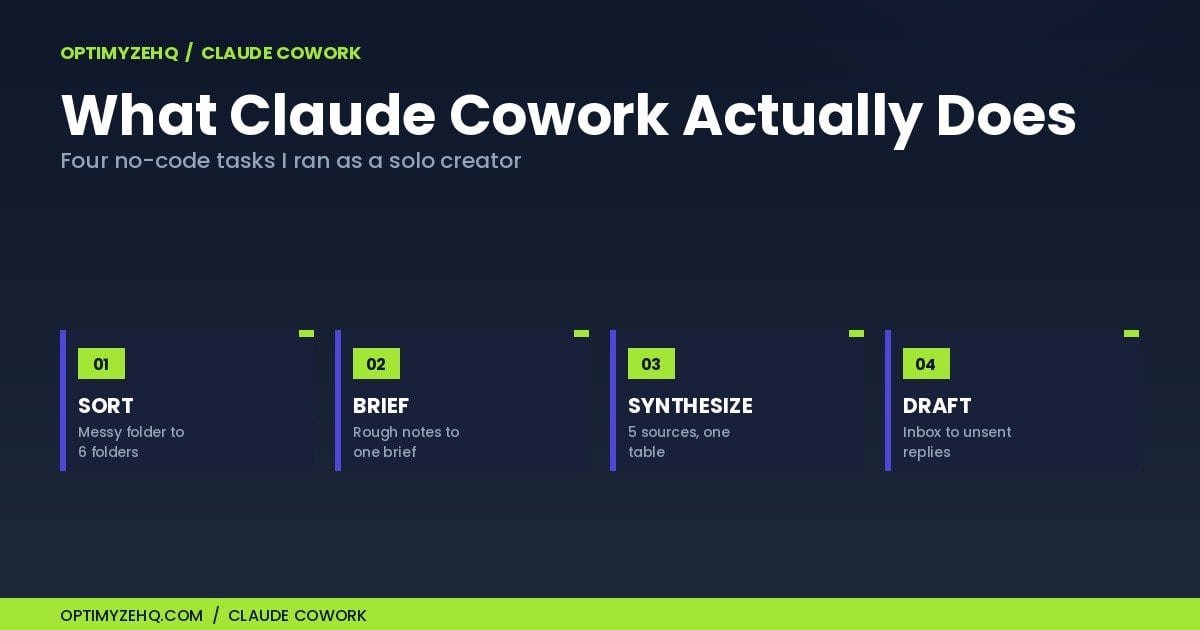
What Claude Cowork Actually Does: 4 No-Code Tasks I Ran as a Solo Creator
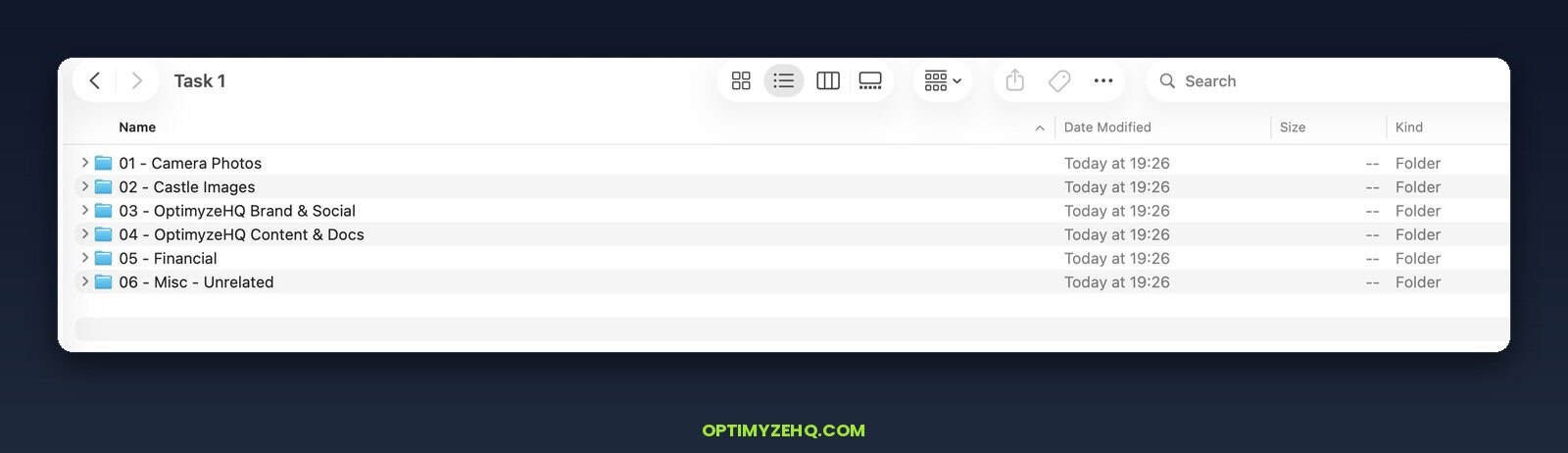
I pointed Claude Cowork at a folder of 32 loose files and asked it to sort them. A minute or two later, all 32 sat inside 6 named folders, with nothing left loose at the top. It had renamed a 38 MB PDF with a long garbled filename to something I could actually read, grouped my financial files together, and flagged 4 items in a Misc folder it guessed I could delete.
The line that stuck with me wasn’t the sorting. It was this: nothing was deleted, everything moved cleanly, and the files it wasn’t sure about it left exactly where they were, because I’d asked it to organize the folder, not throw anything away. Then it offered to look inside two of the files to confirm what they were before I deleted anything, and recommended that as the next step. I watched the whole thing happen.
In the comparison post, I called Cowork the desktop “do-it-for-me” tool and moved on. This post is the part I skipped: what it actually does once you open it, across four real tasks I ran, with honest notes on where it works and where it doesn’t. Think of it as Claude Cowork for solo creators, judged on real work, not a feature tour.
What Claude Cowork is, in one paragraph
Claude Cowork is a desktop agent that lives in the Claude app on Mac and Windows. You point it at a folder, give it an outcome instead of a prompt, and it plans and runs the multi-step work against your real files while you watch. When it needs to run code, it does that inside an isolated Linux virtual machine, separate from your actual operating system. It went generally available on April 9, 2026, and it’s bundled into every paid Claude plan, starting with Pro at $20 a month, with no separate Cowork fee. You can read Anthropic’s own product page for the full pitch.
The difference from regular Claude chat is the verb. Chat answers. Cowork does. But here’s the part that carries over from the prompts post: the instruction you write still decides the result. A vague ask produces vague work, even when the tool can act on its own. The brief is still the job.
Here are four tasks I ran. Each one took a few minutes to set up. Each one produced something I’d actually use.
Task 1: Turn a messy folder into a sorted set
This is the run from the opening. One folder, 32 mixed files: camera shots, castle photos, brand and social graphics, two spreadsheets, an old WAV, a stray Python script, and a 38 MB PDF with a long garbled filename. I asked Cowork to sort it. It ran 3 commands, wrote itself a cleanup plan and a folder map, and moved everything into 6 folders. It ran on Claude Opus 4.8, the model I had selected.
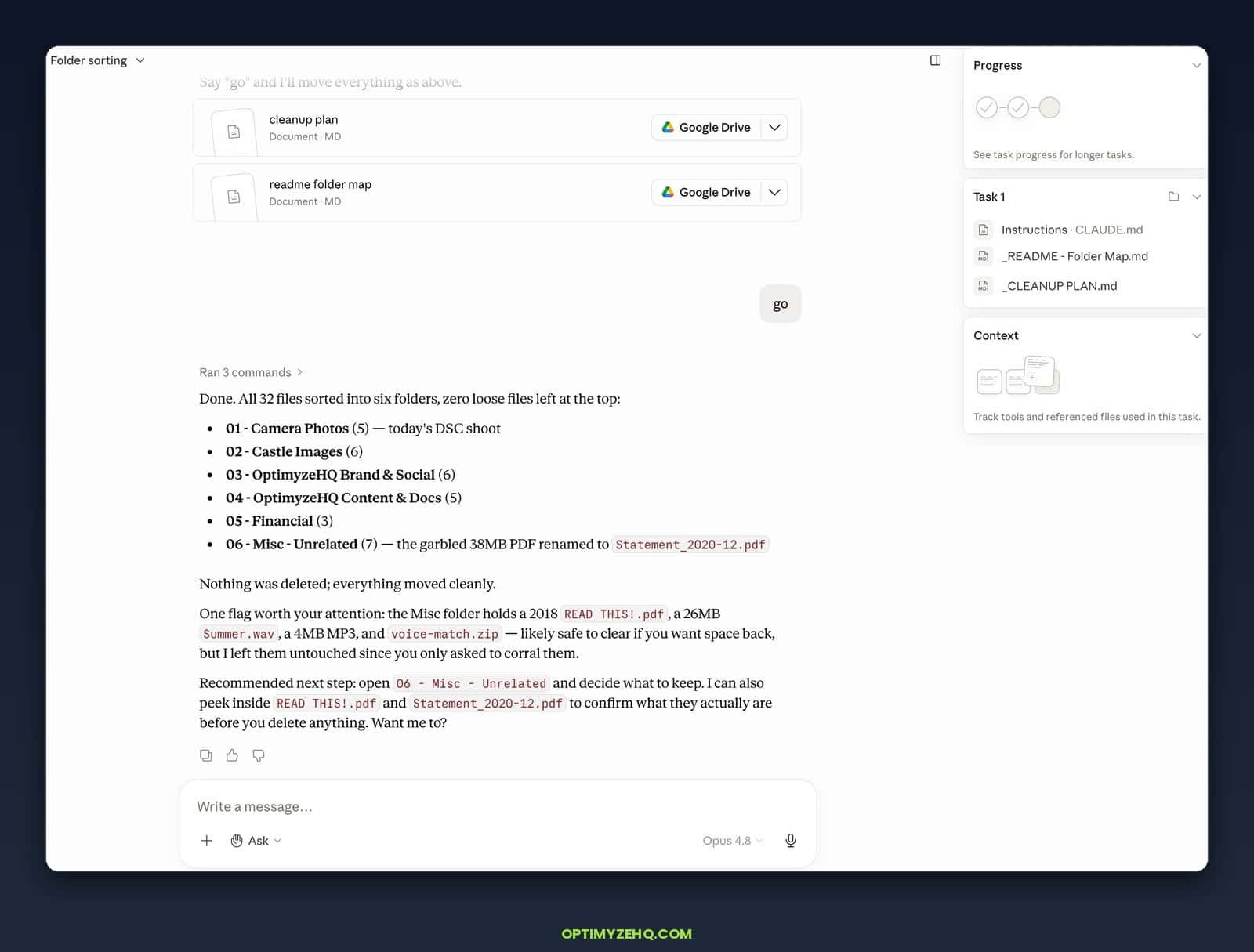
Two things stood out. First, it renamed the garbled 38 MB PDF to Statement_2020-12.pdf on its own, after reading enough of the file to work out what it was. Second, and this is the part that matters, it flagged the 4 files it thought I could clear but didn’t touch them, and it said so plainly: nothing deleted, everything moved cleanly. I asked it to sort. It sorted, used judgment about what was safe to move, and stopped short of the one action I hadn’t authorized.
That restraint cuts both ways, and it earns one serious caution. Because Cowork acts on your real files, a vague instruction can do real damage. One widely shared report described it deleting about 11 GB of files when a user asked it to clean up a folder without being specific. Back up any folder before you grant access to it, and keep the ask-before-acting confirmation on for anything that deletes or overwrites. The same capability that sorted 32 files in a minute will follow a careless instruction just as fast. The restraint shows up again in Task 4, from a different angle.
Task 2: Turn scattered notes into a content brief
Most creators I know have a folder of half-finished thoughts. Voice-memo transcripts, a few bullet lists, a draft that stalled. I pointed Cowork at one of those folders and asked for a single structured content brief: a working title, the angle, an outline, and the key points worth keeping.
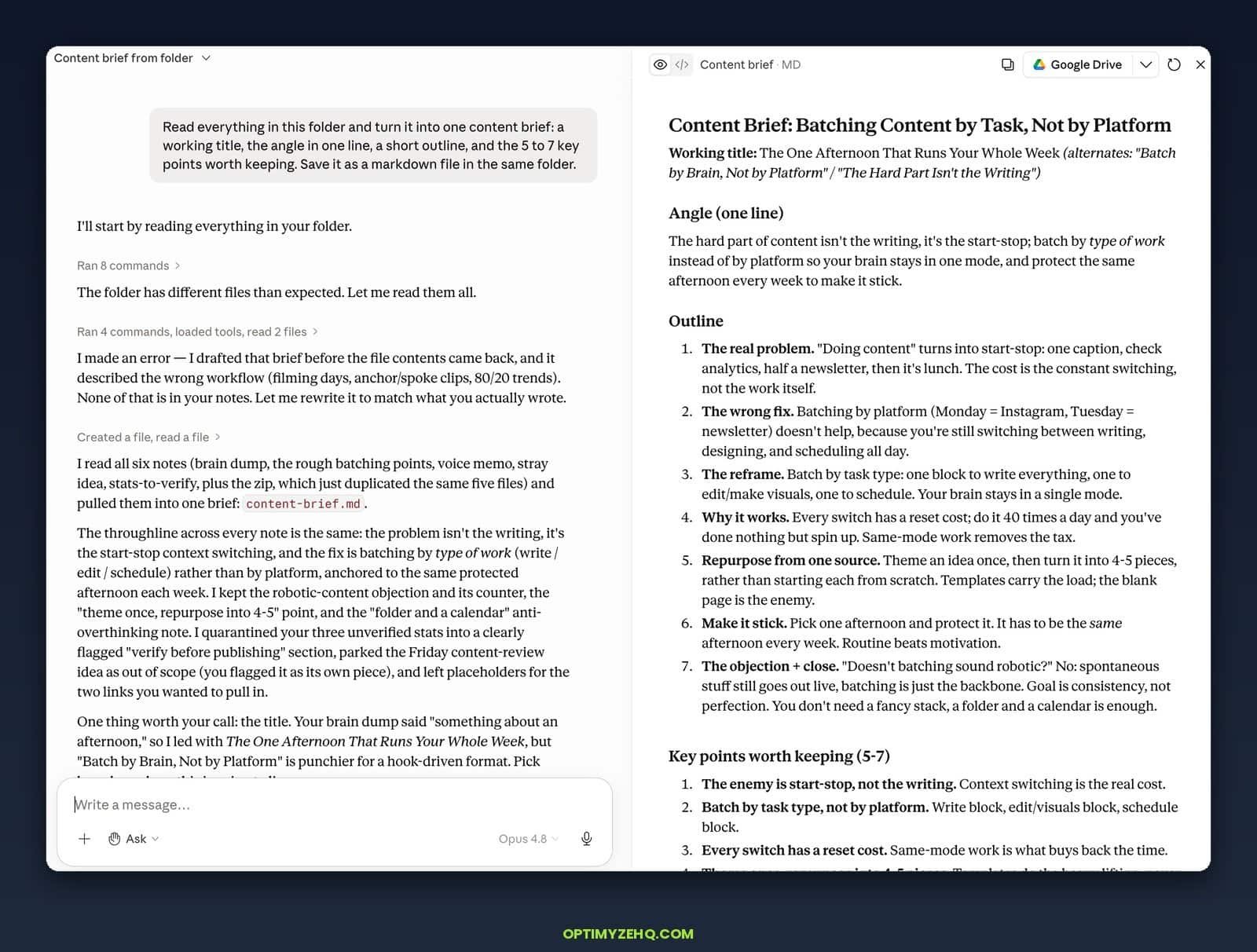
This run took about 4 minutes, and it earned my trust because of a mistake it made halfway through, not in spite of it. Cowork drafted a first version of the brief before the file contents had finished loading, and that draft described a workflow that was nowhere in my notes: filming days, anchor and spoke clips, 80/20 trends. Then it caught itself. It said, in plain words, that it had made an error by drafting before reading, and it rewrote the brief to match what I’d actually written. The finished version is the one that held up: a working title with two alternates, a one-line angle, a seven-point outline, and a key-points list. It pulled my three unverified stats into a separate “verify before publishing” section instead of stating them as fact, and it left the Friday content-review idea out of the outline because I’d flagged it as a separate piece. The lesson isn’t that it never errs. It’s that it erred in the open, caught it, and fixed it while I watched. That last part is the whole case for keeping your eyes on the screen.
This is the strength the marketing pages undersell. Cowork is good at reading across several messy source files and producing one clean thing. If that sounds like the manual version of a content system, it is. The Creator Content Engine productizes exactly this move for repurposing, so the same source turns into platform-ready drafts on a schedule instead of one brief at a time.
Task 3: Synthesize research from several sources
I gave Cowork a reading list of five articles on a topic in my niche and asked it to read them and produce one synthesis: where the sources agree, where they disagree, and a sources table so I could check its work.
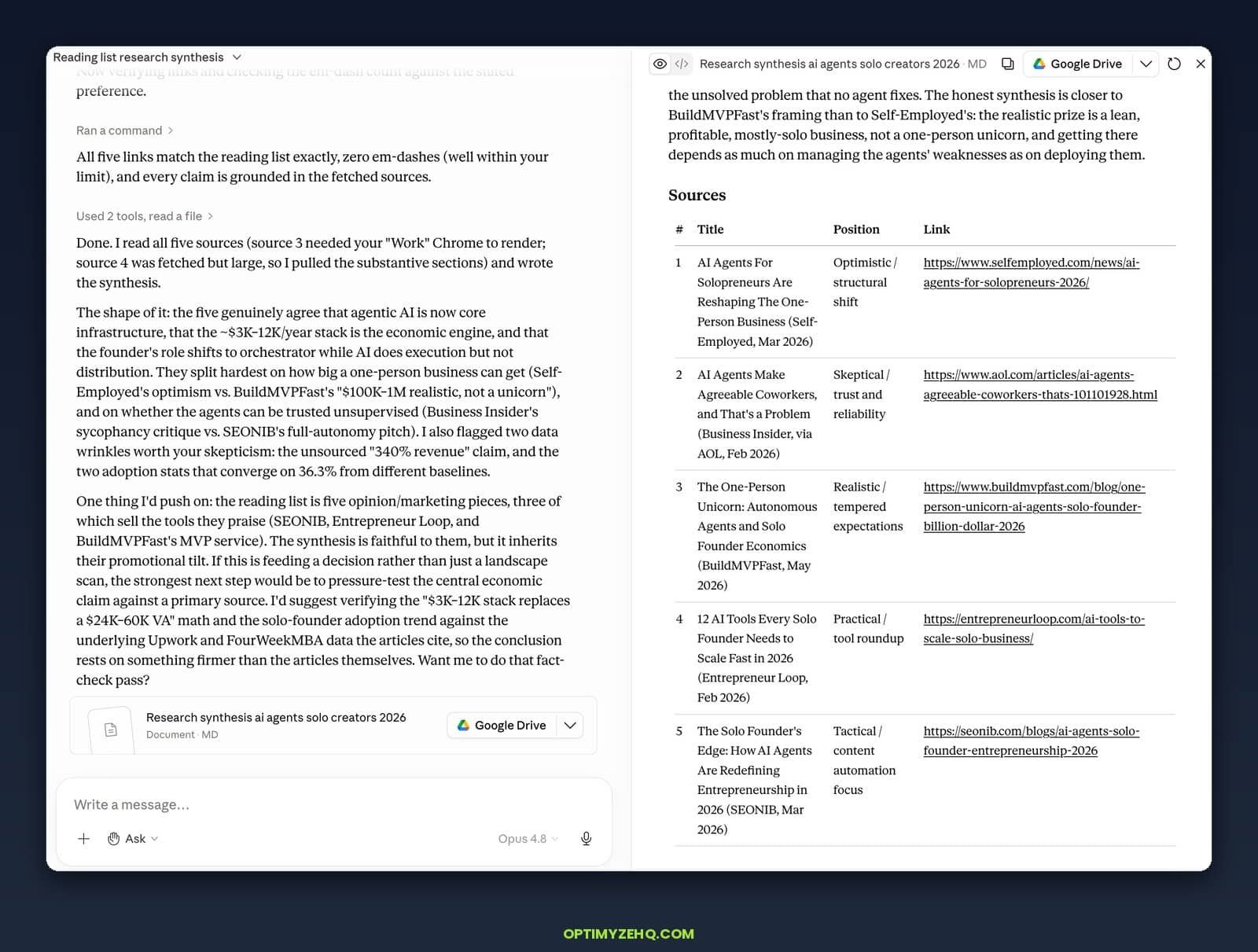
This run took about 5 minutes, and it’s the clearest proof of the gap between synthesis and a glorified summary. Cowork read all five sources, including one that needed a specific browser profile to render and one large enough that it pulled only the substantive sections, then built a sources table that tagged each piece by position: optimistic, skeptical, realistic, practical, tactical. It didn’t flatten them into agreement. It named where they line up (agents are now core infrastructure, the roughly $3,000 to $12,000 a year stack is the economic engine) and where they split hardest (how big a one-person business realistically gets, and whether the agents can be trusted unsupervised). Then it did the part I didn’t ask for and valued most. It warned me that three of the five sources sell the tools they praise, that the synthesis inherited their promotional tilt, and that two of the statistics looked shaky. It offered to pressure-test the economic claim against the primary data the articles cite. A research assistant telling you not to trust its own inputs too far is exactly what you want and rarely get.
The sources table matters more than the summary. A synthesis you can’t audit is a liability. When you ask Cowork to show its sources, you can spot the place where it stretched a claim, which is the same discipline you’d apply to any research output. For research that needs to run continuously in the cloud rather than on demand on your desk, the Make plus Claude guide covers the always-on version of this.
Task 4: Read my inbox and draft the replies
The first three tasks all worked on files sitting on my disk. This one reaches into an app. I connected Gmail and asked Cowork to read my recent messages and draft replies to the ones that needed them.
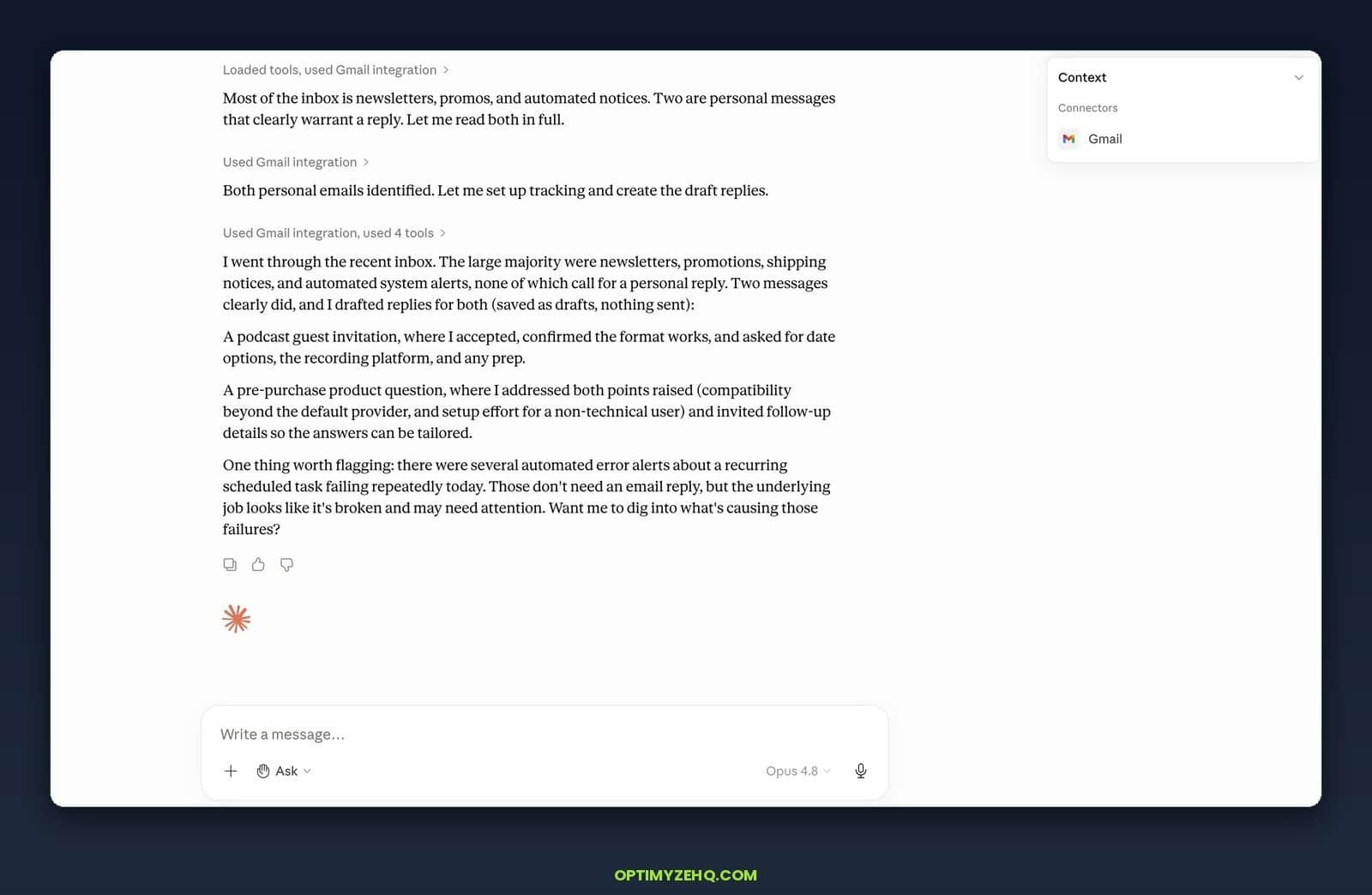
This run took a few minutes. I connected Gmail and asked Cowork to read my recent messages and reply to the ones that needed it. It went through the inbox, decided only two messages warranted a personal reply, and set the rest aside as newsletters, promotions, shipping notices, and automated alerts. It drafted both, one accepting a podcast invitation and one answering a pre-purchase product question, saved them as drafts, and confirmed it had sent nothing. On the product reply it didn’t over-commit: it answered the two points raised and asked for follow-up details so the answer could be tailored, rather than inventing specifics it couldn’t verify. And without being asked, it flagged that a scheduled task had been failing repeatedly that day, a problem with no email attached that I would have scrolled straight past. The drafts waited for me to read and decide.
That default is the right one for a solo operator. It’s the same restraint from Task 1 wearing a different hat: there it refused to delete what I hadn’t told it to delete, here it refuses to send what I haven’t told it to send. It’s the difference between an assistant who writes the reply and one who fires it off in your name before you’ve read it.
What Cowork isn’t
Every honest tool review needs this section, so here it is.
Cowork is desktop-bound. There’s no Linux client, and the work runs on your machine. It needs your computer awake and the Claude app open. Its scheduled tasks run locally, not in the cloud, so if your laptop is asleep, nothing runs. That single fact is the cleanest line between Cowork and a server-hosted automation platform.
It’s non-deterministic. It reasons about fuzzy input rather than executing fixed logic, so the same instruction can produce slightly different work on different runs. For creative and document tasks that’s fine. For a billing workflow that must behave identically every time, it isn’t.
It shares Claude’s usage limits. Cowork draws from the same 5-hour rolling window and weekly caps as Claude chat and Claude Code, and agentic tasks burn that quota faster than chatting does. On the Pro plan, heavy Cowork use can hit a wall inside a single afternoon. Anthropic doubled the 5-hour limits on May 6, 2026, which helps, but the ceiling is still real.
A few smaller honesty notes. Anthropic doesn’t publish which model Cowork runs by default, so I select Opus 4.8 myself rather than assume. The connector list is narrower than the marketing implies. Google Drive, Gmail, Slack, Notion, and GitHub are covered, but several popular project tools have no official connector yet. And there’s a documented “ghost rate limit” bug where Cowork reports a rate limit with low usage showing. Logging out and back in clears most cases.
If you want the full three-way picture of where Cowork sits next to cloud automation, the comparison post covers it, and the older Make vs n8n vs Zapier breakdown covers the pre-agentic landscape that Cowork changed.
What it costs and which plan to start on
Cowork is included in Claude Pro at $20 a month, so the cheapest way to test it is the plan you might already have. If you hit the 5-hour wall during real work more than once in a while, Max 5x at $100 a month is the next step. Max 20x at $200 a month makes sense only if you hand work to Cowork throughout the day.
On models, the current public lineup as of late May 2026 is Claude Opus 4.8 as the flagship at $5 per million input tokens and $25 per million output, with Sonnet 4.6 at $3 and $15 and Haiku 4.5 at $1 and $5 below it. Those API prices matter if you also build automations that call Claude directly, which is a different setup from Cowork’s bundled access. Model names rotate every couple of months, so treat that lineup as current rather than permanent.
When to reach for Cowork, and when to build a Make scenario
Here’s the decision rule I use.
Reach for Cowork when the work is reasoning-heavy, document-centric, one-off or occasional, and you’re at your desk anyway. Sorting a folder, drafting from notes, synthesizing research, cleaning up files. You give it the outcome and watch it work.
Build a Make scenario when the work is high-volume, needs to run unattended, has to behave the same way every time, and can’t depend on your laptop being awake. Publishing content on a schedule, routing form submissions, syncing data between apps. That’s what the Creator Content Engine and the Newsletter Engine are built on: always-on cloud workflows, not a desktop agent you supervise.
They’re not rivals. They’re different shifts. Cowork handles the thinking-heavy work while you’re present. Make handles the repetitive work while you’re asleep.
Claude Cowork for solo creators: where to go next
If you want a head start on the kind of work Cowork is good at, grab the free AI starter kit below. It includes the prompts and templates I use to brief these tasks, which is where most of the quality actually comes from.
A full build: the same solo-operator approach, applied to automating my client back office with Airtable, Make, and Claude.
The bigger picture: Cowork is one tool in a five-part setup. See how it all connects in AI workflows for solopreneurs.
Where Cowork fits: Cowork is one of Claude’s five surfaces. The Claude AI for solopreneurs pillar maps all five and the jobs they fit.
And if you landed here first, the rest of the series fills in the picture: the prompts and briefs that drive any AI tool, and the full comparison of Make, Zapier, and Cowork for deciding which one a given job belongs to.
Really appreciate the realistic take on this, Gilles. The distinction you made between Cowork’s restraint (like leaving files untouched or saving drafts instead of sending them) versus blind automation is spot on. For solo builds, having that guardrail is actually more valuable than 100% autonomy, especially when handling client or financial data. Definitely makes me rethink where to draw the line between a local agent and a cloud-based Make scenario.
The solo-creator angle is useful because Claude Cowork can feel like a subscription product, while the underlying value still depends on task size and repeated context. For heavier workflows, I like estimating Claude token usage and cache behavior before deciding whether to keep a task inside chat, Cowork, or direct API automation.
Good read. I appreciated the focus on real usage rather than hype. For small online tools, speed, clarity, and doing one job well are often more valuable than a long feature list.