
Invoice Reminder Email Template: 3 Scripts (Polite to Firm) That Get You Paid
You delivered the work. The client approved it. You sent the invoice. And then nothing. Days pass, the due date slides by, and you are left drafting a message you rewrite five times because you do not want to sound desperate or rude.
Here is the reframe that fixes most of this: chasing payment is not a nerve problem, it is a system problem. You do not need to be braver. You need a repeatable invoice reminder email template for each stage, sent on a fixed schedule, so you never stare at a blank message again. This post gives you three of them, polite to firm to final, plus the timing that makes them work.
Why your invoice gets ignored (and why it is rarely personal)
Late payment is normal, not a sign you did something wrong. A Bonsai analysis of three years of invoicing data from more than 100,000 freelancers found that 29% of freelance invoices are paid at least a day late. Treat that as a directional figure rather than a precise benchmark, since these numbers move with country and industry, but the pattern is steady across every report.
The more useful half of that same data: over 75% of late invoices are paid within 14 days of the due date, and 90% within a month. Read those two numbers together and the practical lesson is encouraging: most late invoices resolve quickly and without a fight. The usual culprits are administrative. The invoice slid down an inbox, the approver was traveling, or it got stuck behind a finance department’s payment run. A late invoice rarely means the client is refusing to pay.
That is good news, because administrative delays respond to a nudge. Inconsistent follow-up is what makes them expensive: chase late, or feel too awkward to chase at all, and a solvable two-week delay quietly becomes two months of missing rent. A calm, scheduled reminder is usually the entire fix.
The timing that does the work
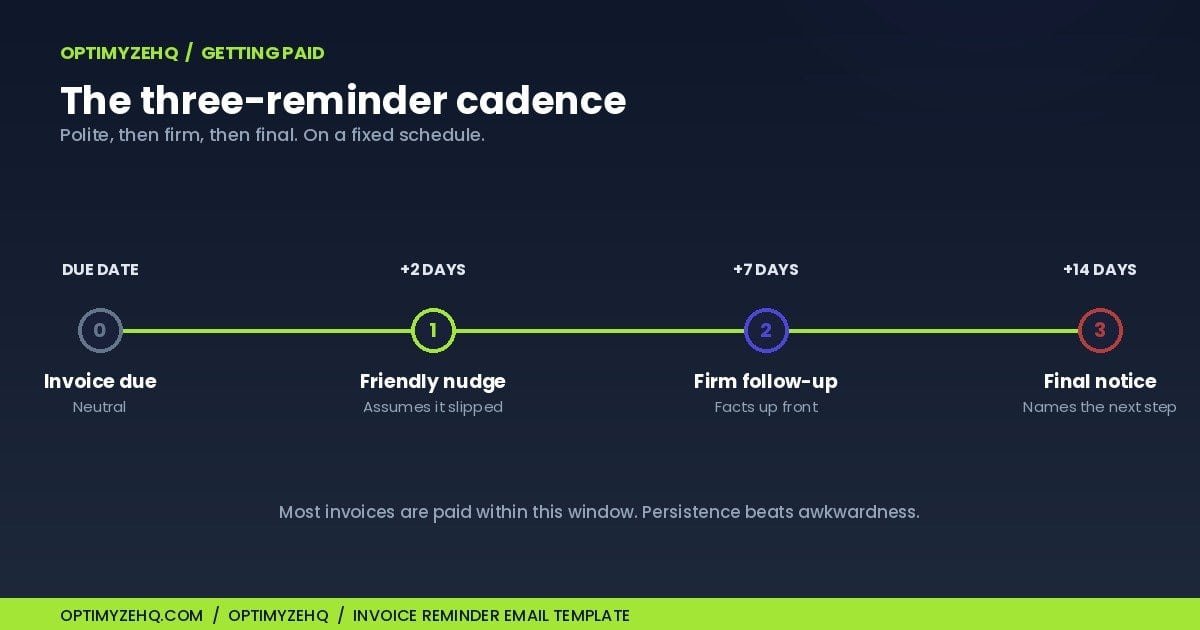
Half of a good reminder is when you send it. Waiting three weeks to say something quietly teaches a client that your due dates are suggestions. A fixed cadence does the opposite. Here is the schedule I use, counting from the invoice due date:
| When | Message | Tone |
|---|---|---|
| Due date | Payment due (no action needed if paid) | Neutral |
| +2 days | Reminder 1 | Friendly nudge |
| +7 days | Reminder 2 | Firm, facts up front |
| +14 days | Reminder 3 | Final notice, names the next step |
Three reminders across two weeks is enough for the vast majority of invoices, because most land inside that 14-day window anyway. If you are still unpaid after the final notice, you are no longer in reminder territory. You are into late fees, paused work, or formal collection, which I cover near the end.
Optional: prevent the late payment before it happens. For larger invoices, new clients, or companies with a formal accounts-payable process, send a brief transactional note 3 to 5 business days before the due date: invoice number, amount, due date, payment link, nothing else. It is not a chase, so it needs no script, and it quietly removes the most common excuse before it exists.
The 3 invoice reminder email templates
Copy these, swap the brackets for real details, and keep them ready. One rule before you send any of them: delete the words “just” and “sorry.” “Just following up” and “sorry to bother you” signal that you feel guilty for asking to be paid for work you already did. You are not bothering anyone. You are collecting a debt the client agreed to.
Template 1: the friendly nudge (day +2)
Assumes the invoice slipped. Warm, short, no pressure. For routine oversights, this may be the only reminder you need.
Subject: Invoice [#1024] for [Project]: friendly reminder

Hi [Name],

Hope [the project] is serving you well. A quick flag that invoice [#1024] for [$amount] was due on [date] and is showing as unpaid on my end. These things slip through busy weeks, so no worries at all.

I've attached it again here: [link]. If payment is already in motion, ignore this. If you need anything from me to get it processed, tell me and I'll turn it around today.

Thanks,
[You]
Template 2: the firm follow-up (day +7)
The nudge did not land. Now you lead with the facts (number, amount, days overdue) and ask for a specific commitment. Still professional, no longer soft.
Subject: Overdue: Invoice [#1024], [$amount], due [date]

Hi [Name],

Following up on invoice [#1024] for [$amount], now [X] days past its due date of [date]. I haven't seen payment arrive and want to make sure it isn't stuck somewhere on your side.

Could you confirm today when I can expect payment, or point me to whoever handles accounts so I can send it directly? Invoice attached again: [link].

Appreciate you helping me close this out.
[You]
Template 3: the final notice (day +14)
Two weeks overdue and silent. This message stays polite but names a deadline and a consequence, and it leans on terms you set in the contract. Never name a fee or a work pause you are not prepared to follow through on. That is why the prevention step below matters so much.
Subject: Final notice: Invoice [#1024], [$amount], [X] days overdue

Hi [Name],

This is my final reminder on invoice [#1024] for [$amount], now [X] days past due. I value working with you and would like to resolve this without further steps.

Please arrange payment by [specific date, e.g. 5 business days out]. If I don't receive it or hear from you by then, I'll pause any active work and apply the late fee set out in our agreement.

Our signed terms and the invoice are attached. I'd much rather settle this directly, so if there's a problem on your end I can help with, please reach out.
[You]
Before you send any reminder, check these 5 things
A reminder that is wrong does more damage than an invoice that is late. Thirty seconds on this list prevents the embarrassing ones:
- The invoice actually went out, to the right contact, with any PO number or vendor details the client’s system requires.
- The due date on the invoice matches the one in your head.
- Payment has not already arrived through another channel.
- The amount and invoice number in your reminder match the invoice exactly.
- Any consequence you plan to name, a late fee or a work pause, is actually in your signed terms.
How to make them sound like you, not a template
An invoice reminder email template that reads like a form letter is easy to ignore. A reminder in your own voice, referencing the actual project, gets treated like a message from a person. This is where AI earns its place. Paste one of these templates into Claude with the client’s name, the project, and your usual tone, and ask it to rewrite the reminder so it sounds like you. To keep every draft consistent, reuse a saved brand-voice profile instead of describing your style from scratch each time.
If you want a starting point, this is the whole prompt:
Rewrite this invoice reminder in my voice. Keep it under 120 words, firm but warm, and do not use the words "just" or "sorry."

My voice: [paste your brand-voice profile, or three sentences on how you write]
Context: [client name, project, invoice number, amount, days overdue]
Template: [paste the tier you need]
The workflow is draft, then approve. Claude gets you to 90% in seconds; you read it once, adjust a line, and send. You are never editing a blank screen, and you are never sending something robotic. That approval step is the whole point: a payment reminder should always go out in words you signed off on, whether you approve each draft by hand or approve the template once and let a system handle the sending.
The best chase is the one you prevent
Every template above is damage control. The real win is making late payment rare, and that happens before the invoice goes out. Four habits do most of the work:
- Put payment terms in writing up front. A clear due date, a deposit, and a stated late fee belong in your proposal and your statement of work, not in a tense email later. Terms the client agreed to are what give your final notice teeth.
- Take a deposit. 30% to 50% before you start filters out the clients most likely to vanish, and it means a late final invoice never puts you fully in the hole.
- Invoice the moment you deliver. The longer you wait, the less fresh the work is in the client’s mind, and the easier it is to question. Same-day invoicing is the cheapest speed-up there is.
- Make paying frictionless. A one-click payment link, the invoice number and amount in the subject, and the right accounts-payable contact remove the excuses that let an invoice sit.
When to put the chase on autopilot
The templates and the calendar are the do-it-by-hand version, and for a handful of invoices a month, that is genuinely all you need. Set three calendar reminders, keep the scripts handy, and work them. Even simpler: the day you send the invoice, queue all three reminders with Gmail or Outlook’s schedule-send, then cancel whichever ones payment makes unnecessary.
It stops scaling when you are juggling a dozen open invoices at once, because now you are the one who has to remember which client is at day 2 and which is at day 14. That is where automation earns its keep. The same three-tier chase can run on rails: every invoice tracked with a due date, a daily check that flags which ones are overdue, and the right reminder tier sent automatically, escalating in firmness, stopping the instant an invoice is marked paid. That is exactly what the Client Pipeline Engine does. It is the automated version of this post: you approve the templates and terms once, and the system does the chasing without you touching it. It spaces reminders on an interval you set rather than this exact day-2/7/14 calendar, but the ladder is the same. If you would rather see how the pieces fit before buying, my full client-management system lays out the logic and my automated client back office shows the build.
If you are not there yet, the three templates above will handle almost everything a solo practice throws at you. One exception applies whichever way you run the chase: if the client disputes the work, the scope, or the invoice itself, stop the reminder sequence and resolve the disagreement directly. A reminder ladder is not a substitute for a conversation.
A quick note on your rights
When the final-notice deadline passes with no payment and no reply, stop sending variations of the same email. Document everything: the invoice, the signed terms, proof of delivery and approval, and your reminder history. Then work the path your agreement gives you, in rough order: pause active work, apply the late fee, send a formal demand letter, and only then weigh small claims or collections.
If a client crosses from “forgot” into “will not pay,” you have more standing than you might think, and it is growing. Recent laws such as California’s Freelance Worker Protection Act (in effect January 2025) and New York’s Freelance Isn’t Free Act require written contracts and on-time payment for qualifying freelance work, with real penalties for clients who ignore them. In the US, a late fee of around 1.5% per month is a common term to include in your contract, though the permitted rate and how enforceable it is vary by state and contract type. This is general information, not legal advice, so check the rules where you and your client operate, especially across borders, before you rely on any of it.
FAQ
How do you politely ask for an overdue invoice?
Lead with the assumption that it slipped, not that the client is dodging you. Keep the first reminder short and warm, restate the invoice number, amount, and due date, attach the invoice again, and offer to help if anything is blocking payment. Drop the words “just” and “sorry,” which make a reasonable request sound like an apology.
When should you send the first invoice reminder?
Around two days after the due date. Waiting a week or more quietly signals that your deadlines are flexible. A prompt, friendly nudge catches the large share of invoices that are late purely by oversight, and it sets the tone that you track your payments.
How many times should you follow up on an unpaid invoice?
Three reminders across about two weeks handles most cases: a friendly nudge at day two, a firm follow-up at day seven, and a final notice at day fourteen. Past that point you are no longer reminding, you are escalating to late fees, paused work, or formal collection.
What do you do when a client refuses to pay?
Move from reminders to your contract. Send the final notice with a firm deadline and the consequence you agreed to, apply any late fee in your terms, and pause active work. If it stays unpaid, options include a formal demand letter, small-claims court, or the freelancer-protection laws now on the books in several places. This is general information, not legal advice.
Should invoice reminders be automated?
The drafting and personalization should stay human-approved, because a payment message is sensitive. The tracking and scheduling are perfect for automation: a system that watches due dates and sends the right tier on time removes the mental load of remembering who is at which stage. That split, automate the tracking, approve the words, is the reliable setup.
How do you avoid chasing invoices in the first place?
Prevention beats any template. Set clear payment terms and a late fee in your proposal and contract, take a deposit before starting, invoice the same day you deliver, and make paying friction-free with a one-click link. Most late payments trace back to a missing one of those four.
You already have the words. Now hit send on time.
Getting paid on time is not about confidence or confrontation. It is about having the right message ready and a schedule that tells you when to send it. Save the three templates, set your day-2, day-7, and day-14 reminders, and let the system carry the awkwardness so you do not have to. The next overdue invoice will feel like a task, not a confrontation.