
Claude Prompt Caching: What It Actually Saves (Measured)
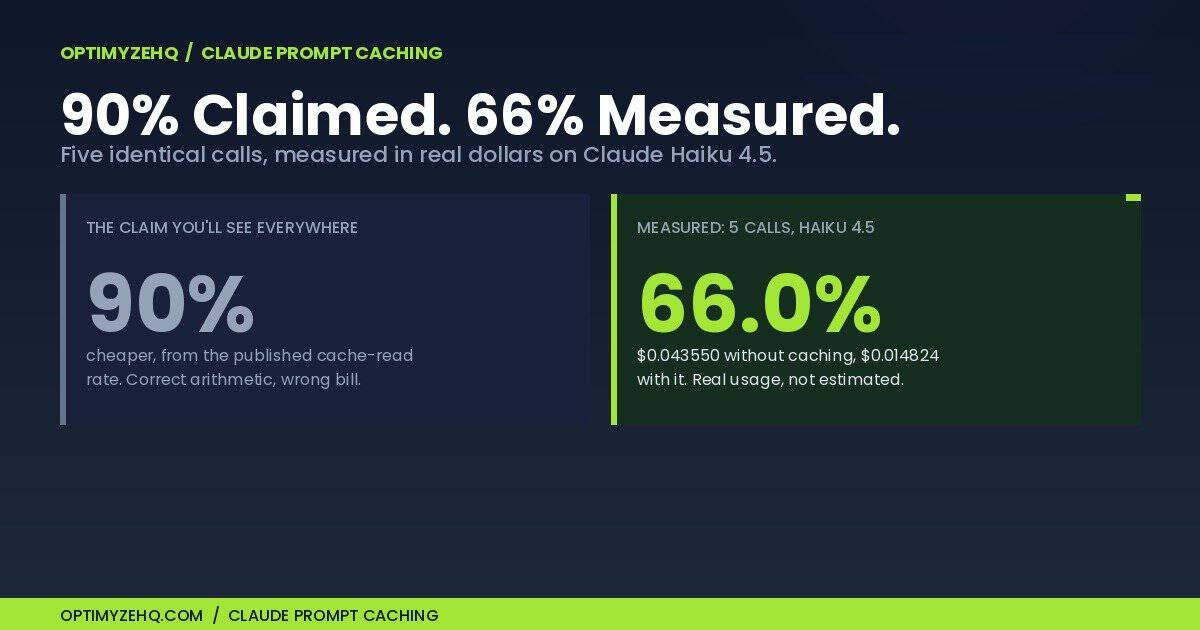
Most explainers about Claude prompt caching lead with the same number: 90 percent cheaper. It comes from Anthropic’s published rate for a cache read, which is a tenth of a normal input token, and the arithmetic is correct. It is also not what lands on your bill.
So I measured it. Twenty-nine live API calls against controlled benchmark prompts built for the test, twelve of them on the largest at 8,587 tokens, the same question asked over and over, first with caching off and then with it on. A token is a piece of a word, roughly three quarters of one, so that prompt is about 6,400 words or a dozen pages. Total spend: about thirteen cents. Across a realistic burst of five calls, caching cut the cost by 66.0 percent. On the warm calls inside that burst, the ones that reused the stored copy, it cut the cost by an average of 88.5 percent. Both figures are true, and the gap between them is the part worth understanding before you wire this into an automation you pay for.
The short version: caching pays for itself after one reuse, the reuse has to land inside a five-minute window, your prompt has to clear a minimum length that differs by model, and a changed character invalidates that cached layer and everything after it, which in my single-breakpoint test meant rebuilding the entire prefix. Miss the stability or the reuse condition and you pay about 25 percent extra for nothing on a call of this shape, less as your replies get longer. Miss the length minimum and caching does not engage at all, with nothing in the response to say so. The rest of this article is the measurements, including the run where caching quietly did nothing and returned no error to say so.
Who this is for: you already call the Claude API from an automation, a script, or a platform like Make or n8n, and you send a long block of the same instructions every run.
Who this is not for: if you use Claude in a browser tab, or on a Pro or Max plan, none of this reaches you. Caching is a billing feature of the API, and a subscription is a flat monthly fee with no per-token bill to reduce. If you have not set up API access at all, start with getting a key and come back to this later.
What Claude prompt caching actually is
When you send a request to Claude, the model processes your whole prompt from the beginning every time. If most of that prompt is the same on every run, which it usually is when software is doing the asking, you are paying to re-read identical text all day.
Caching lets you mark a stable opening section of the prompt and tell Anthropic to keep the processed version for a few minutes. The first call pays a premium to store it. Later calls that begin with the exact same text read it back at a tenth of the input price instead of paying full rate.
Two constraints follow from that design, and nearly every disappointing result traces back to one of them. The cached part has to be at the front of the prompt, because the cache works on a prefix rather than on whichever paragraphs you like. And it has to be identical, byte for byte, on the next call.
One question worth settling before you cache anything sensitive: Anthropic’s documentation states that prompt caching uses workspace-level isolation, with caches isolated per workspace, meaning the container your API key belongs to in the Anthropic console, to keep data separated between workspaces inside the same organization. If you reach Claude through Amazon or Google cloud platforms rather than directly, the isolation sits at the organization level instead. The stored copy also lapses on its own once the lifetime runs out.
What I measured, and what it cost
The test prompt was the kind of thing a one-person business actually sends: a system prompt, meaning the standing instructions you set once that get sent again with every request, holding voice rules and a product reference sheet, 8,569 tokens of stable text, followed by 18 tokens of variable question. That question asked for a single promotional sentence, so output stayed small and the input economics stayed visible.
I ran it on Claude Haiku 4.5 at $1 per million input tokens and $5 per million output, and on Claude Sonnet 4.6 at $3 and $15. Both prices are stable, published rates, checked against Anthropic’s pricing page on 2026-08-08. I avoided the model on introductory pricing on purpose, because cost math built on a promotional rate expires.
Every figure below comes from the usage object Anthropic returns on each call, which reports exactly how many tokens were written to cache and how many were read back. The token counts are measured rather than modeled, and the dollar figures are those counts multiplied by Anthropic’s published rates.
| No caching | With caching | |
|---|---|---|
| First call | $0.008682 | $0.010829 |
| Later calls, average of four | $0.008717 | $0.000999 |
| Later calls, range | $0.008702 to $0.008727 | $0.000970 to $0.001030 |
| Five calls, total | $0.043550 | $0.014824 |
That is a 66.0 percent saving on the burst. It is a real saving and it is worth having. It is also nowhere near 90 percent, and the reason is visible in the first row.
Scaled to a number a business recognizes, by projecting the measured per-call costs rather than running for a month: 30 calls a day on this prompt, arriving in bursts of five, works out to about $7.84 a month without caching and $2.67 with it. A saving of roughly $5 a month. That is the honest size of the prize at small scale, and it sets the right frame for everything below. Caching is worth turning on because it costs one field in a request, not because the money is large, and it is not worth building an elaborate monitoring setup around until your volume runs well above this.
Where the missing savings go
Two things drag the headline number down, and neither is hidden. They are on the pricing page, in the open, and mostly skipped over.
The first call costs more, not less. Writing to the cache is billed at 1.25 times the normal input rate for the five-minute cache, or 2 times for the one-hour version. Comparing like with like, the first call went from $0.008682 without caching to $0.010829 with it, an increase of 24.7 percent. You pay that premium every time you start a new cache.
Output tokens are not cached. Caching applies to what you send, not to what Claude writes back. My test asked for one sentence, so output stayed under 30 tokens: about 1.4 percent of an uncached call’s cost on average, but 12.3 percent of a warm cached one. Once the input is cheap, output is most of what is left. An automation that asks for a 900-word draft will see the cached portion shrink as a share of the bill, and the same 90 percent read discount will move the total far less.
So the honest framing is this: a cache read costs 90 percent less than that part of your input would have cost. What that does to your monthly bill depends on how much of your prompt is stable, how long your outputs are, and how often you reuse the cache before it expires.
Break-even arrives after one reuse
Anthropic states the rule plainly on its pricing page: caching pays off after one cache read for the five-minute duration, or after two reads for the one-hour duration. Rather than repeat that, I checked it.
| Calls made | Cached | Uncached | Verdict |
|---|---|---|---|
| Cold write only | $0.010829 | $0.008682 | Behind |
| Cold write + 1 read | $0.011844 | $0.017404 | Ahead |
| Cold write + 2 reads | $0.012874 | $0.026106 | Ahead |
The vendor rule holds. One reuse inside the window and you are ahead, comfortably. Zero reuse and you have paid a quarter more than doing nothing.
That last line is the whole risk, and it is why the next section exists.
How caching gets switched on
There is no account setting and no checkbox, which surprises people. Caching is turned on per request, by marking where the stable part of your prompt ends. On the Messages API that mark is a cache_control field attached to the last block you want stored, and everything ahead of it becomes the cached prefix. Anthropic’s documentation shows the exact shape.
Anthropic documents two ways to set that mark, and the difference matters more than it looks. You can attach cache_control to a specific block, which is what the rest of this article does. Or you can put a single cache_control field at the top level of the request and let the system choose the breakpoint for you. Anthropic recommends that automatic version as the place to start, and for an assistant that accumulates conversation turns it is the right default: the cache point moves forward on its own as the history grows.
For the workload in this article, automatic placement is the wrong choice, and it fails the same quiet way everything else here does. Automatic caching puts the breakpoint on the last cacheable block. If your request is a long stable system prompt followed by a short user message that changes every run, the last block is the part that changes. Anthropic’s documentation walks through this exact case and calls it a common mistake: the prefix hash differs on every request, the lookback finds nothing stored behind it, and you pay a fresh write every time without ever earning a read. No error, and a bill worse than leaving caching switched off.
The rule that follows is short. Growing conversation, let the system place the mark. Fixed prefix with a variable question after it, which is what most solo automations look like, place the mark yourself at the end of the stable part.
Worth saying plainly, because it is the first worry people have: money is the only thing at stake here. Anthropic’s documentation states that prompt caching has no effect on output token generation, and that the response you receive is identical to what you would get without it. Turning caching on cannot change your answers or break your automation, and removing the mark undoes it.
Whether you can place that mark depends on your tooling. Calling the API directly, or through a code step, you build the request and can add it. Using a no-code module that assembles the request for you, the option exists only if that module exposes it. Settle that before planning around any of the savings here, because it is the difference between a setting you can change and one you cannot reach.
So I went and looked at Make, which is the platform this site writes about most, and the answer is worth having before you start. Make’s native Anthropic Claude module, the one called Create a Prompt, cannot cache your system prompt. Its System Prompt field is a single plain text box, with nowhere to attach the mark, and the message content blocks do not carry it either. The only place cache_control appears anywhere in that module is on MCP server tool definitions. The module most people would reach for is the one that cannot do this.
The way through is the Make an API Call module on the same Anthropic connection. It takes a path relative to the Anthropic API, a method, and a request body you write yourself, and it attaches your authorization for you. Because you build the body, you decide where the mark goes. You give up the mapped fields and you get the setting.
The checking works either way, which is the useful part. Create a Prompt does expose the cache counters in its output, including the split between five-minute and one-hour writes. So on Make you can currently see whether caching happened more readily than you can turn it on, and if you are running the native module today, those counters will read zero for a reason that is not your fault.
That comes from reading Make’s own module definitions on 2026-08-08 rather than from a scenario run end to end, and Make revises its apps often. Check your own module before you rely on it.
The same mark also carries the lifetime. Five minutes is the default, and a one-hour version is selected on the mark itself rather than somewhere in your account. That matters for the scheduling section later on, where the choice between the two changes the answer.
The Cache Fit Check
Before setting caching up on any automation, run three tests against it. Each one comes from something that either worked or failed in the measurements above.
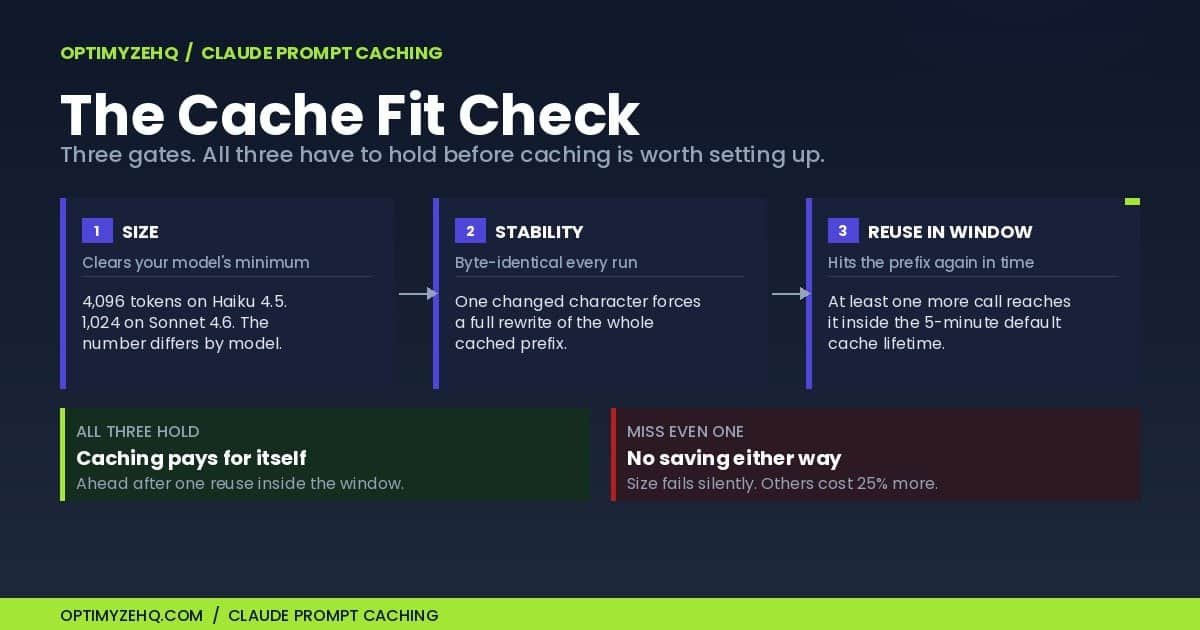
1. Size. Your stable opening section has to clear the minimum cacheable length for the model you are calling. That minimum is not one number, which is the part most write-ups get wrong. You can check this now without writing anything: at roughly three quarters of a word per token, a 4,096-token minimum is about 3,000 words and a 1,024-token one is about 750. Paste your standing instructions into any word counter and compare, or paste them into the Claude API pricing calculator, which counts the words and checks them against the minimum for the model you pick. The table further down gives the minimum for every current model. If your count lands within about 20 percent of the line, treat it as unresolved rather than passed, and confirm it with the cache fields described at the end of this article, because being under the line fails silently.
2. Stability. The cached section has to be identical on every run, from the first character. A timestamp, a rotating greeting, or a record ID near the top of your system prompt will keep you from getting a hit, however stable the rest of the text is.
3. Reuse inside the window. At least one more call has to reach the same prefix before the cache expires. The default lifetime is five minutes, refreshed each time the cache is used, and a one-hour option exists at a higher write price. Anthropic’s prompt caching documentation carries the current details for each of these.
All three have to hold, and the two ways of failing cost you differently. Fail on stability or reuse and you pay the write premium and collect nothing for it. Fail on size and nothing is cached at all: no premium, no saving, and no message telling you which of the two happened.
The failure that returns no error
This is the finding I did not expect to be so stark.
I took a smaller version of the same prompt, 1,775 tokens, marked it for caching in exactly the same way, and sent it to both models. Same text. Same instruction. Different outcomes.
| Model | Minimum | Tokens cached | Cost per repeat call |
|---|---|---|---|
| Claude Haiku 4.5 | 4,096 | 0 | $0.001873 (never cached) |
| Claude Sonnet 4.6 | 1,024 | 1,758 | $0.001181 (cache read) |
On Haiku 4.5 the prompt sat below the model’s 4,096-token minimum, so caching did not happen. There was no error and no warning. Both cache fields came back as zero, which is the only signal you get. The request succeeded and the bill was identical to what the same call costs without asking for caching at all. Anthropic documents this behavior: requests below the minimum are processed without caching and no error is returned.
On Sonnet 4.6, whose minimum is 1,024, the same prompt cached without trouble.
Then the result that looks like it turns the usual advice around. The warm Sonnet 4.6 call cost $0.001181. The Haiku 4.5 repeat calls averaged $0.001873. Once the cache is warm, the model that costs three times as much per token runs about 37 percent cheaper per call, because the cheaper model did not cache at all.
If you are only deciding whether to switch caching on, the three gates above are enough and you can skip ahead to checking whether yours is working. The rest of this section is for getting the last cent out of it.
Now hold that against the same standard as the rest of this article, because a warm call on its own is the exact comparison this piece has been arguing against. Sonnet’s cold write cost $0.007247, and it has to be earned back before any of that saving is real.
| Calls in the window | Sonnet 4.6, cached | Haiku 4.5, uncached | Cheaper |
|---|---|---|---|
| 2 | $0.008428 | $0.003740 | Haiku |
| 5 | $0.011972 | $0.009350 | Haiku |
| 9 | $0.016698 | $0.016830 | Sonnet |
| 12 | $0.020242 | $0.022440 | Sonnet |
Counting the write, the pricier model only wins from about nine calls in a single burst. And nine is a floor rather than a ceiling: Sonnet hit the 40-token output cap on all three of its calls while Haiku finished on its own, so a Sonnet reply allowed to run to its natural length would cost more and push the crossover further out. The Sonnet route needs about eight warm reads inside one window before it beats leaving Haiku uncached. Below that the write costs more than the reads give back. So the honest version of this carries three conditions rather than one: your prefix sits between the two minimums, your replies stay short, and your calls arrive in bursts of roughly nine. Miss the last one and switching to the pricier model on the strength of a warm-call comparison is the same mistake as believing the 90 percent figure.
There is a better answer to that awkward band than switching models, and it costs less. Rather than moving to a pricier model, add enough genuinely useful material to the front of your prompt to clear your own model’s minimum. I padded the 1,775-token prefix out to 4,427 tokens on Haiku 4.5 and it cached: the write cost $0.005614, and each warm read after it cost $0.000569, against $0.001873 for the uncached call it replaces. That pays for itself after three reads, four calls inside one window, against the nine the Sonnet route needs. Both crossovers are worked out from the measured per-call costs rather than run to that length. Two honest caveats. The padding I measured was duplicate rule text, chosen to isolate the cost effect. The advice is the opposite: add real material, such as a brand voice guide, an FAQ, or a product sheet you would otherwise paste in on every call. The cost arithmetic carries over unchanged, because tokens are tokens. Whether a few thousand tokens of genuine extra instruction changes how the model answers is a different question, and not one this run tested. And I did not test whether the extra material changes the quality of the reply, so treat it as a cost finding rather than a free lunch.
On reply length, every call in this run was capped at 40 output tokens. Sonnet 4.6 charges three times as much per output token as Haiku 4.5, so its advantage narrows as replies get longer and reverses somewhere near 120 output tokens on these figures, which is roughly 90 words. Ask for a long draft rather than a short label and the cheaper model is the cheaper model again.
The minimums as published by Anthropic on 2026-08-08, which are worth checking against your own model before you rely on any of this:
| Minimum | Models |
|---|---|
| 512 tokens | Opus 5, Fable 5, Mythos 5 |
| 1,024 tokens | Opus 4.8, Sonnet 5, Sonnet 4.6, Sonnet 4.5 |
| 2,048 tokens | Mythos Preview, Opus 4.7 |
| 4,096 tokens | Opus 4.6, Opus 4.5, Haiku 4.5 |
To size your own prompt without writing any code, count its words and work back: at roughly three quarters of a word per token, 4,096 tokens is about 3,000 words and 1,024 tokens is about 750. Paste your standing instructions into any word counter and you have the answer to gate one.
Haiku 4.5 sitting in the 4,096 row alongside the large Opus models, rather than with the other current models at 1,024, is the trap. It is an obvious pick for a cost-conscious beginner, and it has the highest bar of any current model for caching to engage at all.
One small edit throws it all away
I took the warm 8,569-token cache from the earlier test and capitalized one word near the start, a three-character edit. Nothing else moved.
The next call wrote all 8,569 tokens to cache again at the full write premium, $0.010844. Not a partial update. A complete rebuild, because the prefix no longer matched.
Anthropic’s documentation lists other things that invalidate a cache, and they are worth knowing if your setup drifts over time. Changing your tool definitions clears everything. Turning web search or citations on or off clears the system prompt and messages. Adding or removing an image clears the messages. The pattern is consistent: a change at one level clears that level and everything after it.
For a solo setup the practical version is shorter. Put the stable material at the top and leave it alone. Anything you edit weekly belongs below the mark, not above it.
There is a second lever here that most write-ups skip, and it is the one worth knowing if your prompt has layers. You are allowed more than one mark, up to four, so a prompt does not have to be one block that lives or dies together. Put your brand and voice rules first, a reference document that changes monthly after them, and the variable input last, with a mark after each stable layer. Edit the reference document and you lose that layer and everything after it, while the layer above it survives. That behavior is from Anthropic’s documentation rather than from this run, since my test used a single mark. My test used a single mark, which is why one small edit destroyed all 8,569 tokens. With the layers separated, the same edit would have cost only the part that actually changed.
Latency: a small difference, not the advertised one
The other claim attached to caching is that it makes responses faster. Anthropic’s documentation describes improved time to first token, meaning how long you wait before the first word appears, for long documents. That is a narrower claim than the “85 percent faster” figure circulating on other sites. I did not find that percentage on Anthropic’s pricing or prompt caching pages when I checked them on 2026-08-08.
In my run, median response time was 1,050 milliseconds uncached and 990 milliseconds across the five cached calls. Counting only the warm reads, which is the cleaner comparison because it leaves out the write, the median was 958 milliseconds. That is roughly 9 percent faster.
Real, then, but modest, and a long way from the “85 percent faster” being repeated elsewhere. Treat even the 9 percent as a limited result rather than a finding about caching generally: five calls per condition, one session, one connection, one prompt size, and enough run-to-run variation that I would not lean on the exact figure. A much larger cached prefix could behave differently, and this test was not built to detect that. What I can say is that at roughly 8,600 tokens on Haiku 4.5, speed is a rounding error next to the cost difference. Cost is the reason to turn caching on.
When caching costs you money
Here is the case the enthusiastic write-ups skip, and it describes a lot of small automations.
Say you run an automation once an hour: a digest, a triage pass, a check on a form. Each run sends the same long system prompt. Caching looks like an obvious win.
It is not. The default cache lasts five minutes, and I confirmed the window really does close rather than taking the documentation’s word for it. I wrote a cache, saw the next call read it back, waited six and a half minutes, then sent the identical prompt again. That call billed a fresh write of the entire prefix and zero reads. The cache was gone.
So a run every hour arrives long after the cache expired, and every single run is a cold write. You never collect a read. You pay 1.25 times the input rate forever and receive nothing back for it. On the numbers above, that turns a $0.008682 call into a $0.010829 call, about 25 percent worse, every hour, indefinitely.
Two responses to that are worth doing the arithmetic on, because the obvious one is wrong and the unobvious one works.
Keeping the cache warm with filler calls loses. Ping the cache every four minutes to stop it lapsing and you make about 15 extra calls an hour at roughly $0.001 each, near enough $0.015, to avoid a write premium of about $0.002 on the one run you actually wanted. The cure costs more than the disease it treats, and more than doing nothing at all: an hour of pings runs to roughly twice the cost of letting that one run go uncached.
Batching the work is the answer I can stand behind. Rather than re-timing anything, collect the hour’s items and run them together as one burst. That puts every call inside the five-minute window, which is the case measured above, and it changes no schedules. The price is up to an hour of delay on any single item, which most digests, triage passes and weekly reports absorb without anyone noticing.
The one-hour cache is worth understanding, and worth being careful with. Anthropic’s guidance is to stay on the five-minute cache when a prompt is reused more often than every five minutes, because that one refreshes at no charge on every use, and to reach for the one-hour version when reuse falls somewhere between five minutes and an hour. The one-hour write costs 2 times base input rather than 1.25, and it is chosen on the same mark, by adding a ttl of 1h next to the cache type.
Here is the part to be careful about, and it is why I am not turning it into a recommendation. Free refresh on use is documented for the five-minute cache. I did not find the same statement for the one-hour cache, and I did not test it. If the hour does refresh on every read, an automation running every 50 minutes writes once and reads all day: roughly $0.046 against $0.25 uncached on this prompt. If the hour instead runs from the write, a 50-minute cadence alternates a write and a read forever, which comes to about $0.018 per pair of runs against $0.017 for doing nothing: marginally worse than never caching at all. Same schedule, opposite conclusion, resting on a question the pages I read do not settle. Confirm the refresh behavior before you re-time anything around it, or batch instead and stay on ground that has been measured.
Caching rewards bursts, not schedules. It pays when several calls share one prefix in quick succession: processing twenty rows through the same instructions, fanning one source article out to five platforms, running a few drafting passes over the same brief. But bursts have their own trap, and it is the one that cost the most in my testing. I fired five calls at the same instant against a cold prefix, which is what you get whenever several calls start together: a step set to process rows in parallel, or five runs of the same automation firing at once because five form submissions landed together. All five billed a cache write and not one of them got a read. The burst cost $0.028255, a measured sum of five real calls, against a computed $0.007890 for the same five run one after another: one measured write plus four measured reads at the rates above, since I did not run a five-call sequential burst separately. The most likely reading is that none had finished writing the cache by the time the others arrived, so each one paid to write it, though the usage object reports the charge rather than the cause. One trial, five at once, one prefix size: treat the direction as structural and the three-and-a-half-times figure as what happened here rather than a constant. Wider fan-out costs more, not less.
The fix is a sequencing detail rather than a redesign: send the first call on its own, confirm a non-zero cache read on the second, and only then fan out the rest, meaning send the remaining calls together. If your automation fires once and goes quiet, leave caching off and spend the attention somewhere it earns more. Choosing the right model for the job is usually the larger lever, and if you are still working out which model that is, our guide to using Claude as a solopreneur covers the cost ladder.
How to check whether yours is working
You do not have to trust any of this. Every response tells you whether Claude prompt caching engaged, in three fields inside the usage object:
cache_creation_input_tokens is what was written to cache on this call. cache_read_input_tokens is what was read back. input_tokens is everything charged at the normal rate.
Send the same request twice, a few seconds apart, and look at the second response. A number greater than zero in cache_read_input_tokens means it is working. Zero in both cache fields means it is not, and since no error is raised when your prompt sits under the minimum, this check is the most dependable signal you have. Those same fields feed the rate limit accounting, where cache reads are treated differently from ordinary input on most current models.
Check it once and you have confirmed today’s setup. The trouble is that the cache breaks later, silently, for all the reasons above: you edit the system prompt, you swap models, you add a tool. A one-time check does not survive any of those, and the failure still arrives without an error.
So make the check permanent instead. Record cache_read_input_tokens on every run and raise a flag when it comes back zero and this is not the first call against that prefix in the window, which usually means an iterator position or bundle order above one. The second half of that condition matters: without it the flag fires on every legitimate cold write, you mute it within a week, and the silent failure goes back to being silent. Route it to a notification or a log row rather than a filter that drops the bundle, because you want to be told, not to have the run stop. And when the flag does fire, log it and carry on rather than blocking or retrying: a prompt sitting under the minimum would otherwise turn a cost optimization into a stalled automation.
Worth restating the threshold here, where you are deciding rather than reading. At the five-dollar-a-month scale from earlier, turn caching on and stop. The monitoring branch, the sequencing, and the layered marks start earning their keep once this prompt is a material share of your API bill, and not before. The article you are reading costs more attention than the savings do at small volume. That one branch turns a finding you read once into a safeguard that keeps working, and it catches the silent failure the same day it starts rather than on next quarter’s bill.
Whether your automation tool shows you these fields depends on the tool. Make’s Create a Prompt module does expose all three, along with the five-minute and one-hour write split, as noted earlier. If yours surfaces the response body, the fields above are the answer. If it does not, treat caching as unverified in that tool rather than assumed.
What I would tell a solo operator
Claude prompt caching is a genuine saving, at a scale that depends on the shape of your workload rather than its size. Run the Cache Fit Check first. If your prompt clears your model’s minimum, stays byte-identical, and gets reused inside the window, turn it on and expect something in the region of the two-thirds saving measured here, less if your outputs run long. If it fails any of the three, leave it off. Failing on stability or reuse charges you the write premium for nothing; failing on size gives you no caching at all, quietly.
One benefit that never shows up on the bill is worth knowing about. On most current models, tokens read from cache do not count toward your input-tokens-per-minute rate limit, while ordinary input tokens and cache writes do. If an automation of yours has ever failed partway through a busy run with a rate limit error, that headroom can be worth more to you than the pennies.
And check the minimum for your specific model before anything else. It is the failure with no error message attached, which makes it the one you will not notice on your own.
If you have not set up API access yet, start with how to get Claude API key access, which covers creating the key and capping what it can spend. For the wider picture of running Claude inside an automation platform, see our Make.com and Claude workflows guide. And if none of this is running yet, your first AI automation is the place to begin.
Method, so you can check my work
Twenty-nine calls to the Anthropic Messages API on 2026-08-08, in two rounds. A system prompt of 8,569 stable tokens plus an 18-token question, sized with Anthropic’s token counting endpoint. That prefix was built from 40 near-identical voice rules followed by 30 near-identical product reference lines, so anyone can rebuild one of the same shape.
The first round was eighteen calls: five without a cache instruction, five with one, three on a 1,775-token prompt on each of the two models, and two after a three-character edit to a warm prefix. The second round was eleven more, added after readers of a draft pushed on the weakest claims: three on a prefix padded past Haiku’s minimum, five fired simultaneously against a cold prefix, and three to test expiry, one write, one read to confirm the cache was live, then a six and a half minute wait and one more.
Each call was capped at 40 output tokens; Sonnet 4.6 reached that cap on all three of its calls, while Haiku 4.5 finished on its own every time. Costs computed from the returned token counts at published rates, using the documented multipliers of 1.25 times input for a five-minute write and 0.1 times input for a read. Total spend across both rounds: $0.1323.
Where a table gives a figure for repeated calls, it is the average of those calls, and the range is shown alongside it. Individual calls vary by a fraction of a cent because the model’s reply is not the same length every time. Totals are exact sums of what was actually charged, and the break-even table adds up real calls rather than projecting from an average.
One pricing assumption is worth stating outright. Every figure here uses Anthropic’s default global routing. Pinning inference to the United States with the inference_geo parameter carries a 1.1 times multiplier across input, output, cache writes and cache reads on Claude 4.6 and later models, so each number below would rise by a tenth. Haiku 4.5 came before that parameter and always bills at standard rates.
Prices and model minimums are a dated snapshot taken on 2026-08-08. Anthropic changes both, so re-check the pricing and prompt caching pages before you rely on a figure here for a decision that matters.
Every call, in full
Here is the complete log: all twenty-nine calls, the token counters Anthropic returned for each one, and what each cost. Every figure in this article is computed from these rows, so you can recompute any of them yourself instead of taking my word for it.
Two disclosures before the numbers. The Haiku calls were sent to the pinned identifier claude-haiku-4-5-20251001, and the eleven second-round calls recorded what the API resolved it to, which matched. The three Sonnet calls were sent to the floating alias claude-sonnet-4-6, and the first round did not record what that resolved to, so I cannot tell you which Sonnet snapshot sits behind those three rows. Pin both identifiers if you rerun this.
Each row costs (input × rate) + (write × rate × 1.25) + (read × rate × 0.1) + (output × output rate), with Haiku 4.5 at $1 and $5 per million tokens and Sonnet 4.6 at $3 and $15, the published rates on 2026-08-08. Every call was capped at 40 output tokens.
- Test 1. Haiku, 8,587-token prompt, no cache mark.
- Test 2. Haiku, same prompt, cache mark set.
- Test 3. Haiku, 1,775-token prompt, under the 4,096 minimum.
- Test 4. Sonnet, same 1,775-token prompt, over its 1,024 minimum.
- Test 5. Haiku, warm prefix after a three-character edit.
- Test 6. Haiku, write / confirm warm / 390s wait / call again.
- Test 7. Haiku, 1,775-token prompt padded to 4,427.
- Test 8. Haiku, five simultaneous calls, cold prefix.
| Test | Call | Input | Cache write | Cache read | Output | Latency | Cost |
|---|---|---|---|---|---|---|---|
| Test 1 | #1 | 8,587 | 0 | 0 | 19 | 1505 ms | $0.008682 |
| Test 1 | #2 | 8,587 | 0 | 0 | 27 | 1050 ms | $0.008722 |
| Test 1 | #3 | 8,587 | 0 | 0 | 23 | 872 ms | $0.008702 |
| Test 1 | #4 | 8,587 | 0 | 0 | 26 | 966 ms | $0.008717 |
| Test 1 | #5 | 8,587 | 0 | 0 | 28 | 1074 ms | $0.008727 |
| Test 2 | #1 | 18 | 8,569 | 0 | 20 | 2387 ms | $0.010829 |
| Test 2 | #2 | 18 | 0 | 8,569 | 28 | 990 ms | $0.001015 |
| Test 2 | #3 | 18 | 0 | 8,569 | 31 | 926 ms | $0.001030 |
| Test 2 | #4 | 18 | 0 | 8,569 | 21 | 1007 ms | $0.000980 |
| Test 2 | #5 | 18 | 0 | 8,569 | 19 | 901 ms | $0.000970 |
| Test 3 | #1 | 1,775 | 0 | 0 | 21 | 714 ms | $0.001880 |
| Test 3 | #2 | 1,775 | 0 | 0 | 23 | 1261 ms | $0.001890 |
| Test 3 | #3 | 1,775 | 0 | 0 | 15 | 646 ms | $0.001850 |
| Test 4 | #1 | 18 | 1,758 | 0 | 40 | 1960 ms | $0.007247 |
| Test 4 | #2 | 18 | 0 | 1,758 | 40 | 2293 ms | $0.001181 |
| Test 4 | #3 | 18 | 0 | 1,758 | 40 | 1676 ms | $0.001181 |
| Test 5 | #1 | 18 | 8,569 | 0 | 23 | 1232 ms | $0.010844 |
| Test 5 | #2 | 18 | 0 | 8,569 | 27 | 1428 ms | $0.001010 |
| Test 6 | cold_write | 18 | 4,420 | 0 | 19 | 979 ms | $0.005638 |
| Test 6 | warm_confirm | 18 | 0 | 4,420 | 22 | 1147 ms | $0.000570 |
| Test 6 | after_sleep | 18 | 4,420 | 0 | 24 | 860 ms | $0.005663 |
| Test 7 | #1 | 18 | 4,409 | 0 | 17 | 1400 ms | $0.005614 |
| Test 7 | #2 | 18 | 0 | 4,409 | 21 | 1625 ms | $0.000564 |
| Test 7 | #3 | 18 | 0 | 4,409 | 23 | 1157 ms | $0.000574 |
| Test 8 | #1 | 18 | 4,420 | 0 | 21 | 1166 ms | $0.005648 |
| Test 8 | #2 | 18 | 4,420 | 0 | 23 | 1003 ms | $0.005658 |
| Test 8 | #3 | 18 | 4,420 | 0 | 20 | 963 ms | $0.005643 |
| Test 8 | #4 | 18 | 4,420 | 0 | 18 | 901 ms | $0.005633 |
| Test 8 | #5 | 18 | 4,420 | 0 | 26 | 1125 ms | $0.005673 |
The twenty-nine rows sum to $0.132335, which is the thirteen cents quoted at the top. Test 6 ran as three named calls rather than a numbered series: a cold write, a warm read to confirm the cache was live, then a 390-second wait and one more call, which billed a fresh write.
Frequently asked questions
What is prompt caching in Claude?
It is a way to avoid paying full price to re-send the same text on every API call. You mark a stable opening section of your prompt, Anthropic stores the processed version for a few minutes, and later calls that start with identical text read it back at a tenth of the normal input price. The first call pays a premium of 1.25 times the input rate to store it, so the saving only arrives once you reuse the cache.
How much does Claude prompt caching actually save?
In a measured run on 2026-08-08 using Claude Haiku 4.5 and an 8,587-token prompt, five identical calls cost $0.043550 without caching and $0.014824 with it, a saving of 66.0 percent. The warm calls averaged 88.5 percent cheaper than the uncached equivalent. The commonly quoted 90 percent applies to the cached portion of the input alone, not to a whole bill, because the first call costs about 25 percent more and output tokens are not cached.
How long does a Claude prompt cache last?
Five minutes by default, refreshed at no extra cost each time the cached content is used. Anthropic also documents a one-hour option, which costs 2 times the base input rate to write instead of 1.25 times. Because the default window is short, automations that run on an hourly or daily schedule usually miss it and pay the write premium on every run without ever collecting a read.
Does Claude Code use prompt caching?
Yes. Claude Code is Anthropic’s coding tool, and it is worth knowing that it is a different surface from the API calls discussed here. Anthropic publishes separate documentation for how Claude Code handles caching across a coding session, where the conversation history itself becomes the reusable prefix. The measurements in this article are from direct Messages API calls, which is what an automation platform makes, so treat the two cases separately.
Do cached tokens count toward Claude API rate limits?
For most current Claude models, tokens read from cache do not count toward your input tokens per minute limit, while normal input tokens and tokens written to cache do. Anthropic’s rate limit documentation marks the exceptions, so check the table for your specific model rather than assuming. Where it applies, this makes caching useful for staying under a rate limit as well as for cost.
Can I use Claude prompt caching in Make?
Not through Make’s native Anthropic Claude module. In the Create a Prompt module the System Prompt field is a single plain text box, so there is nowhere to attach the cache_control mark, and the message content blocks do not carry it either. The Make an API Call module on the same connection does work, because you write the request body yourself. Create a Prompt does report the cache counters in its output, so you can confirm what happened even when you cannot set the mark. Checked against Make’s own module definitions on 2026-08-08.