
I built Creator Content Engine because generic AI doesn’t sound like me
Creator Content Engine is the AI content repurposing system I built because generic AI doesn’t sound like me. And there’s a good chance it doesn’t sound like you either.
Last spring I published a blog post on a Sunday afternoon. By Tuesday morning I’d repurposed it five times — a LinkedIn long-form post, a Twitter thread, a Threads post, a Bluesky note, an email newsletter draft. Combined repurposing time: roughly four hours. The original post took two.
I’d accidentally built a workflow where the amplification of an idea cost more time than the idea itself. And I was doing it every week.
Worse: half of the platform versions felt like I was phoning it in. The LinkedIn version got proper attention because I’d write it first while I still had energy. By the time I got to the X thread on Tuesday afternoon, I was copy-pasting bullet points and reformatting paragraphs without really thinking about whether they worked for the platform. The thread would underperform. I’d shrug. “Twitter’s just hard.” Then do the same thing the next week.
Around month four of this routine, I tried to fix it the obvious way: AI.
What generic AI got wrong
I pasted a blog post into ChatGPT. Asked it to write a LinkedIn version. Got back something competent, professional, and unmistakably not me.
It used words I’d never use (“delve,” “leverage,” “unprecedented”). It opened with hedged statements where I’d open with a claim. It ended with “Thoughts?” instead of an actual question. Anyone who’d read both my real writing and the AI version would clock the difference inside three lines.
Tried Claude. Better, but still off. Tried writing more detailed prompts: “Write in a direct, conversational tone. Use short sentences. Don’t use corporate language.” Output got marginally better. Still recognizably AI-flavored.
I stopped pasting AI-generated content after about three weeks.
The insight I kept missing
The problem wasn’t that AI is bad at writing. AI is, actually, very good at writing. The problem was that I was using it as if it had no idea who I was — because, of course, it didn’t.
A short prompt produces generic output. That’s not a model failure. That’s a specification failure.
Every piece of writing has a fingerprint. Specific words you use that others don’t. Specific words you’d never use even though they’re correct. A characteristic sentence length. A way you open and a way you close. A list of things you’d cringe to publish under your own name. Generic AI output is “anyone with a vague brief writing about your topic.” Your voice is the opposite of generic — it’s specifically yours.
The fix wasn’t a better prompt. It was a structured definition of voice that the AI could read on every run.
I started calling this Voice DNA.
What Voice DNA actually is
It’s a system prompt with structure. Not just “write in a direct, conversational tone” — but instead a filled-in template with explicit slots:
- Reference creators: “the cadence of [X], the clarity of [Y]” (be uncomfortably specific)
- Audience: not “professionals,” but “solo creators and freelancers earning $50K–$200K who are stretched thin”
- Kept words: 10–15 distinctive words and phrases that recur across your last 5 published pieces
- Banned words: 10–15 words that make you wince when you see them in your own drafts
- Opening patterns: how you usually start a piece
- Closing patterns: how you usually end one
- Sentence-length register: average, short and punchy, or long and clausal
- A short example of your actual writing, included verbatim
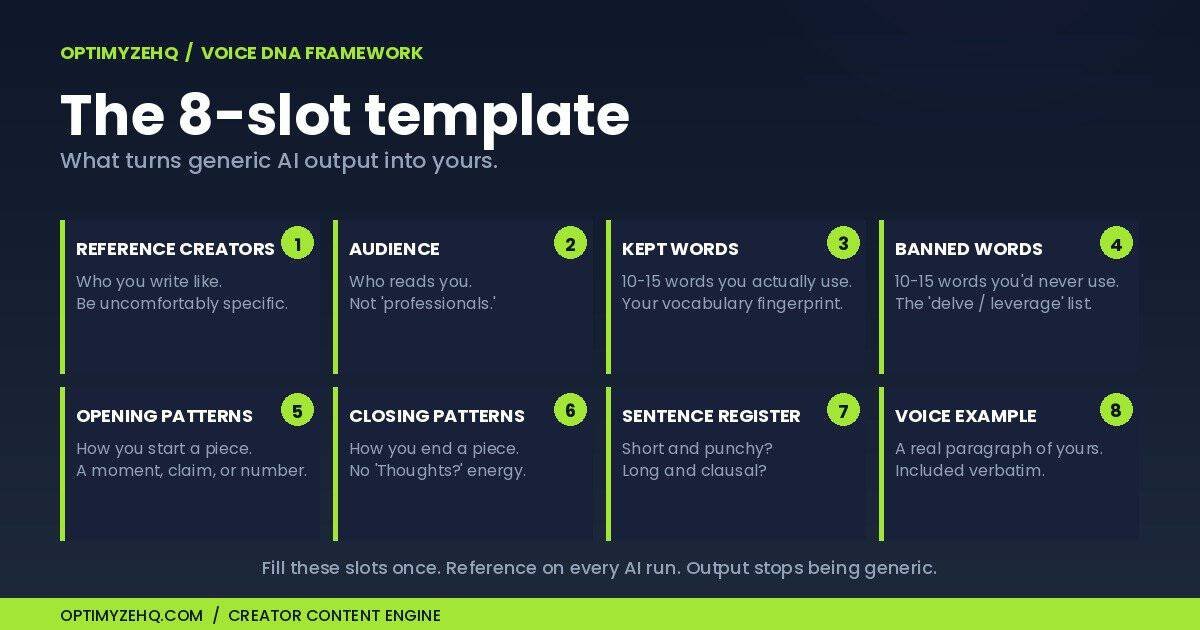
Once that template is filled out — about 60 minutes of focused work, mostly looking at your own past writing — every AI run can reference it. The output stops being “competent AI writing about your topic” and starts being “your voice writing about your topic.”
That’s the entire trick. There’s no model magic. The trick is that almost nobody writes their voice down with enough specificity for an AI to use.
I wrote mine down. The output got dramatically better immediately. Drafts went from “I’d have to rewrite this entirely” to “I’d edit two sentences and publish.” Three months later I’d reduced repurposing time from four hours per pillar piece to roughly twenty minutes — and most of those twenty minutes was just final review, not rewriting.
The system worked. So I built the rest of it.
What Creator Content Engine is
Creator Content Engine is the productized version of the workflow I’d been running by hand.
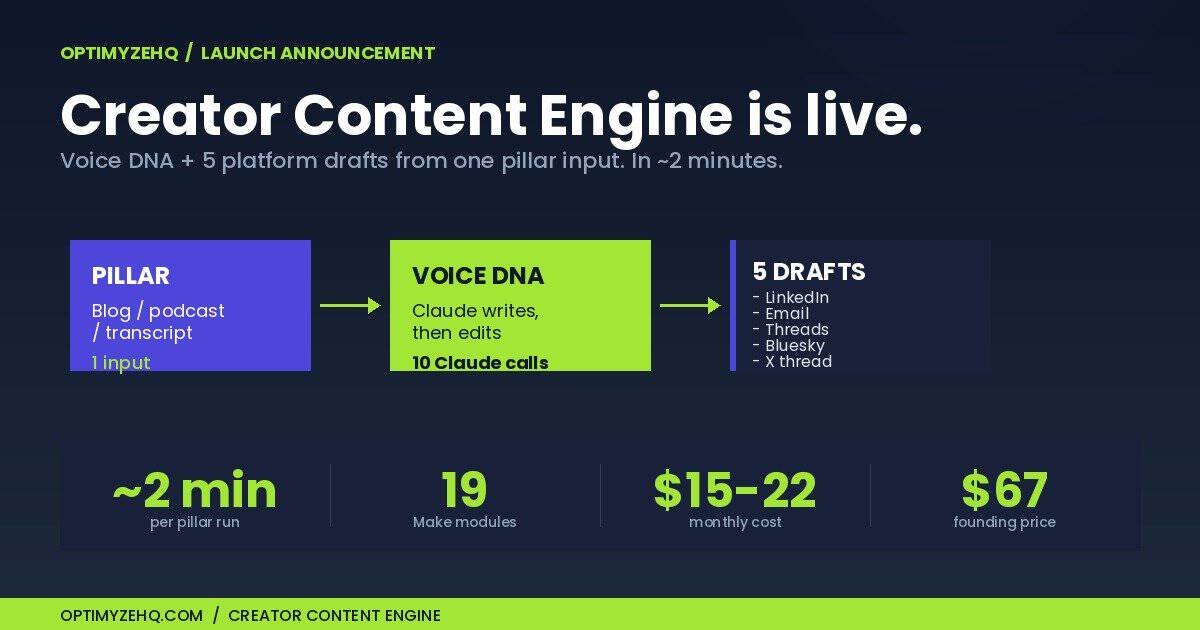
One input. Five drafts. About two minutes.
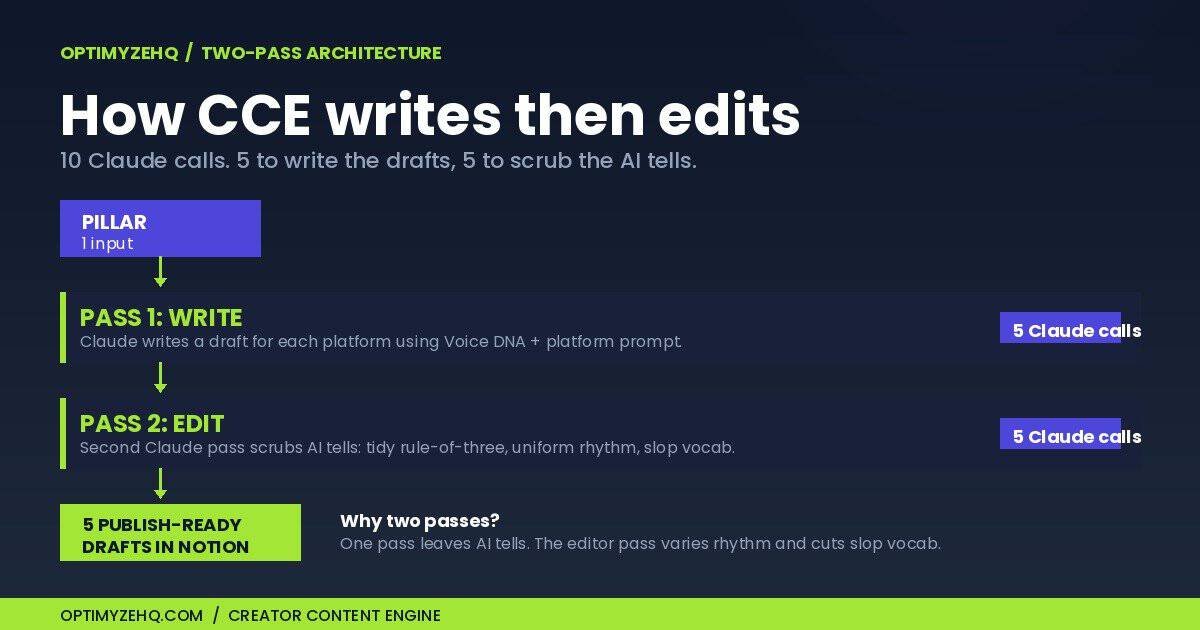
You drop a pillar piece (blog post, podcast transcript, talk transcript, long-form article) into a Notion database. A Make.com pipeline picks it up automatically. For each platform, Claude writes a draft using your Voice DNA and a platform-specific prompt, then a second Claude pass edits that draft to strip the AI tells and tighten it to your voice. Ten Claude calls in total — five to write, five to edit. About two minutes later, five drafts land back in Notion: a LinkedIn long-form post, an email newsletter, a Threads post, a Bluesky post, and an X thread.
Each one sounds like you wrote it — because your Voice DNA was applied at generation time, not pasted on after.
Why two passes, not one
Here’s the part most AI repurposing tools skip. A single generation pass — even one steered by a strong Voice DNA — still leaves the small tells that make writing read as machine-made: the tidy rule-of-three lists, the uniform sentence length, the “it’s not just X, it’s Y” cadence, the throat-clearing openers. A reader can’t always name what’s off, but they feel it.
So every draft goes through a second Claude pass before it lands in Notion: a dedicated line-editor step that reads the draft against your Voice DNA and rewrites those tells out — varying the rhythm, breaking the symmetry, cutting the AI-slop vocabulary, keeping the dashes under control. The writing pass gets your ideas onto the page in your structure. The editing pass makes the prose read like a sharp human wrote it and edited it once before publishing. That two-step design is the difference between drafts you’d quietly rewrite and drafts you’d actually publish.
The full system you get:
- A Make.com scenario blueprint (19 modules, one-click import) — it writes and edits every draft
- A Notion workspace template (one-click duplicate, pre-configured)
- The Voice DNA system framework — the part that actually matters
- 5 platform-specific prompts (LinkedIn, Email, Threads, Bluesky, X Thread)
- A written setup walkthrough (~2 hours total, all read-and-do, no video)
- An example pillar with 5 example drafts to study before your first run
- Troubleshooting guide and email support
What it costs to run after you buy:
- Notion: free plan works fine
- Make.com: Core plan, $9/month billed annually
- Anthropic API: about $0.08–0.15 per pillar run (typical solo creator: under $10/month)
Total monthly running cost for typical use: about $15–22. That’s the cost of one $50 freelance task per month, for unlimited content repurposing runs.
What it isn’t
I’m going to be specific about what this won’t do, because I’d rather you not buy it than buy it and feel misled.
It’s not zero-setup. You’ll spend about two hours getting it running once. The hardest hour is filling out the Voice DNA questionnaire honestly — looking at your own writing, identifying the patterns. The rest is technical wiring with a written walkthrough.
It’s not real-time. You drop a pillar in, then about two minutes later you have drafts. That’s batch, not streaming. If you publish 5+ pieces per day and need instant turnaround, this isn’t the tool.
It’s not set-and-forget magic. Voice DNA captures how you write, not what you write about. You still need to have pillar content worth repurposing. CCE amplifies your output; it doesn’t replace the act of having something to say.
It’s not a no-code SaaS experience — but the setup guide walks you through every step. Make.com is real. The Anthropic API is real. You’ll paste an API key and configure a 19-module scenario. The written walkthrough is built for someone who’s never done this before: each step shows what to click, what to paste, and what success looks like. If you can follow specific written instructions for about two hours, you can finish setup. If the idea of touching configuration settings still actively stresses you out, this isn’t your tool.
If you’re past those caveats, the system works.
The Founding offer
It’s live today. Two prices:
$67 for the first 50 buyers. Founding members help shape v1.1 — you’ll get a +14-day feedback email asking what worked, what broke, what surprised you. I read every reply. That’s the deal: same product as $97 buyers, $30 off, direct input on the next iteration.
$97 after the first 50 sell. Same exact product, no feature difference, just the regular price.
One-time purchase. Lifetime updates as the pipeline evolves. 30-day refund, no questions asked.
Not ready for the full system yet? The Free Starter Kit gives you the five core prompts and a Notion template you can run by hand. Same workflow CCE automates, just manual. If those prompts save you hours but the copy-pasting starts to feel tedious after a few weeks, that’s the signal you’re ready for the automated version. And if you sell content services, the pricing question matters as much as the workflow: here is what to charge when AI does most of the work.
The honest reason I’m building this
I’m a solo operator. I run OptimyzeHQ from a desk in Quebec City. Every product I ship is something I built for myself first, because I’m the audience: a solo creator who’d rather automate the boring parts than hire a team.
CCE solved my repurposing problem six months ago. I’ve spent those months refining the manual version of this workflow — tightening the Voice DNA, fixing edge cases, getting the platform prompts right. This launch announcement is the first pillar piece going through the productized version end-to-end. Same workflow I’ve been running by hand for half a year, now automated.
That’s the whole pitch. I built the tool I wanted, used it on my own content, and now I’m shipping it to other people in the same situation.
If you’ve ever sat down on a Tuesday afternoon trying to make a Twitter thread out of a blog post you’ve already mentally moved past — and felt your engagement with your own work decline — this is for you.
First 50 buyers only. After that it’s $97. Either way, one-time purchase, 30-day refund.
If you have questions, reply to any email I send you (info@optimyzehq.com). I read them all.
— Gilles, OptimyzeHQ
Under the hood: the engine runs on the prompting system behind every automation I sell.