
How to Get Clients With AI: The System I Built With Claude and Make
Finding clients as a solo operator is the part nobody warns you about. You can deliver great work and still burn your best hours scrolling job boards, firing off cold DMs that go nowhere, and waiting on referrals that show up once a quarter. It feels like hustle. It is actually a system problem.
This is how to get clients with AI without turning into a spam machine. Not a thousand-lead blast. Not a tool that emails strangers while you sleep. A repeatable pipeline you build once, from tools you already pay for, where AI does the research and the drafting and you keep the judgment and the send. Here is the architecture I built, laid out layer by layer, so you can build it yourself.
What this is not
A few things to clear out of the way first.
This is not a 1,000-lead spam cannon. Most of what ranks for “AI lead generation” is built for sales teams chasing volume, with contact databases in the hundreds of millions and email sequences that fire at scale. That is the opposite of what a solo operator needs. Fifty well-chosen prospects beat five hundred scraped ones every time, and they will not get your domain flagged.
This is not “let AI email people on autopilot.” Nothing in this system sends without you reading it first. That boundary is the entire point, and I will come back to why it matters more than any clever prompt.
This is not a scraper, and it is not a $99-a-month subscription. The stack is Claude, Make, and Airtable, the same three tools that run most of what I do. You own the build. No platform tax, no marked-up native AI modules, no annual contract you forget to cancel.
The reframe: a pipeline, not a hustle
Getting clients breaks into four jobs.
Define who. A clear picture of the client worth your time, written down somewhere a model can read it.
Find them. A short list of real people who match, not a giant scraped pile you will never work through.
Reach out in your voice. A first message that sounds like you wrote it for them, because the research behind it actually did. The craft of that message itself, the subject line, the earned opener, and the ask, is its own skill, and I broke it down in how to write a cold email with AI.
Track and follow up. A place where every prospect has a status, so nothing falls through and the follow-up that closes a lot of deals actually happens.
The hustle version does all four by hand, unevenly, on the days you remember to. The system version hands the repetitive middle to AI and keeps you on the two things only you can do well: choosing who is worth your time, and deciding what goes out under your name.
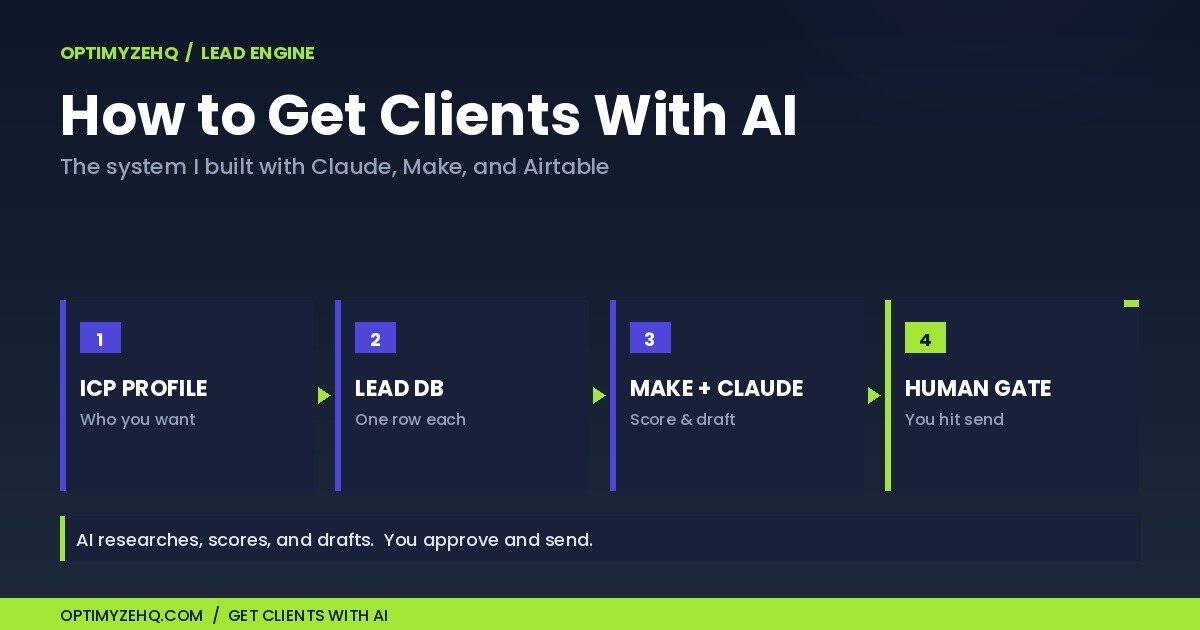
How to get clients with AI: the four-layer system
Four layers, each with a single job. The cleaner the separation between them, the better the output.
Layer 1: the ICP profile
One Claude-readable document that describes your ideal client. Who they are, what they are struggling with, the signals that say they might be ready to hire, and where they tend to show up. This is the brief every later step reads from. Make it specific. “Marketing leads at B2B SaaS companies under fifty people who recently shipped a rebrand” beats “small businesses who need help” by a mile, and the whole pipeline inherits that sharpness or that vagueness from this one page.
Layer 2: the lead database
An Airtable base. One row per prospect. Name, company, a link or two for context, a score field, and a status field that moves a lead from New to Researched to Contacted to Replied to Booked. This is the spine of the system. If you would rather build that spine by hand before automating it, here is how I set up a simple Airtable CRM for freelancers. Airtable’s free plan holds 1,000 total records per base, which is plenty to start; once you cross that, you prune the rows you have already worked or move up to a paid plan. It grows whether or not you are actively pitching that week, and after a couple of months it stops being a to-do list and becomes a real asset you can pull from in seconds.
Where do those rows come from? You add them yourself, a handful at a time. Referrals and past clients, someone posting a hiring signal, a company that recently shipped something you could improve, newsletter replies, the people whose posts you already engage with. Curated by hand, not scraped by a bot. That hand-curation is the reason the list stays short and worth your time.
Layer 3: the Make pipeline
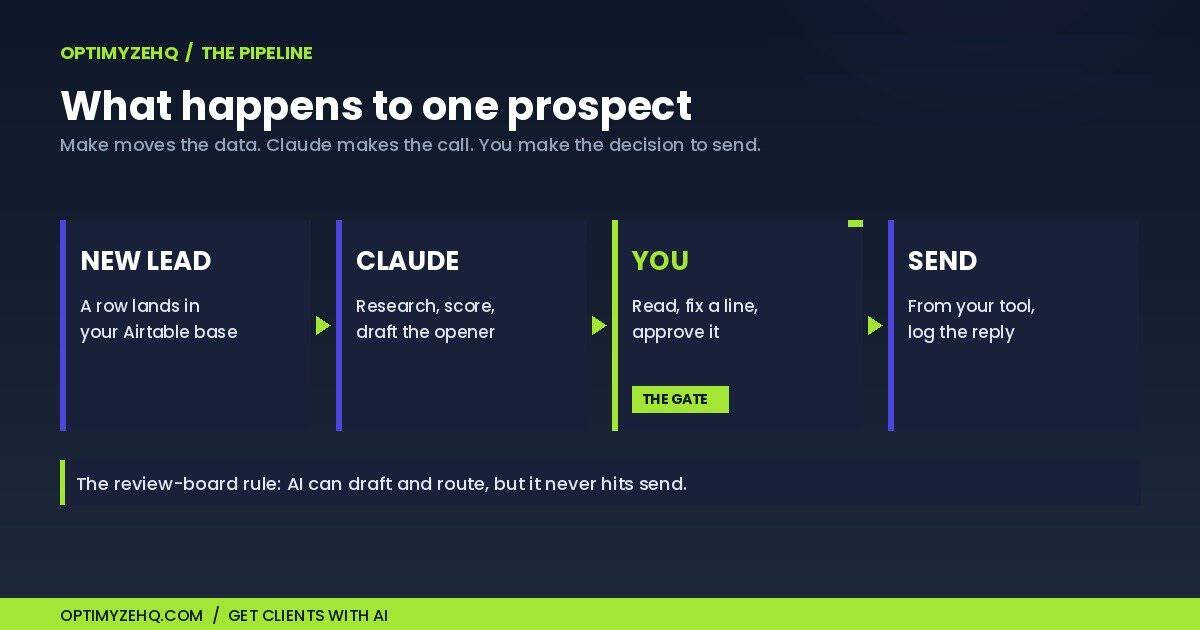
A Make scenario picks up each new prospect, triggered by an Airtable automation when you mark a prospect ready, rather than by constant polling. It fires in sequence. It pulls the row, hands the context plus your ICP profile to Claude, and asks Claude to do three things: score the fit against the profile, write a short and specific opener in your voice that references something real about that prospect, and flag anything that says this is not actually a match. The results get written back to the row as a number, a draft, and a one-line reason. One rule governs the drafting: the model may only use real details from that prospect’s own context, and if there is no honest reason to personalize, it says so instead of inventing one. A prospect who is a clean industry match but hiring full-time staff rather than freelancers gets flagged as not a fit, not forced into a message. Make moves the data. Claude makes the call. Neither one does the other’s job, which is exactly why it holds up over months instead of breaking in week two.
Layer 4: the human gate
Nothing sends itself. You open the rows that scored well, read the drafts, fix the one line that is slightly off, and send from your own email tool. Replies get logged, the status moves, and the follow-up draft is waiting when it is time to nudge. You sit in the loop at the only two moments that decide whether this works: which prospects are worth a message, and what that message actually says.
Why it works: keep the human gate on outreach
The reason this produces messages I am willing to put my name on, and the reason most “automate your outreach” setups produce things I would be embarrassed to send, comes down to one rule.
Call it the review-board rule: AI can research, score, and draft, but it cannot send. The human gate is structural, not a courtesy. A model has no stake in your reputation or your inbox placement, so it should never be the last step before a stranger hears from you.
That is an ethics point, and it is also a survival one. The moment you let AI send unread, three things break at once. Your deliverability suffers, because spam filters notice volume without engagement. Your reputation takes the hit, because one tone-deaf message to the wrong person travels further than ten good ones. And your own judgment dulls, because you stop noticing what is going out under your name. Keep the gate and outreach stays a real conversation you chose to start. Remove it and you have built a spam machine with your address on the return label.
One more boundary worth respecting is the law. Cold outreach is legitimate when it is honest and relevant, but the rules vary by country. Keep your sender identity accurate, give every message a real way to opt out, honor those opt-outs, and never contact someone who has asked you not to. In Canada, CASL adds consent, identification, and unsubscribe requirements; in the United States, CAN-SPAM sets its own. Check what applies to you and to the person you are reaching. None of this is legal advice, but a few minutes of care here protects the reputation the rest of the system depends on.
The other half of the rule is the separation that makes any Make and Claude build hold together. Make is infrastructure: it triggers, queries, calls APIs, and writes results back. Claude is judgment: it reads context and returns voice-true, fit-aware output. Ask Make to make creative decisions, or ask Claude to manage state across an external service, and the whole thing turns fragile. Keep each in its lane and it runs quietly for months. If you want those patterns at the module level, our Make.com and Claude workflows guide covers the choices in depth, and the voice profile that makes the openers sound like you uses the same format as our Voice DNA guide.
What it costs to run
Almost nothing, which still surprises people who expect a tool like this to come with a tool’s price tag.
Each researched prospect runs a cent or two in Claude API costs on Sonnet 4.6, depending on how much context you feed it and how long the draft is. The Make side can run on the free tier, but only if you design the trigger with a little care. Make’s free plan gives you 1,000 credits a month, two active scenarios, and a fifteen-minute minimum schedule, and every poll spends a credit even when nothing new has landed. So you either trigger the scenario from a webhook or an Airtable automation when a prospect is actually added, or you accept a longer interval. Run a busier pipeline and the Core plan, around nine dollars a month for ten thousand credits and unlimited scenarios, covers it with room to spare. Your sending happens through the email tool you already use, so there is nothing new to buy there. There is no per-seat fee because there is no SaaS in the middle.
Put that next to the alternatives. The data-and-outreach platforms built for this job start around fifty to a hundred dollars a month and climb as your list grows. The agency version of “build me a lead system” runs into the thousands before anyone sends a single email. You are paying for an architecture you own outright, not a subscription you rent, and the running cost is close to rounding error.
What stays human
Worth being honest about where this system stops.
It does not pick your niche. That is your call, and it is the highest-impact decision in the whole pipeline. A sharp ICP makes everything downstream work. A fuzzy one makes the system politely useless, churning out drafts to people who were never going to hire you.
It does not decide real fit. The score is a filter, not a verdict. You still read the rows that matter and trust your own read when the number and your gut disagree, because they sometimes will.
It does not build the relationship. The opener earns you a reply. The discovery call, the trust, and the actual hire are yours. The system’s job is to get you to the conversation already prepared, not to have the conversation for you.
And it does not own the follow-up judgment. AI will draft the polite nudge. Whether this is the week to send it, or whether a prospect has gone quiet for a reason worth respecting, is something you read, not something you set on a timer.
Everything in between, the research, the scoring, the first drafts, the tracking, runs without you. That is the part that used to swallow your week.
Where this goes next
This is the system I built into OptimyzeHQ’s Lead Engine, the always-on prospecting and outreach build for solo operators who need a steadier pipeline. It is live now, and it installs in about thirty minutes: the Airtable base, the Make scenario, the ICP and voice templates, and a setup guide that walks the wiring. You can build the architecture above yourself straight from this post, or start from the finished build.
Full disclosure: the Lead Engine is our product, and this link is not sponsored by Anthropic.
Winning the client is the first move in a longer sequence. Once a prospect says yes, you write the proposal that closes the deal, then you onboard them cleanly, then you run the engagement without drowning in admin. Lead Engine wins the lead; the rest of the OptimyzeHQ client-ops stack runs everything that comes after. The whole map lives in AI workflows for solopreneurs.
That is the whole architecture, and every piece of it is something you can stand up this week. Start with Layer 1: build the ICP profile before you touch Make, because if that document is vague, everything downstream produces vague outreach. Get it sharp, then build the rest, keep your hand on the send, and you have a client pipeline you own instead of rent.
Frequently asked questions
Will AI actually get you clients?
Not on its own. AI does the research, scoring, and first drafts that used to eat your week, which means you reach more of the right people with sharper messages. The client still hires you because of your work and the conversation you have with them. The system gets you to that conversation more often, and better prepared.
Is this cold emailing? Is it spammy?
It is the opposite of spam, by design. Every message is researched, personalized, and read by a human before it goes out. The system deliberately favors a short list of well-matched prospects over a giant blast. Spam is volume without judgment. This is judgment at the front and the back, with AI clearing the busywork in the middle.
What tools do I need?
Claude, Make, and Airtable, plus the email tool you already send from. That is the entire stack. No scraper, no contact-database subscription, no separate outreach platform to learn and pay for.
How much does it cost to run?
A cent or two per researched prospect in Claude API costs. The Make side runs on the free tier if you trigger it from a webhook rather than constant polling, or about nine dollars a month on Make’s Core plan for a busier pipeline. Add whatever your existing email tool already costs. There is no separate platform fee, because you own the build rather than renting it.
Do I need to code?
No. Airtable is a database you click together, Make is a visual canvas you wire by dragging, and Claude is prompted in plain language. If you can set up a spreadsheet and follow a setup guide, you can build this.
How is this different from Apollo or Instantly?
Those are built for sales teams sending at scale, and you rent them every month. This is built for one person who wants a small, sharp, owned pipeline. The difference is not only price. It is the whole posture: a short list you actually read and approve, versus a database you blast and hope.